

You are using an out of date browser. It may not display this or other websites correctly.
You should upgrade or use an alternative browser.
You should upgrade or use an alternative browser.
Flight Question How to have AutoFCS in Orbiter 2010 (Landing the Shuttle Fleet)
- Thread starter Pipcard
- Start date

- Joined
- Apr 13, 2011
- Messages
- 2,215
- Reaction score
- 0
- Points
- 36
- Location
- Los Angeles
- Website
- www.youtube.com
I recommend Glideslope MFD highly.
It has an "automatic steering" function which holds the AoA and dampens roll commands, so it makes rolling back and forth during the s-turns much easier. Then just following the track and time your rolls, keeping an eye on both your relative azimuth to the base, and your altitude/speed, all of which Glideslope presents in very nice screens. It can also help you time out your de-orbit burn as well.
It has an "automatic steering" function which holds the AoA and dampens roll commands, so it makes rolling back and forth during the s-turns much easier. Then just following the track and time your rolls, keeping an eye on both your relative azimuth to the base, and your altitude/speed, all of which Glideslope presents in very nice screens. It can also help you time out your de-orbit burn as well.

Just change the "EchoAllParams" to TRUE in your Orciter.cfg file.AutoFCS doesn't work in Orbiter 2010.
Anyway, I recommand you to use Aerobrake MFD and BaseSync MFD.
I've never hear about a "Glideslope MFD". I will try.
Just change the "EchoAllParams" to TRUE in your Orciter.cfg file.
Does that really work? I've seen on another thread that people miss KSC when trying to land and are still flying very quickly over it.
---------- Post added at 01:58 PM ---------- Previous post was at 09:38 AM ----------
Well, if the people who are building the Hadfield Station are using AutoFCS, they must be using Orbiter 100606, not 100830.
I am building Hadfield, and I use Orbiter 100830. And AutoFCS. I never miss KSC with it, even when I landed the shuttle at Wideawake. Because AutoFCS fly them to the "0.00N 0.00E" geographic point.
In your "Config\Earh.cfg" make sure there is a ":" between fhe name and the location of the base. It works. And if not, I don't know why ...
In your "Config\Earh.cfg" make sure there is a ":" between fhe name and the location of the base. It works. And if not, I don't know why ...
I am building Hadfield, and I use Orbiter 100830. And AutoFCS. I never miss KSC with it, even when I landed the shuttle at Wideawake. Because AutoFCS fly them to the "0.00N 0.00E" geographic point.
In your "Config\Earh.cfg" make sure there is a ":" between fhe name and the location of the base. It works. And if not, I don't know why ...
Then how come all the other people in the forum were complaining about how AutoFCS doesn't work on 100830?
As I said : There isn't a ":" between the name (eg. KSC) and the location (eg. 20.38 28.54)Then how come all the other people in the forum were complaining about how AutoFCS doesn't work on 100830?
A correct line in the Config\Earth.cfg :
Code:
KSC: 20.435 28.534- Joined
- Apr 13, 2011
- Messages
- 2,215
- Reaction score
- 0
- Points
- 36
- Location
- Los Angeles
- Website
- www.youtube.com
Then how come all the other people in the forum were complaining about how AutoFCS doesn't work on 100830?
Maybe they don't know what they are doing? :shrug:
Try it and see how well it works for you. I have used it and it works just fine in Orbiter 2010p1.
or fly it in by hand, and then you have no one to blame for driving the Shuttle nose first into the ground except yourself.
I can tell you this, you are never going to learn how to do it without trying.
In Config/Earth.cfg, it seems that there are colons already there.
Is that it? But it still won't let me select my landing site.
Code:
; === Surface Bases ===
; place additional bases or
; base directories in this list
BEGIN_SURFBASE
DIR Earth\Base
EDW:	-117.92	+34.892
KSC:	-80.675	+28.5208
VBG:	-120.5694 	+34.7345
ZZA:	-1.0467	+41.6683
END_SURFBASE
Is that it? But it still won't let me select my landing site.
Last edited:

- Joined
- Mar 29, 2008
- Messages
- 33
- Reaction score
- 0
- Points
- 0
I'm curious about this as well. I have just started using shuttle fleet recently and I love it. AutoFCS would be cool, but I haven't tried it since everyone says it doesn't work in with Orbiter 100830. I've watched some older videos and it looks awesome. If there is a work around for it, I'd like to know about it.

- Joined
- Aug 5, 2011
- Messages
- 1,667
- Reaction score
- 7
- Points
- 38
Hi Pip ... give this a read and let me know if it's of use: http://www.orbiter-forum.com/showthread.php?t=26614
I haven't done any STS for a while, but I recall that this worked pretty nicely when I wrote it.
I haven't done any STS for a while, but I recall that this worked pretty nicely when I wrote it.
Cras and SolarLiner, it seems like you have some secret information or something.

Numero6
New member
- Joined
- Aug 15, 2010
- Messages
- 18
- Reaction score
- 0
- Points
- 1
In Config/Earth.cfg, it seems that there are colons already there.
Code:; === Surface Bases === ; place additional bases or ; base directories in this list BEGIN_SURFBASE DIR Earth\Base EDW: -117.92 +34.892 KSC: -80.675 +28.5208 VBG: -120.5694 +34.7345 ZZA: -1.0467 +41.6683 END_SURFBASE
Is that it? But it still won't let me select my landing site.
The same for me, AutoFcs run and control the shuttle but no bases show up in the pull down menu.
It seems that the only problem is that Autofcs can´t read the bases.
Numero6
New member
- Joined
- Aug 15, 2010
- Messages
- 18
- Reaction score
- 0
- Points
- 1
On this thread you can see the autofcs runnig
http://orbiter-forum.com/showthread.php?t=28034
Here is a picture
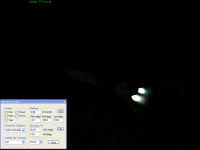
How they do it!!??!!??
http://orbiter-forum.com/showthread.php?t=28034
Here is a picture
How they do it!!??!!??

Cras and SolarLiner, it seems like you have some secret information or something.
That's because they are awesome enough to have secret information. :thumbup:
Yesterday, I forgot to
Now AutoFCS works!
change the "EchoAllParams" to TRUE in your Or(b)iter.cfg file.
Now AutoFCS works!
That's because they are awesome enough to have secret information. :thumbup:
Haha ! :rofl:
I am working on an AutoFCS pack who is working for me and (i hope) for all.
Okay, when I said AutoFCS works, it meant that I could now select the base. But it won't do the automatic burn.
---------- Post added at 10:21 AM ---------- Previous post was at 10:16 AM ----------
But it now works, when I copied the base .cfg (such as Canaveral.cfg) from
*\Config\Earth\Base
to
*\Config
, and commented out the LOCATION line.
http://www.orbiterwiki.org/wiki/AutoFCS
so just do that, as well as changing "EchoAllParams" to TRUE in Orbiter.cfg.
---------- Post added at 10:21 AM ---------- Previous post was at 10:16 AM ----------
But it now works, when I copied the base .cfg (such as Canaveral.cfg) from
*\Config\Earth\Base
to
*\Config
, and commented out the LOCATION line.
http://www.orbiterwiki.org/wiki/AutoFCS
so just do that, as well as changing "EchoAllParams" to TRUE in Orbiter.cfg.
Last edited:
On an attachment you have my AutoFCS version. Backup and install it and replace all overwriting files (Config\Earth.cfg and Orbiter.cfg) or better, install it using JSGME.
After installed, and because your "orbiter.cfg" is replaced, you should re-configure your Orbiter or copy all the lines from your ancient Orbiter.cfg file below the "EchoAllParams" parameters into the new one. It works for me.
I also removed the Atlantis.dll module, because it CTD Orbiter.
EDIT: I have not viewed the Pipcard Message. It is all good now :thumbup:
After installed, and because your "orbiter.cfg" is replaced, you should re-configure your Orbiter or copy all the lines from your ancient Orbiter.cfg file below the "EchoAllParams" parameters into the new one. It works for me.
I also removed the Atlantis.dll module, because it CTD Orbiter.
EDIT: I have not viewed the Pipcard Message. It is all good now :thumbup:
Attachments
AutoFCS really works wonders.
Similar threads

- Replies
- 11
- Views
- 3K


- Replies
- 0
- Views
- 5K


