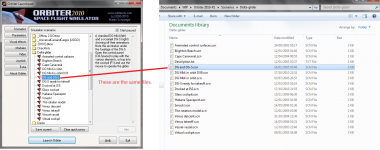
When I was trying to start the Thor scenarios, it says I'm missing vessel.cpp. Here's what orbiter.log said...
**** Orbiter.log
Build Jun 6 2010 [v.100606]
Timer precision: 3.77525e-007 sec
Found 2 joystick(s)
Devices enumerated: 3
Devices accepted: 3
==> RGB Emulation
==> Direct3D HAL
==> Direct3D T&L HAL
Module AtlantisConfig.dll .... [Build 100606, API 100606]
Module AtmConfig.dll ......... [Build 100606, API 100606]
Module DGConfigurator.dll .... [Build 100606, API 100606]
Module transx.dll ............ [Build 100528, API 100527]
Module TrackIR.dll ........... [Build 091120, API 091120]
TrackIR module not found.
Module ScriptMFD.dll ......... [Build 100606, API 100606]
Module ScnEditor.dll ......... [Build 100606, API 100606]
Module Rcontrol.dll .......... [Build 100606, API 100606]
Module Meshdebug.dll ......... [Build 100606, API 100606]
Module LuaMFD.dll ............ [Build 100606, API 100606]
Module LuaConsole.dll ........ [Build 100606, API 100606]
Module Framerate.dll ......... [Build 100606, API 100606]
Module FlightData.dll ........ [Build 100606, API 100606]
Module ExtMFD.dll ............ [Build 100606, API 100606]
Module CustomMFD.dll ......... [Build 100606, API 100606]
**** Creating simulation session
DirectDraw interface OK
Direct3D interface OK
Graphics: Viewport: Window 1594 x 1172 x 32
Graphics: Hardware T&L capability: Yes
Graphics: Z-buffer depth: 32 bit
Loading 8816 records from star database
Joystick throttle: SLIDER 0
Joystick throttle control detected
Module Sun.dll ............... [Build 100215, API 100212]
VSOP87(E) Sun: Precision 1e-006, Terms 554/6634
Module Mercury.dll ........... [Build 100215, API 100212]
VSOP87(B) Mercury: Precision 1e-005, Terms 167/7123
Module Venus.dll ............. [Build 100215, API 100212]
Module VenusAtm2006.dll ...... [Build 100606, API 100606]
VSOP87(B) Venus: Precision 1e-005, Terms 79/1710
Module Earth.dll ............. [Build 100215, API 100212]
Module EarthAtmJ71G.dll ...... [Build 100606, API 100606]
VSOP87(B) Earth: Precision 1e-008, Terms 2564/2564
Module Moon.dll .............. [Build 100217, API 100215]
ELP82: Precision 1e-005, Terms 116/829
Module Mars.dll .............. [Build 100215, API 100212]
Module MarsAtm2006.dll ....... [Build 100606, API 100606]
VSOP87(B) Mars: Precision 1e-005, Terms 405/6400
Module Phobos.dll ............ [Build ******, API 060425]
Module Deimos.dll ............ [Build ******, API 060425]
Module Galsat.dll ............ [Build 100217, API 100215]
Module Jupiter.dll ........... [Build 100215, API 100212]
VSOP87(B) Jupiter: Precision 1e-006, Terms 1624/3625
Module Io.dll ................ [Build 100217, API 100215]
Module Europa.dll ............ [Build 100217, API 100215]
Module Ganymede.dll .......... [Build 100217, API 100215]
Module Callisto.dll .......... [Build 100217, API 100215]
Module Satsat.dll ............ [Build 100215, API 100212]
Module Saturn.dll ............ [Build 100215, API 100212]
VSOP87(B) Saturn: Precision 1e-006, Terms 2904/6365
Module Mimas.dll ............. [Build 100215, API 100212]
SATSAT Mimas: Terms 113
Module Enceladus.dll ......... [Build 100215, API 100212]
SATSAT Enceladus: Terms 33
Module Tethys.dll ............ [Build 100215, API 100212]
SATSAT Tethys: Terms 101
Module Dione.dll ............. [Build 100215, API 100212]
SATSAT Dione: Terms 59
Module Rhea.dll .............. [Build 100215, API 100212]
SATSAT Rhea: Terms 68
Module Titan.dll ............. [Build 100215, API 100212]
SATSAT Titan: Terms 100
Module Iapetus.dll ........... [Build 100215, API 100212]
SATSAT Iapetus: Terms 605
Module Uranus.dll ............ [Build 100215, API 100212]
VSOP87(B) Uranus: Precision 1e-006, Terms 1827/5269
Module Miranda.dll ........... [Build ******, API 060425]
Module Ariel.dll ............. [Build ******, API 060425]
Module Umbriel.dll ........... [Build ******, API 060425]
Module Titania.dll ........... [Build ******, API 060425]
Module Oberon.dll ............ [Build ******, API 060425]
Module Neptune.dll ........... [Build 100215, API 100212]
VSOP87(B) Neptune: Precision 1e-006, Terms 391/2024
Finished initialising world
>>> ERROR: No vessel class configuration file found for:
---------------------------------------------------------------
>>> ERROR: Multistage\Multistage
>>> [Vessel::OpenConfigFile | .\Vessel.cpp | 252]
---------------------------------------------------------------
>>> TERMINATING <<<
I do have multistage installed correctly.
**** Orbiter.log
Build Jun 6 2010 [v.100606]
Timer precision: 3.77525e-007 sec
Found 2 joystick(s)
Devices enumerated: 3
Devices accepted: 3
==> RGB Emulation
==> Direct3D HAL
==> Direct3D T&L HAL
Module AtlantisConfig.dll .... [Build 100606, API 100606]
Module AtmConfig.dll ......... [Build 100606, API 100606]
Module DGConfigurator.dll .... [Build 100606, API 100606]
Module transx.dll ............ [Build 100528, API 100527]
Module TrackIR.dll ........... [Build 091120, API 091120]
TrackIR module not found.
Module ScriptMFD.dll ......... [Build 100606, API 100606]
Module ScnEditor.dll ......... [Build 100606, API 100606]
Module Rcontrol.dll .......... [Build 100606, API 100606]
Module Meshdebug.dll ......... [Build 100606, API 100606]
Module LuaMFD.dll ............ [Build 100606, API 100606]
Module LuaConsole.dll ........ [Build 100606, API 100606]
Module Framerate.dll ......... [Build 100606, API 100606]
Module FlightData.dll ........ [Build 100606, API 100606]
Module ExtMFD.dll ............ [Build 100606, API 100606]
Module CustomMFD.dll ......... [Build 100606, API 100606]
**** Creating simulation session
DirectDraw interface OK
Direct3D interface OK
Graphics: Viewport: Window 1594 x 1172 x 32
Graphics: Hardware T&L capability: Yes
Graphics: Z-buffer depth: 32 bit
Loading 8816 records from star database
Joystick throttle: SLIDER 0
Joystick throttle control detected
Module Sun.dll ............... [Build 100215, API 100212]
VSOP87(E) Sun: Precision 1e-006, Terms 554/6634
Module Mercury.dll ........... [Build 100215, API 100212]
VSOP87(B) Mercury: Precision 1e-005, Terms 167/7123
Module Venus.dll ............. [Build 100215, API 100212]
Module VenusAtm2006.dll ...... [Build 100606, API 100606]
VSOP87(B) Venus: Precision 1e-005, Terms 79/1710
Module Earth.dll ............. [Build 100215, API 100212]
Module EarthAtmJ71G.dll ...... [Build 100606, API 100606]
VSOP87(B) Earth: Precision 1e-008, Terms 2564/2564
Module Moon.dll .............. [Build 100217, API 100215]
ELP82: Precision 1e-005, Terms 116/829
Module Mars.dll .............. [Build 100215, API 100212]
Module MarsAtm2006.dll ....... [Build 100606, API 100606]
VSOP87(B) Mars: Precision 1e-005, Terms 405/6400
Module Phobos.dll ............ [Build ******, API 060425]
Module Deimos.dll ............ [Build ******, API 060425]
Module Galsat.dll ............ [Build 100217, API 100215]
Module Jupiter.dll ........... [Build 100215, API 100212]
VSOP87(B) Jupiter: Precision 1e-006, Terms 1624/3625
Module Io.dll ................ [Build 100217, API 100215]
Module Europa.dll ............ [Build 100217, API 100215]
Module Ganymede.dll .......... [Build 100217, API 100215]
Module Callisto.dll .......... [Build 100217, API 100215]
Module Satsat.dll ............ [Build 100215, API 100212]
Module Saturn.dll ............ [Build 100215, API 100212]
VSOP87(B) Saturn: Precision 1e-006, Terms 2904/6365
Module Mimas.dll ............. [Build 100215, API 100212]
SATSAT Mimas: Terms 113
Module Enceladus.dll ......... [Build 100215, API 100212]
SATSAT Enceladus: Terms 33
Module Tethys.dll ............ [Build 100215, API 100212]
SATSAT Tethys: Terms 101
Module Dione.dll ............. [Build 100215, API 100212]
SATSAT Dione: Terms 59
Module Rhea.dll .............. [Build 100215, API 100212]
SATSAT Rhea: Terms 68
Module Titan.dll ............. [Build 100215, API 100212]
SATSAT Titan: Terms 100
Module Iapetus.dll ........... [Build 100215, API 100212]
SATSAT Iapetus: Terms 605
Module Uranus.dll ............ [Build 100215, API 100212]
VSOP87(B) Uranus: Precision 1e-006, Terms 1827/5269
Module Miranda.dll ........... [Build ******, API 060425]
Module Ariel.dll ............. [Build ******, API 060425]
Module Umbriel.dll ........... [Build ******, API 060425]
Module Titania.dll ........... [Build ******, API 060425]
Module Oberon.dll ............ [Build ******, API 060425]
Module Neptune.dll ........... [Build 100215, API 100212]
VSOP87(B) Neptune: Precision 1e-006, Terms 391/2024
Finished initialising world
>>> ERROR: No vessel class configuration file found for:
---------------------------------------------------------------
>>> ERROR: Multistage\Multistage
>>> [Vessel::OpenConfigFile | .\Vessel.cpp | 252]
---------------------------------------------------------------
>>> TERMINATING <<<
I do have multistage installed correctly.