General Question Moving launch-platform - how to move the attached rocket

Arthur Dent

Absolutely Mental
Donator
Joined
Feb 8, 2008
Messages
336
Reaction score
1
Points
18
Location
Dresden
Website
wasa.pottyland.de
Hi everyone,

I'm developing a crawler-like moving launch platform. At least I'm trying to. I made one in with SC3. I used Artlav's SC3 to DLL converter to generate the source code.

The goal is to have a launch platform that is moved by a train out of a VAB to the launchpad, with the rocket attached to it.

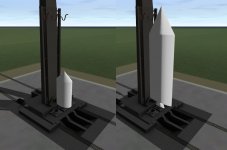
What I have achieved so far is the moving platform. It is basically an animation that moves all the objects 1800 meter from the launchpad to the VAB (and back). Of course, the way SC3 handles it, it is impossible to move the rocket that is attached as a payload, as well.

See the attached image for visualization (I'm using a dummy rocket for demonstration purposes).

Is there a simple way of doing it that I don't see?

I tried moving the whole platform using RCS translation thrusters instead, but that was A) not precise enough (the platform constantly strayed off the railtrack - this is the greater problem) and B) pressing a thruster button for one hour is not really feasible (this is the smaller problem).

Any ideas how to solve this problem?
 

Attachments
  • move_problem.jpg
    move_problem.jpg
    144.4 KB · Views: 50
Last edited:
I think the FOI guys did it as well with their Aurora launch platform.
 
Ask Woo about his train at Carl Sagan Space Center. He was able to make it work with a wide variety of rockets.
 
First you need a "toparent = true" attachment point that is coded into ypur rocket and then assign an attachment point handle to it.

Then you need a to child, aka "toparent = false", point on your launch pad/crawler.

Attach them and then move the crawler's attachment point, the rocket should move with it.
 
Last edited:
Here is another example. Using sc3 if I remember right. [ame="http://www.orbithangar.com/searchid.php?ID=5974"]Firebird I HLV + Makatea Space Center[/ame]
 
Actually, I don't think the rocket moves, the carrier only moves away from the pad. I think.

I think you're right. I may be getting it confused with this one [ame="http://www.orbithangar.com/searchid.php?ID=5965"]Angara Launch Vehicle[/ame]
 
I think you're right. I may be getting it confused with this one Angara Launch Vehicle

After analyzing the SC3 code of the Angara (and the hint with moving the attachment points), it appears to be, that the simplest solution is to use the robot arm animation. The robot arm has an attachment point..
I thought robot arm movement only allows rotation, but apparently, it allows translation animation, too. :)

I have to evaluate that.
 
Download my JasonLEO addon, it has a rollout from VAB to tower with UAP launch, using Velcro rockets.

[ame="http://orbithangar.com/searchid.php?ID=5619"]Jason LEO vehicle[/ame]
 
Thanks Donamy! As far as I can tell, you also used the SC3 robotic arm translation to move the pad and the attached rocket?
 
Thanks Donamy! As far as I can tell, you also used the SC3 robotic arm translation to move the pad and the attached rocket?


Yes. The scenario starts with the rollout animation already in progress, while the UAP is counting down to launch.
 
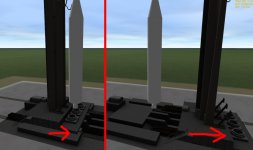
I tried to put the attachment with the robotic arm animation in my SC3 file, but somehow, the attached dummy has a strange "stretchy" bouncing movement, where it rapidly changes "shape" (see attached).

Here is the related SC3.ini code:
Code:
[PARENT_ATTACH_0]	
NAME="Moving_Pad"
POS=(-2.4,-13.4,0)
DIR=(1,0,0)
ROT=(0,0,1)
LOOSE=1
RANGE=10.5


[ROBOTIC_ARM]
JOINT_0_NAME="Moving_Pad"
JOINT_0_SEQ=1	
JOINT_0_RANGE=(0,1742)  ;320

JOINT_1_NAME=""
JOINT_1_SEQ=5
JOINT_1_RANGE=(0,90)
GRAP_SEQ=5
GRAP_ATTACH=0

[...]

[ANIM_SEQ_5]
;grap
DURATION=1
INIT_POS=0

[...]

[ANIM_COMP_9]	           
SEQ=5
RANGE=(0,1)
TIP_1=(-2.6,-13.4,0)
TIP_2=(-2,-13.4,0.3)
TIP_3=(-2,-13.4,-0.3)
TYPE=ROTATE
ROT_AXIS=(0,1,0)
ROT_PNT=(-2.4,-13.387,0)
ANGLE=0
PARENT=1

Any help would be much appreciated. :)
 

Attachments

  • attachment_bounce.jpg
    attachment_bounce.jpg
    136.7 KB · Views: 17
Last edited:
Just to conclude this issue: After countless tries, it appears to be, that there was an issue with [ANIM_COMP_9]. The Parent was set to 1, but it needed to be 2. At least that's what I think it was.

Many thansk again for giving me the SC3 examples (the code of the Angara Train and the Jason vehicle helped me a lot) :)
 
Last edited:
Tip1, has to match the parent attach point you want to use. Tip2 and tip3 control the direction and rotation angle.

Example.

Code:
[PARENT_ATTACH_0]
POS=(-0.003,0.346,0.023)
.
.
.
TIP_1=(-0.003,0.346,0.023)  ; Parent_0 attachment pount
TIP_2=(-0.003,[COLOR="red"]-1.346[/COLOR],0.023) ; subtract 1 from the y axis
TIP_3=(-0.003,0.346,[COLOR="red"]-1.023[/COLOR]) ; subtract 1 from the Z axis

You can't addd or subtract from the same axis in tip2 or tip3.
 
Ah. That enplanes a lot. This wasn't emphesized like that in the spacecraft.pdf documentation.

You should change your user-title to "SC3 Guru", Donamy! :)
 
Back
Top