New Orbiter SVN commit (r.71, Oct 14 2017)

They're still in development.
Martin said they will be released with the first patch.
http://www.orbiter-forum.com/showthread.php?t=37493

Ok. I already check the above link. Since they are still in development, why is it that the d3d9 client is released first? Supposedly the texture should be released first accompanied by the external d3d9 graphic engine. If I cannot even download the lunar sub-metre terrain, what is the point downloading the beta d3d9 client? No lunar sub-metre terrain will be displayed.

Also, Ripley, my question concerns with the reason Earth, Mars and lunar texture cannot be displayed using the latest beta d3d9 client uploaded by Kuddel. His upload was preceeded by the release of the r.64 orbiter 2016 beta, which I had downloaded using tortoise svn. I followed Dr. Martin's instruction on the official webpage regarding orbiter beta and added the texture dir like in the orbiter config file of orbiter beta. I also downloaded another official orbiter 2016 release with high-res texture files and copied them to the texture folder in the official orbiter 2016 folder. Then, I install the stable version d3d9 client for orbiter 2016. Both graphic engines, be it in-line of external d3d9, works flawlessly in the official stable orbiter 2016.

The problem arises with the orbiter beta. After following doctor's instruction, I can confirm that orbiter beta works well with its in-line graphic engine. To enhance graphic quality, I downloaded Kuddel's d3d9 beta graphic client AMD after extracting the files to orbiter beta, the textures for earth, moon and mars and in fact all planetary bodies do not show up. On earth, just plain blue ocean, and on mars reddish brown soil.

Even IF the beta d3d9 client works with sub-metre lunar texture, it should work with ordinary earth and mars texture, but it doesn't.

Read through this and my last post to understand my problem better.

Thank you, Ripley.

Nicholas.
 
Last edited:
Could this issue

Hello,

I have downloaded the latest r.64 Orbiter beta and installed D3d9 client beta 25.1 uploaded by kuddel above. However, the surface textures fail to load using the d3d9 client...

be related to this?

This may be a Bug or a Feature but, I had a problem with no planet textures showing in the D3D9 Client but it the inline client it was fine...


---------- Post added at 16:19 ---------- Previous post was at 16:15 ----------

...I want to know if there are other pre-use requirement for the d3d9 client beta to work...
One is of course the creation of symbolic links from the Video -> Advanced button.
 
Ok. I already check the above link. Since they are still in development, why is it that the d3d9 client is released first? Supposedly the texture should be released first accompanied by the external d3d9 graphic engine. If I cannot even download the lunar sub-metre terrain, what is the point downloading the beta d3d9 client? No lunar sub-metre terrain will be displayed.

The D3D9 client for this feature has not been released, Kuddel has shared a beta revision of the in-development version to allow early adopters to test the latest code alongside the newest (also beta) Orbiter version.

Beta software is not finished software. It can, and usually does, contain bugs and problems which can vary wildly in severity. If you are expecting a complete, polished, finished product, you should not be downloading anything marked "Beta".

As for why the client is released ahead of the new sub-metre scenery, it's valuable to test that changes to the code to enable support for this kind of scenery hasn't inadvertently broken anything else (a regression), so that is one possible reason. Another might be because the code can be written now, ready for when the scenery itself is ready, which is hardly a bad thing.
 
This might not be the best place to ask this but here it goes: I noticed that oapiGetMFDMode() returns 1000 for a vessel-specific MFD, but I can't find any references to this behaviour in the documentation. Am I safe in assuming that a vessel-specific MFD has always mode = 1000, so I can call up that MFD by that mode?
 
We have a potential bug over here. Getting a compiler warning about assigning a double to a boolean and it's likely a boolean that goes in rescale. These two lines exists in two different places in the source code.
Code:
rescale = (do_rescale = (hdr.scale != tgt_res) ? hdr.scale/tgt_res : 1.0);
offset  = (do_shift   = (hdr.offset != 0.0) ? (INT16)(hdr.offset/tgt_res) : 0);

I have changed that to this:
Code:
rescale = (do_rescale = (hdr.scale != tgt_res)) ? hdr.scale/tgt_res : 1.0;
offset  = (do_shift   = (hdr.offset != 0.0)) ? (INT16)(hdr.offset/tgt_res) : 0;
 
@martin:
Looking at your OVP r57 commit...isn't the 2nd offset assignment (line 293) still wrong?
 
Hi Martin,

I have a question, it's just an idea:

Is it possible to develop an easy way to change 2D panel size while running Orbiter? Thus without the need to exit to go to the Launchpad and change the Panel scale there.

My reason for this is the following problem:

Many vessels, for example the XR-vessels, the DG-IV and DG-EX, still do not support the 4k/UHD resolution (3840x2160), resulting in a 2D panel half the size it should be, because 1920x1080 their maximum.

This is very annoying, because buttons are very small and texts are very difficult to read.
Or I have to play Orbiter in a lower resolution, but of course I don't want to do that. (Of course I know that the stock client itself does not support a resolution larger than 2048px, but that problem does not exist with the D3D9Client.)

The only way I can solve this, is to double the Panel scale setting in the Launch pad to 2.0.

But the problem here is:
This change also duplicates the panel size of the vessels that are already correct, like the DG and other vessels that really automatically scale their panel.
So when I want to switch between vessels within one scenario, I often have to exit Orbiter to change the panel scale setting.
 
New Orbiter SVN commit (r.65, Nov 25 2016)

Change log:

  1. Earth and moon config: switched default elevation resolution to 0.5
  2. API: new function oapiGetGbodyParent and oapiGetGbodyChild
  3. DG: Thermal subsystem implemented
  4. Bug fix: DG: landing/docking light switch anomaly in VC
  5. Bug fix: SurfTile: rescaling bug for elevation mod tiles with scale factor != 1
  6. Bug fix: Vessel: transient thruster level was reset erroneously on IncThrusterGroupLevel
  7. Flight recorder: default stepsize reduced from 4 to 2s

The corresponding OVP commit to go with this is still r58 from 15 September.
 
This might not be the best place to ask this but here it goes: I noticed that oapiGetMFDMode() returns 1000 for a vessel-specific MFD, but I can't find any references to this behaviour in the documentation. Am I safe in assuming that a vessel-specific MFD has always mode = 1000, so I can call up that MFD by that mode?

Any info on this?
 
I modified an elevation tile (level 15, the highest level of the area) and placed it in the Elev_mod, and sometimes the shadows and vessel touchdown points seem to be using the original tile or a lower resolution tile. Maybe related, the area only has a level 13 surface (texture) tile.
 
I modified an elevation tile (level 15, the highest level of the area) and placed it in the Elev_mod, and sometimes the shadows and vessel touchdown points seem to be using the original tile or a lower resolution tile. Maybe related, the area only has a level 13 surface (texture) tile.

There isn't any level 14 tile in between?
 
There isn't any level 14 tile in between?

The area in question has elevation tiles from level 4 to level 15, and surface (texture) tiles from level 1 to level 13. I just edited the level 15 elevation tile.
 
It's been a while, but here is the next beta for you perusal and enjoyment.
Retrieve the beta (#67) from the usual location via SVN.

This one mainly adds support for quadtree-based surface labels. To get this working, you need to download the quadtree archives for the label layers (Label.tree) from the texture repository. Label layers are currently available for Earth and Mars. Install them by copying the tree file to the appropriate location like any other quadtree layers.

The Earth layers in particular are now quite extensive. There's a label for every City, suburb and village, plus pretty much every airport, heliport and airstrip. Also mountains, rivers and forests. Let me know what you think.

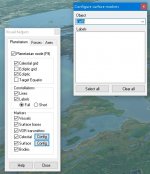
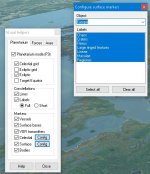
The new quadtree-based layers can be customised the same way as the old-style labels (Ctrl-F9, Planetarium->Markers->Surface->Config).

This currently only works with the inline client and the external D3D7Client. For other clients you'll have to wait for the changes to be implemented.

There is a new OVP commit (#59) to go with this beta.

In other news, the tileedit tool has been debugged to fix the worst CTDs. Should be a bit less annoying to use. The bad news is that you need new Matlab runtimes (R2015b).
 
Hi Martin,

I've seen your new commits and have a problem...

I've "installed" the Label quadtree files at \Textures\Earth\Archive\ rsp. \Textures\Mars\Archive\, but I cannot select anything at the "F9-Dialog".

The bodies without Label quadtree files work as before (see 2nd Attachment)

..and, yes, I'm running the inline-client ;)
 

Attachments

  • Earth.jpg
    Earth.jpg
    44.5 KB · Views: 29
  • Europa.jpg
    Europa.jpg
    47.5 KB · Views: 26
Hi Martin,

I've seen your new commits and have a problem...

I've "installed" the Label quadtree files at \Textures\Earth\Archive\ rsp. \Textures\Mars\Archive\, but I cannot select anything at the "F9-Dialog".

The bodies without Label quadtree files work as before (see 2nd Attachment)

..and, yes, I'm running the inline-client ;)

I guess this is due to a missing Label.cfg. The updated PlanetTextures.pdf contains this:
A label layer for a planet should be accompanied by a label legend in file Config\<planet>\Label.cfg where <planet> is the planet’s name. Label.cfg is an ASCII text file in UTF-8 format, where each line describes a label type, with the format
<typeid> <default-visible> <r> <g> <b> <typename>
where <typeid> is a character defining the type, corresponding to the IDs in the quadtree files, <default-visible> is one of characters ‘x’ (visible by default) or ‘o’ (not visible by default), <r>, <g> and <b> are the red, green and blue components (0-255) of the colour with which the labels are displayed, and <typename> is a string describing the label type.
The user can activate and deactivate the display of specific label types by opening the Planetarium dialog (Ctrl-F9), enabling Surface Markers, and opening the Surface Marker Config list to select label types.
 
Thanks Face!
You don't have by chance one of those Label.cfg files, right? ;)
So I think I'll have to wait for r68...
 
Thanks Face!
You don't have by chance one of those Label.cfg files, right? ;)
So I think I'll have to wait for r68...

I've unpacked the Earth label layer to see the content and noticed the type "C" (presumably for "City") being prevalent. So I think a file with the following content should suffice to see the labels of that type:
C x 255 255 255 Cities
W x 255 0 0 Water
M x 0 255 0 Mountains
A x 0 0 255 Airports
EDIT: at level 11 there is also W (Water), M (Mountain), A (Airport).

---------- Post added at 11:53 ---------- Previous post was at 11:30 ----------

Mars seems to have some different type characters:
a x 255 255 255 Catena
b x 255 255 255 Chaos
c x 255 255 255 Chasma
d x 255 255 255 Colles
e x 255 255 255 Lingula
f x 255 255 255 Fossae
g x 255 255 255 Palus
h x 255 255 255 Serpens
m x 255 255 255 Mensae
p x 255 255 255 Planum
s x 255 255 255 Sulci
t x 255 255 255 Tholi
v x 255 255 255 Vastitas
B x 255 255 255 Cavi
C x 255 255 255 Landing sites
D x 255 255 255 Dorsa
E x 255 255 255 Events
F x 255 255 255 Fluctus
G x 255 255 255 Patera
L x 255 255 255 Labyrinthus
M x 255 255 255 Montes
P x 255 255 255 Planitia
R x 255 255 255 Rupes
S x 255 255 255 Scopuli
T x 255 255 255 Terra
U x 255 255 255 Undae
V x 255 255 255 Vallis
 
Last edited:
Back
Top