

UPDATE: Published at [ame="http://www.orbithangar.com/searchid.php?ID=4681"]SideMountHLV[/ame]
The SDHLV is flying!
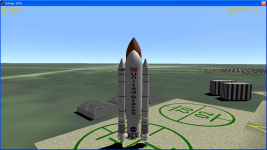
If you launch a heavy-lift vehicle designed to take 100 tons of cargo with zero tons of cargo, you get a real hot-rod! This thing hit 12.5km/s at 10+ g's at main engine cutoff. It went that fast because it doesn't have a main engine cutoff switch yet.
Now it's time for another long boring section on another one of my crazy hair-brained ideas: FlyByWire.
Almost all real launch vehicles use thrust-vector control (TVC) to steer. This means that they swing their engines around somehow. Most engines are mounted on gimbals, so that the whole engine block can be swung around. The SRBs on the Space Shuttle (and SDHLV) have a flexible nozzle. Imagine how much fun that was to design. Older solid boosters, like those on the Titan III and IVA used liquid fuel sprayed into the nozzle to shape the flame and get thrust control from there.
My launch vehicles use this also. First, an aside on virtual thrusters. If you are willing to put up with your attitude RCS inducing some translation as well, you can control rotation in three dimensions with as few as four thrusters. A common configuration is six: three on each "wingtip", one pointing up, one out, and one down. Make sure that the plane these thrusters are in do not include the center of gravity. You use matching pairs of up/down thrusters to pitch, opposite pairs to roll, and the out thruster on each wing to yaw.
When you put this into Orbiter, you end up putting some of the jets into two different thruster groups. For instance the left up thruster is in both the pitch up and roll left group. This is fine, but when you want to read the thruster group output, Orbiter works weird when the same thruster is in two groups, and you can't get a correct reading on the group.
Consequently, virtual thrusters. Create a set of six thrusters of your own, and assign one to each axis. Give them zero thrust (but a definite thrust vector, a zero vector sends your vessel to NaNland) and attach one to each group. You can then read the groups using VESSEL::GetAttitudeRotLevel( ) and use this to control the thrust vectoring.
FlyByWire is an object which encapsulates this virtual thruster concept. When you build it into your vessel, it creates a set of six virtual thrusters and a 1 milligram propellant resource just for them. When you enable it, it counts how many real RCS thrusters the vessel has on each axis, and remembers them. Then when you tell it to fly by wire around certain axes, it disconnects the real RCS from the attitude control groups and connects its own virtual thrusters. When you tell it to give up certain axes, it reconnects the original RCS. Then, your vessel can use FlyByWire to read the RCS axes that it manages, and do your own thing with it.
FlyByWire is designed to work by axis because sometimes you want the real RCS to work for one or another axis. On the Pegasus XL for instance, the second and third stage have a single steerable solid motor. You can get pitch and yaw control from this, but not roll, since the engine is on the roll axis. Therefore, the roll control RCS are left active, while the pitch and yaw are redirected to the engine gimbal.
Read all about it in the SDHLV code, to be posted to OrbitHangar soon.
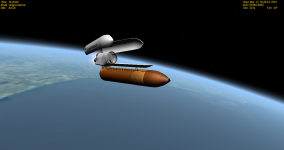
The SDHLV is flying!
If you launch a heavy-lift vehicle designed to take 100 tons of cargo with zero tons of cargo, you get a real hot-rod! This thing hit 12.5km/s at 10+ g's at main engine cutoff. It went that fast because it doesn't have a main engine cutoff switch yet.
Now it's time for another long boring section on another one of my crazy hair-brained ideas: FlyByWire.
Almost all real launch vehicles use thrust-vector control (TVC) to steer. This means that they swing their engines around somehow. Most engines are mounted on gimbals, so that the whole engine block can be swung around. The SRBs on the Space Shuttle (and SDHLV) have a flexible nozzle. Imagine how much fun that was to design. Older solid boosters, like those on the Titan III and IVA used liquid fuel sprayed into the nozzle to shape the flame and get thrust control from there.
My launch vehicles use this also. First, an aside on virtual thrusters. If you are willing to put up with your attitude RCS inducing some translation as well, you can control rotation in three dimensions with as few as four thrusters. A common configuration is six: three on each "wingtip", one pointing up, one out, and one down. Make sure that the plane these thrusters are in do not include the center of gravity. You use matching pairs of up/down thrusters to pitch, opposite pairs to roll, and the out thruster on each wing to yaw.
When you put this into Orbiter, you end up putting some of the jets into two different thruster groups. For instance the left up thruster is in both the pitch up and roll left group. This is fine, but when you want to read the thruster group output, Orbiter works weird when the same thruster is in two groups, and you can't get a correct reading on the group.
Consequently, virtual thrusters. Create a set of six thrusters of your own, and assign one to each axis. Give them zero thrust (but a definite thrust vector, a zero vector sends your vessel to NaNland) and attach one to each group. You can then read the groups using VESSEL::GetAttitudeRotLevel( ) and use this to control the thrust vectoring.
FlyByWire is an object which encapsulates this virtual thruster concept. When you build it into your vessel, it creates a set of six virtual thrusters and a 1 milligram propellant resource just for them. When you enable it, it counts how many real RCS thrusters the vessel has on each axis, and remembers them. Then when you tell it to fly by wire around certain axes, it disconnects the real RCS from the attitude control groups and connects its own virtual thrusters. When you tell it to give up certain axes, it reconnects the original RCS. Then, your vessel can use FlyByWire to read the RCS axes that it manages, and do your own thing with it.
FlyByWire is designed to work by axis because sometimes you want the real RCS to work for one or another axis. On the Pegasus XL for instance, the second and third stage have a single steerable solid motor. You can get pitch and yaw control from this, but not roll, since the engine is on the roll axis. Therefore, the roll control RCS are left active, while the pitch and yaw are redirected to the engine gimbal.
Read all about it in the SDHLV code, to be posted to OrbitHangar soon.


