Installation Orbiter 100830 installation

FALCONFLYER

New member
Joined
Jun 8, 2008
Messages
27
Reaction score
0
Points
1
Location
Dallas, Texas
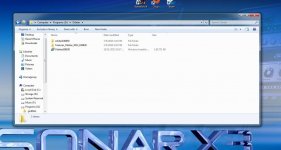
I downloaded the big zip file and extracted using winzip and here is the folder I extracted to. Where do I put the textures_orbiter_2012_100830 folder?? Thanks.
 

Attachments

  • orbiterfile.jpg
    orbiterfile.jpg
    139.6 KB · Views: 33
I suppose the texture should be moved into the "texture" folder in the orbiter100830 folder you downloaded.

Nicholas.
 
According to here: http://www.orbiter-forum.com/download.php

Look for the "Optional texture packs" section, it states that:

The folder structure of the zip file should be preserved. So, after unzipping the big file, double click the optional hi-res texture folder and observe the files and folders directory/structure. If you see textures2 and the hi-res texture files are inside there, then you should move the files to the textures2 folder in your Orbiter folder.

Maybe you are right FalconFlyer, I don't download hi-res texture when I use Orbiter. So, perhaps the files should be moved to textures2 instead of textures. Just go ahead with your folders and ignore my "textures" folder solution. Move your files depending on your downloaded folder.

My apologies. Please forgive me.

Yours sincerely,

Nicholas.
 
I've never downloaded the "big zip file", which isn't an officially supported Orbiter installation archive, so I can't help you much, but like Nicholas Kang stated, the target texture directories should be the same as they are in "Optional texture packs" official downloads.

If they are however different, the Textures2 is simply a directory which takes precedence over Textures when files with the same names are present in both of them. High resolution textures would be read by Orbiter whether you put them in Textures or in Textures2, but if you put texture files named the same for an object in both Textures2 and in Textures, the textures from Textures2 will be used in such case.


What files/directories are inside the "Textures_Orbiter_2012_100830" subdirectory from your screenshot?

 
OK...i see the file structure. Thanks for explaining how textures and textures2 work. I should have it figured out
 
Back
Top