Orbiter for Kids: advice please

HazMatt

New member
Joined
Nov 19, 2012
Messages
81
Reaction score
1
Points
0
I am helping a non-profit organization that provides educational and fun science events for kids. We want to use Orbiter as a hands-on introduction to basic space flight.

Has anyone here used Orbiter in a classroom or at a science day camp? We are hoping there is some kind of 15 minute scenario that we can coach a kid through. The kids can range in age from 7 to 12 years old.

I found Bruce Irving's blog posts "Orbiter For Educators", but I didn't find a lesson outline or anything like that.
 
Well, in 15 minutes you can open Deltaglider/Brighton Beach.scn, go to lunar orbit and rendezvous Luna-OB1, I guess.
 
I wouldnt show hard gameplay per se, but instead a compilation of achievements, like a Saturn V launch, a shuttle launch, the ISS, etc. etc.
 
Also, you can explain the basics and let some pre-made scenarios with "problems" to solve, like that of the low perigee in Go Learn In Space or the scenario in ISS v3.2 where you have to change the Soyuz from one docking port to another (the latter is too hard for begginers, maybe).

And don't forget to use Saturn and other exotic space vistas.
 
We are hoping there is some kind of 15 minute scenario that we can coach a kid through.

You could take a scenario like DG docked at ISS ... undock the DG from the ISS and back it up 30 or 40 meters and zero out the velocity, then quick save the scenario. Take the quicksave out of the quicksave folder and save it somewhere else where it's easier to find. Then you could have the kids attempt to close the last 30 or 40 meters to dock with the ISS. (I would recommend turning off all perturbations for the sake of the coaching.)

That seems like something that would fit within your "15 minute scenario" requirement.

Example that I just tossed together.

Code:
BEGIN_DESC
END_DESC

BEGIN_ENVIRONMENT
  System Sol
  Date MJD 51982.0315548064
END_ENVIRONMENT

BEGIN_FOCUS
  Ship GL-02
END_FOCUS

BEGIN_CAMERA
  TARGET GL-02
  MODE Cockpit
  FOV 60.00
END_CAMERA

BEGIN_HUD
  TYPE Docking
  NAV 0
END_HUD

BEGIN_MFD Left
  TYPE Docking
  NAV 0
END_MFD

BEGIN_MFD Right
  TYPE COM/NAV
END_MFD

BEGIN_PANEL
END_PANEL

BEGIN_SHIPS
ISS:ProjectAlpha_ISS
  STATUS Orbiting Earth
  RPOS 3628888.46 5231701.34 -2179713.12
  RVEL 6326.228 -4387.724 12.562
  AROT -110.23 -14.32 -84.81
  AFCMODE 7
  IDS 0:588 10 1:586 10 2:584 10 3:582 10 4:580 10
  NAVFREQ 0 0
  XPDR 466
END
GL-02:DeltaGlider
  STATUS Orbiting Earth
  RPOS 3628946.74 5231722.51 -2179713.10
  RVEL 6326.229 -4387.712 12.555
  AROT -90.02 74.28 110.68
  VROT 0.00 0.00 0.07
  RCSMODE 2
  AFCMODE 7
  PRPLEVEL 0:1.000000 1:0.999680
  NAVFREQ 586 466 0 0
  XPDR 0
  NOSECONE 1 1.0000
  SKIN BLUE
  AAP 0:0 0:0 0:0
END
 
Thanks everyone! I'll be making some lesson plans and scenarios this weekend. Later, after I test them a bit, I'll post the results here.
 
My first thought would be to use the Space Shuttle. A space craft that everyone should recognize and relate with, and fly that around. But that might go against your primary objective, Shuttle being limited and not very easy to fly.

I would suggest maybe exaggerating things a bit. So when you say....burn at perigee to raise apogee, dont just go raising the apogee by a few miles, but by hundreds. Or even a thousand. So they are really see how things change. Subtle, I dont think, would work well with kids of that age.
 
You could take a scenario like DG docked at ISS ... undock the DG from the ISS and back it up 30 or 40 meters and zero out the velocity, then quick save the scenario. Take the quicksave out of the quicksave folder and save it somewhere else where it's easier to find. Then you could have the kids attempt to close the last 30 or 40 meters to dock with the ISS. (I would recommend turning off all perturbations for the sake of the coaching.)

Thanks! I think I will do something similar to that. BTW, I'm still learning the Scenario Editor, so I will take a look at that scenario as soon as I have that figured out.

An additional scenario I think I'll prepare is starting at Brighton Beach and launching into lunar orbit. Then, circularizing the orbit.
 
There is a stock scenario that has a Shuttle-A on approach to the ISS. The user has to translate to the port side just a bit, null that movement out and translate forward towards the dock. No scenario editing needed.

The next student in line could take the same ship, and move from one dock to another (involves rotation and translation, and manipulting DockMFD).
 
Thanks again everyone for your input. I have prepared two lesson plans for Orbiter, and three for FSX. I will be presenting these to the administrators during our planning meeting on Tuesday.
I might develop an additional lesson plan for a landing at Hall Base on Phobos.


Lesson: Lunar Launch

Overview: Student will take off and maneuver near a Moon base, then launch into a stable orbit.

Subjects to Cover:
· NASA astronauts landed on the Moon six times
· Definitions: orbit, apoapsis, periapsis, prograde, retrograde, translation, rotation
· Turning to specific headings, setting specific pitch attitudes, maneuvering a spacecraft in a low gravity environment, engine management, interpretation of flight instruments, distances in meters and kilometers, checklist usage, communication with Mission Control
· Acronyms: MFD = Multi-Function Display, HUD = Heads Up Display, RCS = Reaction Control System, MECO = Main Engine Cut-Off, ApA = Apoapsis altitude, PeA = Periapsis altitude

Lesson Events:
· Pre-takeoff checklist, set up MFDs, set RCS to Rotation
· Hover at a low altitude, yaw spacecraft left and right
· RCS to Translation, move spacecraft left/right, forward/backward
· Launch to orbit: RCS to Rotation, turn to 90 degrees, engage full thrust, pitch up to 20º
· MECO to achieve a 200 km apoapsis
· Periapsis will be too low. Turn prograde, fast-forward time to a minute before reaching apoapsis. Short bursts of main engine thrust will raise periapsis to 200 km.


Lesson: Dock with Space Station

Overview: Student will set spacecraft instrumentation, select a docking port, and maneuver the spacecraft to dock with the International Space Station

Subjects to Cover:
· The International Space Station is real. Several nations cooperated to build this station and it has orbited the Earth for 10 years. Astronauts take turns manning the space station and conducting experiments
· Entering frequencies in the MFD, maneuvering in a zero-gravity environment, distances in meters and kilometers, checklist usage, communication with ISS
· Definitions: orbit, translation, rotation, constellations
· Acronyms: ISS = International Space Station, MFD = Multi-Function Display, HUD = Heads Up Display, RCS = Reaction Control System, NASA = National Aeronautics and Space Administration, ESA = European Space Agency, NASDA = National Space Development Agency

Lesson Events:
· Pre-dock checklist, set up MFDs, open nose cone, set RCS to rotation, open radiators
· Practice using the RCS system to rotate the spacecraft. Check out side view
· Enter navigation frequencies into the MFD, select closest docking port
· Set RCS to translation, and maneuver the spacecraft into the docking path between the 2nd and 3rd gates
· Orient the spacecraft to line up with the dock and approach the ISS
· Use docking MFD. Align longitudinal axis first, then approach with translational movements
· Dock with ISS, open airlock
 
I wrote a third lesson plan for a landing on Phobos. All three lesson plans are in a pdf file here: http://www.rogerdodger.net/files/Orbiter_Lesson_Plans_02-2013.pdf

I will actually be re-writing all of these to define tasks for teams consisting of three people (a two-person ship crew and one person as mission control). We are designing this exercise for a group of 18 kids, divided into teams of 3 kids each.

---------- Post added at 01:36 AM ---------- Previous post was at 01:35 AM ----------

Lesson: Land on Phobos

Overview: Student will set spacecraft instrumentation, select a landing pad, approach and land at a fictional base on the Mars moon, Phobos.

Subjects to Cover:
· Mars has two moons, Phobos and Deimos. Both moons are small, irregularly shaped, and have weak gravity. Phobos orbits closer to Mars than Deimos
· Hall Base is named after Asaph Hall, who discovered both Mars moons.
· Entering frequencies in the MFD, maneuvering in a zero-gravity/ low-gravity environment, distances in meters and kilometers, checklist usage, communication with base
· Definitions: orbit, translation, rotation, periapsis, apoapsis
· Acronyms: MFD = Multi-Function Display, HUD = Heads Up Display, RCS = Reaction Control System, NASA = National Aeronautics and Space Administration

Lesson Events:
· Pre-landing checklist, set up MFDs, set RCS to rotation, open radiators
· Practice using the RCS system to rotate the spacecraft. Check out side view
· Enter navigation frequencies into the MFD, select Landing Pad 1
· Select Landing MFD
· Set RCS to translation and rotation as needed. Maneuver the spacecraft above the landing pad
· Orient the spacecraft to line up with the pad and touch down
 
What age group ?
 
I'm working on a Sim, for that age group myself.
 
I'm working on a Sim, for that age group myself.

Cool! I will post more information here in the future. We will be testing and refining our lesson plans and simulator over the next few months. As we learn what practices work best, I'll post our experiences here.
 
What do you have for a sim so far ?

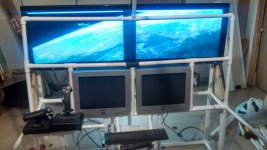
I built a LAB out of PVC, with 4 station racks.
 
What do you have for a sim so far ?
I'm using the DIY Roll-Away Flight Sim with the Orbiter Keyboard Mod. I intend to create a different Orbiter keyboard mod with button locations that are more like the stock DG.

 
I went alittle larger.
 

Attachments

  • cockpit.jpg
    cockpit.jpg
    119.9 KB · Views: 87
I went alittle larger.

Outstanding! How big are those monitors, and what are the resolutions?
Those PVC corner connectors are very interesting too, I don't see those much.

My simulator had to be very mobile, so it is entirely self-contained and can fit in the back of a mini-van. I can roll it down narrow hallways and through doorways like a two-wheel hand truck.
 
They are 32" monitors, I may go with three 24" instead. All the PVC will eventually be covered, with some switches added. I can fit down the same corridors, only in pieces and more trips. ;)
 
Back
Top