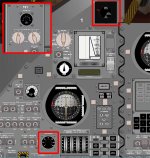
Problem Panel problem with Win7

juhowee

New member
Joined
Dec 17, 2008
Messages
7
Reaction score
0
Points
0
Some gauges are black, see attachment. Orbiter has worked before in this computer whit WinXP but now I use Win7 and I got this problem. Orbiter works fine in other ways.
 

Attachments

  • panel.jpg
    panel.jpg
    171.7 KB · Views: 38
Does changing the colour depth on the Video tab make any difference?
 
Can you please post your system specs (CPU, memory, video card model, video RAM, etc.)? If you're running on-board video, that could cause the problem you're seeing. Also, do you see any other visual glitches at all besides that panel? Or is it just that one panel on that one vessel?

 
Does changing the colour depth on the Video tab make any difference?

Im using window mode but I tried using 16 and 32 both in FullScreen but no change =/

Here are my specs:

Intel Core 2 6420 2.13GHz
Nvidia GeForce 8800 GTS
4 Gb RAM
Windows 7 64-bit

That is NASSP panel but I havent noticed any other problems like that.
 
Some more questions for trying to solve this problem:
  1. Do you use "Always enumerate devices" option and appropriate "Direct3D T&L HAL (<name of graphics card>)" 3D device selected on Video tab in Orbiter Launchpad?
  2. Have you tried to use the "Try stencil buffer" option from the Video tab to check if it changes anything?
  3. Is your Orbiter installed in "Program files"?
  4. Does this problem persist if you run Orbiter as Administrator?
 
I tried all. I have two displays but I use larger for playing orbiter. Here is my 3D device -list:

Direct3D HAL
Direct3D T&L HAL
Direct3D HAL (NVidia GeForce 8800 GTS) <- thats for my 2nd display
Direct3D T&L HAL (NVidia GeForce 8800 GTS) <- thats for my 2nd display
Direct3D HAL (NVidia GeForce 8800 GTS) <- thats for my 1st display

I tried to change settings of "Always enumerate devices" and "try stencil buffer" but no effect. Runnin as an Administtrator didn't help.

I have'nt installed orbiter into Program Files or Program Fiels x84 or into that harddrive at all.

It's interesting that there are many other gauges like these but they work well.
 
Can you try running it in RGB emulation? If the error persists, then we can be sure it has nothing to do with any part in the video setup.
 
Can you try running it in RGB emulation? If the error persists, then we can be sure it has nothing to do with any part in the video setup.

Didn't help :D and orbiter is nearly impossible to run with that. I'll try to reinstall orbiter and NASSP soon..
 
RGB mode is solely for debugging purposes anyway.
I stick with missing DLL. Try dropping msvcp70.dll, msvcp80.dll, msvcp90.dll, msvcr70.dll, msvcr80.dll and msvcr90.dll into the orbiter directory.
 
Well that worked! Thank you and for the other for help!:)
 
Back
Top