TransX Possible glitch? Planet sphere solid white.

Indigod

New member
Joined
Nov 18, 2010
Messages
4
Reaction score
0
Points
1
Location
Vancouver
Hey everyone, this is my first time posting here, so just want to say first that I love this site. It's always had the answer I needed to any problem I've had; that is, until now. I've searched all over and haven't seen anything similar to this. Check this out:

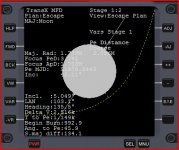
I'm running the 2010 version of Orbiter, currently sitting at a launchpad at Brighton Beach in my DGIV. I've been learning TransX, and I would like to go from the Moon back to Earth. Problem is, every time I pull up Pe Distance (or Ej Orientation) in the Escape Plan, the Moon on the display fills in with white, and I am unable to see the green lines for my position, along with making the text difficult to read. I can't seem to get this to go away, and as long as it's there I have no idea where to orient my orbit! I know this is hard to picture, so I attached a screen shot. Has anyone else had this issue before?
 

Attachments

  • Transx_Problem.JPG
    Transx_Problem.JPG
    36.8 KB · Views: 69
Are your graphics card drivers up to date?

Darren

Edit: And :welcome: to the forum. :thumbup:
 
Last edited:
Well, to be honest, I'm not entirely sure. However, I'm running a ATI Radeon x1270, and this is the only problem (graphically) I've come across while using Orbiter. I've used all the built in MFDs, traveled from Earth to Moon, Phobos to Mars, docked to Iss, Mir, etc. I doubt it's a problem with my graphics card, otherwise I would think I would have noticed something else amiss as well. I hope someone knows what's up, it's very aggravating when something so small is keeping you from continuing on the Orbiter journey :idk:
 
What is it about ATI cards and Orbiter...
 
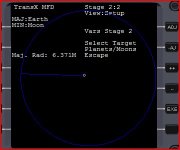
Haha okay sorry for this Pyro, but I figured it out. After trying to update my drivers and finding out I am in fact up to date, I got annoyed and decided to mess around some more with transx to see if I missed something. Turns out, I just forgot to switch the target to escape. How could I miss that? Well, I had both MFDs in transx, and before switched one to escape, but not the other. It was the one I hadn't switched that I was trying to use and kept getting the problem. I just happened to switch the other one over just a minute ago and saw that it wasn't filled in. Again, sorry about that, I feel pretty stupid, especially after taking all that time to try find drivers I didn't need :facepalm:

Edit: Re-read what I wrote, realized it didn't make sense. So again, providing a picture of where I forgot to turn on Escape
 

Attachments

  • Escape.JPG
    Escape.JPG
    24 KB · Views: 37
Last edited:
Hi Indigod, welcome to the community!

The white planet sphere from the screen shot in your first post is actually a known bug with TransX in ORBITER 2010-P1. There is a recent ORBITER beta version (v.100905) which fixes that problem, however it introduced a new issue which is much less annoying than the white sphere and isn't hard to work around. See the last 2 posts in the bug report which was created about this issue here:

http://www.orbiter-forum.com/project.php?issueid=564

:thumbup:
 
The white planet sphere from the screen shot in your first post is actually a known bug with TransX in ORBITER 2010-P1.

I also discovered this bug in the Orbiter 2010-P1 TransX. I downloaded TransX 3.13 (compiled for Orbiter 2006) from Orbit Hangar, however, and it now works for me.
 
I also discovered this bug in the Orbiter 2010-P1 TransX. I downloaded TransX 3.13 (compiled for Orbiter 2006) from Orbit Hangar, however, and it now works for me.
Great suggestion. I just did same and also see proper operation of TransX in the few minutes I had to play with it. I had actually gone back to using just 2006 version because of the glitches in TransX.
 
I simply keep another vessel in the scenario so when the stage changes I can switch to that vessel right quick with transx pulled up and then back to my original vessel and transx graphics work again. :)
 
Isn't it like scratching your right ear with your left hand?
 
why the bash on ATI on post #5? ATI are as good as nvidia most times, and im running nvidia at the moment, and it generates the same errors as other cards.

seriously though, i just bought a new computer with ATI graphics, they seriously cant be bad if they were getting limelight in Comet
 
why the bash on ATI on post #5? ATI are as good as nvidia most times

You have answered your own question! "Most times" means that sometimes they aren't as good - and that is likely the reason for the bash. ATI cards have many more problems with Orbiter than NVidia, and this holds true with the OGLA client as well. Some of this is due to poor drivers, although this has improved dramatically since AMD bought ATI. I switched to NVidia before that since I suffered frequent BSOD's and a multitude of other problems with ATI cards - all of which were traceable to poorly written drivers. ATI hardware was fantastic - if the drivers ever fully catch up I'll consider them again. With ATI, an OS upgrade likely means you'll need a new card if the one you have is discontinued - legacy support is still abysmal. If your card predates AMD's buyout of ATI, you are pretty much screwed.
 
well its about 2007, radeon 3000 (just checked my order), hows that?
 
well its about 2007, radeon 3000 (just checked my order), hows that?

This is not a video card discussion, let's please keep it on topic. Thanks. :tiphat:
 
Had this problem too, solved using the old version.
 
Hey thanks for the leads guys, while messing with TransX a bit did get it to go away, it would come back every time I started the sim again, and most of the time I couldn't get it to go away at all. Transx started having other glitches too, like when I was about halfway between Earth and Mars all the lines turned green. So I've decided that at this point I will download another version of TransX as was suggested :thumbup:
 
Anyway when I had an nVidia card this did not happen. I also have problems to see the names of the planetarium mode. Off-topic wars between cards apart, I suspect that ATI cards may be related to this glitch.
Anyone experiencing the planetarium mode glitch?
 
Transx started having other glitches too, like when I was about halfway between Earth and Mars all the lines turned green.{...}

It sounds like you still have not updated to the Orbiter beta release after 2010-P1 (v.100905) as I remember those green lines as well.


Anyway when I had an nVidia card this did not happen. I also have problems to see the names of the planetarium mode. Off-topic wars between cards apart, I suspect that ATI cards may be related to this glitch.
Anyone experiencing the planetarium mode glitch?

Wrong, I have nvidia now and the TransX problem exists for me in Orbiter 2010-P1. I don't know anything about a planetarium bug... Just to clarify though, are you guys fixing the bugs mentioned in this thread by using an outdated TransX version with Orbiter 2010-P1 (v.100830)? I don't understand all of the changes made from 2006-P1 to 2010-P1 which could affect the MFDs, but it seems like the older version of TransX shouldn't work right in 2010-P1.


Flytandem: Have you tried using TransX 3.13 with Orbiter 2010-P1? You are for sure the TransX master, I'm curious if you notice everything working as it should. :)
 
Back
Top