Problem with shuttles velocity vector

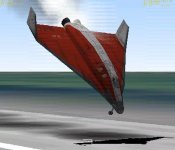
i crash because i cant lift the nose! and i fail!

OK, and do you think, we can NOW tell you what you do wrong?

Make a screenshot of your cockpit, with all open MFDs, BEFORE you crash and save it in a resolution, in which people can read your data - typically the same resolution you use for playing the game.
 
Yes............ What Urwumpe said. Chances are your speed is way to slow so you are falling out of the sky and not landing.
 
same thing but in DG!
 

Attachments

  • crash 2!.jpg
    crash 2!.jpg
    17.8 KB · Views: 13
Your problem is that your nose is pointing down.
 
Have you seleted your joystick in the launch screen ?
 
i dont use a joystick! also garyw like ive already said i cant get the nose to point up because of the velocity vector! i cant point my nose upward
 
Do you have AF control Surfaces selected?
And, the Velocity Vector isn't your problem. That only tells you which direction you are moving.

EDIT:
Okay, Here's what I'm gonna do. Give you a step by step landing procedure. Start with the DG and DG-S Scenario. When you are in your cockpit, Throttle up, and take off. The SECOND your wheels are up, turn off your engines. Dont touch them again. Dont pull your gear up either. Just gently nose over until you are pointed at the ground (about a 20 degree slope). When you are 25m above the ground, pull up relativly sharp, pointing the nose at about 30 degrees. You will hit the ground hard, and over the water, but that is just an idea of how to get you to land (I just pulled that out of my butt hole right now, but it *should* work)
 
i dont use a joystick! also garyw like ive already said i cant get the nose to point up because of the velocity vector! i cant point my nose upward

Like Kaito already said: The velocity vector is not the problem, it is the result. The velocity vector points into the direction you are flying. If you are stalled, it does not matter where you point your nose, the velocity vector will point at solid ground as you are already dropping like a (uncontrolled) stone.
 
AF = Air Foils (I think). Let me take a screenie...
untitled.jpg

If it isn't like that left click/right click to get them like that
 
ok thanks


-----Post Added-----


can you tell me what mfd that is on the right hand side?
if its the map mfd how can you get the map to look like the actual countries instead of just green lines
 
ok thanks


-----Post Added-----


can you tell me what mfd that is on the right hand side?
if its the map mfd how can you get the map to look like the actual countries instead of just green lines

[ame="http://www.orbithangar.com/searchid.php?ID=2356"]Color Earth and Moon Maps for Map MFD[/ame]
 
yep thats the one!

thanks!

also i am starting to get the hang of landing thanks to


-----Post Added-----


...... thanks to kaito!

thanks
devie08.
 
Are you able to land without going nose first into the ground now?
 
For the colored mapMFD?
There is no module for that. All it did was replace some textures
 
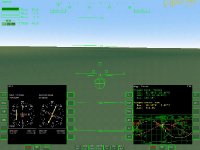
kaito i have managed to get a screenshot of what happens when i go to land from inside the cockpit! here it is:
 

Attachments

  • crash 3!.jpg
    crash 3!.jpg
    63.8 KB · Views: 24
what happens is that when i try to pull up the nose i end up going back down! i have turned on the AF but still nothing happens..?
 
Don't forget to use the trim, too. Proper trim, airspeed, angle and weight and the Shuttle will almost land itself.
 
Back
Top