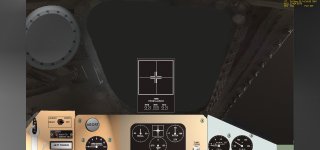
Problem Project Mercury Panel

cb1221

New member
Joined
Mar 8, 2010
Messages
4
Reaction score
0
Points
0
Hello everyone. I've looked around and decided that this was the best place to try and find help since I couldn't find any information elsewhere. My problem is that when I try to run the Project Mercury scenarios, The top panel is messed up. The large window just appears a dull black while the small circular window displays the sky just fine. Also, the timer is right in the middle of the large window and I believe it's supposed to be farther to the left. I've tried messing with the video settings to no avail. Any help is appreciated.

 
Unfortunately it didn't help =[. I tried moving my Orbiter folder from Program Files to My Documents and now the panels are too small. Here's a screen capture of my particular problem.
 

Attachments

  • screen cap1.jpg
    screen cap1.jpg
    192.3 KB · Views: 36
And do I get it right that this happens on any mission scenario, not just MR-3 Freedom 7?
 
Yes. This happens in all of the Mercury Scenarios.
 
The small panel is a limitation of Orbiter. 2D panels have a fixed resolution and don't automatically scale to your Orbiter window.
You can adjust the scale manually with the "Panel Scale" option in the launchpad, however, the results are not that pretty.

Regarding your closed windows... I have no idea what causes that :(
 
Here's a screen capture of my particular problem.
Those 2D panels were designed only for 4:3 screen ratio, so they will have left/right edges looking like that. You can change panels' scale, but then top and bottom parts will go off screen.
 
You can, however, scroll through the panels with the arrow keys. I personally prefer using the arrow keys than having the feeling to sit in open space.
 
This seems to have stopped with the Mercury Atlas scenario, but still does this with the Redstone scenario.
 
Back
Top