OHM ProjectX-15 V.2.0

OrbitHangar

Addon Comments
Joined
Apr 9, 2008
Messages
3,832
Reaction score
18
Points
0

Author: projectx-15

Version 2 of our simulation of the historical X-15 program, with all major vehicles in the program. Please see the detailed manual for full installation and flight instructions. Requires the ProjectX-15 Edwards & High Range addon and Vinka's spacecraft3.dll

DOWNLOAD
 
This add-on is totally great.Great feeling,good detail and i just hope to see the next version optimize for Orbiter 2010.
 
X-15 won't drop, O-100830

Hi, I'm using Orbiter 2010 100830, and regardless of whether I use "MouseClickSeparate" or "Ctrl-DSeparate", the X-15 will not separate from its carrier, the B-52. I am being very careful to make sure that I am not using both modules at the same time, so I don't know what the problem could be. For some reason, it worked fine with the X-20 Dyna-Soar. Could you please tell me what the problem might be, or make an update to fix this?
 
Hi, I'm using Orbiter 2010 100830, and regardless of whether I use "MouseClickSeparate" or "Ctrl-DSeparate", the X-15 will not separate from its carrier, the B-52. I am being very careful to make sure that I am not using both modules at the same time, so I don't know what the problem could be. For some reason, it worked fine with the X-20 Dyna-Soar. Could you please tell me what the problem might be, or make an update to fix this?

I'm using X-15 on 100830, and it separates nicely by hitting "J".

---------- Post added at 03:33 AM ---------- Previous post was at 03:31 AM ----------

I think this video interesting. I hope you enjoy.
 
Thanks!

Thanks a lot, Lisias! :thumbup:

---------- Post added at 07:36 AM ---------- Previous post was at 06:57 AM ----------

Actually, wait... all [J] does it drop the tanks and dorsal fin:oh:...
I wonder what's going on... I was having similar problems with Sputnik's
M2F1-3...
 
Try focusing on the B-52 and then using "J" key.
 
Actually, wait... all [J] does it drop the tanks and dorsal fin:oh:...
I wonder what's going on... I was having similar problems with Sputnik's
M2F1-3...

Loru nailed it. You should be focusing the B-52 in order to jettison the vessel.

Don't hit it twice, or the second "J" will go to the X-15.
 
Hi, I'm using Orbiter 2010 100830, and regardless of whether I use "MouseClickSeparate" or "Ctrl-DSeparate", the X-15 will not separate from its carrier, the B-52. I am being very careful to make sure that I am not using both modules at the same time, so I don't know what the problem could be. For some reason, it worked fine with the X-20 Dyna-Soar. Could you please tell me what the problem might be, or make an update to fix this?

I think with "MouseClickSeparate" and "Ctrl-DSeparate" you refer to this section of the documentation:
Before loading an X-15 scenario you MUST click on the Modules tab of the Orbiter Launch Pad window and activate ONE of the following:

Release-Mouse OR Release-ShiftD
Do not activate both Release MFDs

Release-Mouse releases the X-15 from the carrier ship with a mouse click on the MFD screen button. Release-ShiftD releases the X-15 with a [Shift]+[D] key command. Release-ShiftD permits releasing the X-15 from an external view of the aircraft.

In order to have that working, you have to activate the module AND activate the MFD mode. The Shift-D also works with the usual Orbiter mechanism of having to use the Shift key on the left or right side according to the side your MFD is displayed.

EDIT: Just tested it, works like a charm. Focus X-15, bring up the Release MFD mode, hit Left-Shift-D if the MFD is on the left, or hit Right-Shift-D if the MFD is on the right.

Do you have any suggestions for improvement of this MFD mode?
 
Last edited:
How am I to do that?

This sounds very useful, but could you please tell me how to open the ReleaseMFD mode?
 
This sounds very useful, but could you please tell me how to open the ReleaseMFD mode?

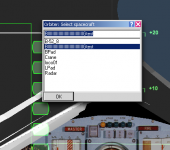
The same as you open any other MFD mode. If the module is activated, it should show up in the mode select list as "Release / (Shift-R)" entry. This list you get by clicking the SEL button (the middle button below the MFD display in glass cockpit).

If the entry does not show up despite you activating the appropriate module in the modules tab of Orbiter's launch pad, that would be a bug. In this case, a posting of the log-file might help.
 
Thanks a lot, Lisias! :thumbup:

---------- Post added at 07:36 AM ---------- Previous post was at 06:57 AM ----------

Actually, wait... all [J] does it drop the tanks and dorsal fin:oh:...
I wonder what's going on... I was having similar problems with Sputnik's
M2F1-3...

I think I understood the problem. The X-15 (the original one) appears to work fine using "J" from the B52. The X15-A2 does not.

I also experimented a UI lockout when I tried ReleaseMeMFD. Using the ShiftD and Mouse versions didn't helped (but didn't locked the UI neither).

And then something interesting happened. I finished the Orbiter in frustration, and when I came back later, things worked fine. :-)

It appears to be some initialization flaw somewhere in the X-15 A2 or the Release MFD. By selecting the MFD and finishing the scenario, when loading back the glitch is solved somehow.
 
I think I understood the problem. The X-15 (the original one) appears to work fine using "J" from the B52. The X15-A2 does not.

I also experimented a UI lockout when I tried ReleaseMeMFD. Using the ShiftD and Mouse versions didn't helped (but didn't locked the UI neither).

And then something interesting happened. I finished the Orbiter in frustration, and when I came back later, things worked fine. :-)

It appears to be some initialization flaw somewhere in the X-15 A2 or the Release MFD. By selecting the MFD and finishing the scenario, when loading back the glitch is solved somehow.

Well, the mode of operation is documented in the addon's manual, so I didn't try J to make the detachment. The MFD mode worked as advertised, but of course the documentation is not detailing the MFD mode activation procedure for beginners. EDIT: Actually, it IS detailed even for beginners in the checklist on page 2-4:
As you near the launch distance of 310 miles
(500 km), bring up the Release MFD on the
left (replacing the MapMFD for now) by
pushing the SEL button and then the Release
button from the MFDs listed. The ReleaseMFD
screen will display the word ATTACHED.

I used the ProjectX-15\Historical X-15\X-15 Record Flights\* scenarios for my tests, though. What scenario did you use?
 
Last edited:
I used the ProjectX-15\Historical X-15\X-15 Record Flights\* scenarios for my tests, though. What scenario did you use?

I used ProjectX-15\Historical X-15\X-15 & B-52 Takeoff from Edwards .

The B-52 & X-15 ones works by using "J".

The B-52 & X-15A-2 ones are the ones that works using ReleaseMe - but after exiting Orbiter and then restarting.

I'm using Orbiter 2010P1
 
Interesting. Perhaps the problem is not a initialization flaw, but a buffer overrun.

I just noticed this, after clicking check on the ReleaseMeMFD, using the white X-15 - the vessel name got scrambled.
 

Attachments

  • Screen Shot 2016-03-05 at 02.50.41.png
    Screen Shot 2016-03-05 at 02.50.41.png
    85.6 KB · Views: 11
Interesting. Perhaps the problem is not a initialization flaw, but a buffer overrun.

I just noticed this, after clicking check on the ReleaseMeMFD, using the white X-15 - the vessel name got scrambled.

You mean the one from my examples download?!? Well, yes, that's clear, because the "check" code was implemented to do exactly that: test if the vessel name is directly writable and if this might crash Orbiter. It was a quick test-bed implementation that got accidentally published together with the rest of the code of this very simple MFD mode here: http://orbiter-forum.com/showthread.php?t=1066

But that has nothing to do with the version from the addon in question here, and never was intended to be a replacement.

Anyway, it would be interesting to hear if 8bitgamer13 got it to work in the end. Because if not, maybe some missing runtime library or somesuch is the problem, and a recompile could help. That's also the reason for me to ask for suggestions for improvement.
 
Interesting. I'm back to my hypothesis of some initialization flaw.

When running Orbiter inside a WINE box, the thing worked without the "restart hack".

In my old days of Windows development, I would use Rational Purify to check against this. Since it's a long time since that, I don't know how to help nowadays - but on a quick and dirty search I found this: http://drmemory.org/
 
Interesting. I'm back to my hypothesis of some initialization flaw.http://drmemory.org/

You only get the "CHK" button on the MFD if you use my example version linked above. You don't get this when you use the versions released with the addon in question here.

I used the version released with the addon and don't see any problem at all.
 
Back
Top