Software Ravenstar Panel areas not displayed

akonaman00

New member
Joined
Jul 16, 2009
Messages
4
Reaction score
0
Points
0
Hello, all. This is my first post. I've been an Orbiter fan/simmer for some time now and visit the forum every so often for updates and news. Most of the time I find answers to questions already asked or solutions to roblems already posted.

Here's an issue I've just been ignoring but have seen for some time on my laptop. I'm finally getting around to presenting it. Thanks in advace for the help.
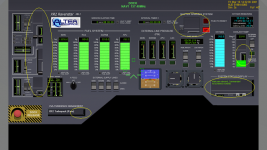
My issue concerns the Ravenstart panels. Please see the attached images and note the missing areas. This issue occurs on a clean install of 2010 final and the 2006 release. The Sim runs fine with no apparent issues. All video drivers are up to date.

Here are my system specs:
Toshiba Satellite A505 series
- Windows® 7 Home Premium 64-bit
- Intel® Core™ 2 Duo processor P7450; 2.13GHz, 3MB L2 Cache, 1066MHz FSB
- NVIDIA® GeForce® GT 230M with 1GB GDDR3 discrete graphics; memory plus up to 2814MB dynamically allocated shared graphics; memory using NVIDIA® TurboCache™ technology.
- Total Available Graphics memory 3838M
- Configured with 6GB DDR3 1066M

[Main Panel_S.jpg
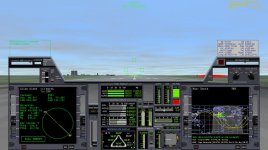
Lower Panel_S.PNG
 
Last edited:
I can't help with your problem, per se, but that text is really hard to read. It's so small without the images I'd have no idea what you were talking about.
 
First off, What version of the XR2 are you using?

Second does the same problem happen With the XR1 or XR5?

Third have you tried redownloading the XR2
 
check any texture management options in your drivers. Seems there is a sort of incoherency between the turbocache and shared memory for texture storage..?

try different bit depths as well, 16, 24, 32..?
 
First off, What version of the XR2 are you using?

Second does the same problem happen With the XR1 or XR5?

Third have you tried redownloading the XR2

- For 2006 the one that was appropriate for that version. 1.0
- For 2010 I'm using the updated version.

Downloaded many times. Only occurs on my laptop.

Keatah..
I'll look into those options too.
 
This looks like the same issue as was reported here, but it never got a solution there either.

Are those elements of the main panel I can see hiding in the missing parts of your lower panel there?
 
Yes, I see parts of another behind the lower panel where it's blank.

Thanks for the link, helps to know that it's an issue that is out there an experienced by others.
 
It looks to me like a graphics driver issue. Here is what I recommend:

1. Download the latest driver for your video card from here and install it.
2. Bring up the Orbiter launchpad and click on the "Video" button.
3. Ensure that "Always enumerate devices" is checked. For "3D Device", select "Direct3D T&L HAL".
4. If you run in full-screen mode, make sure that 32-bit color is selected.
5. Bring up Orbiter. If it still doesn't work for you, it sounds like a graphics driver bug.
 
It looks to me like a graphics driver issue. Here is what I recommend:

1. Download the latest driver for your video card from here and install it.
2. Bring up the Orbiter launchpad and click on the "Video" button.
3. Ensure that "Always enumerate device" is checked. For "3D Device", select "Direct3D T&L HAL".
4. If you run in full-screen mode, make sure that 32-bit color is selected.
5. Bring up Orbiter. If it still doesn't work for you, it sounds like a graphics driver bug.

Thanks for taking the time to write a response. I'm currently downloading a new driver package for my Graphic GPU. Looks like NVidia recently posted one in June. It's been since January since I've done the update and it didn't help then with 2006. I'll keep you posted.

---------- Post added at 01:13 PM ---------- Previous post was at 12:45 PM ----------

:thumbup:
Thanks, dbeachy1, the update to the drivers did the trick. Lesson learned. Keep trying with each new driver drop. I never went back to see if further updates would help.

I appreciate the help. XR2 panels appear as intended now. Thanks!

Kindly
AKM00
 
Back
Top