Scaling in Spacecraft3

Poscik

Addon Developer
Addon Developer
Joined
Mar 28, 2008
Messages
512
Reaction score
3
Points
18
Location
Sulejówek
Hi! I have a problem with scaling in spacecraft3. Mesh which I want tu scale is translating and scaling. I don't know why... Maybe REF_PNT is wrong?
 
Poscik,

Can you please give a little more information? Perhaps paste the problem code so we can troubleshoot it for you.

I'm about to play with scaling, too, and this could be mutually educational.
 
In my experience, the SCALING command is the hardest animation type to use correctly. So much so, that I pretty well gave up on it, especially since most realistic behavior of materials and real-world systems wouldn't behave this way, anyway.
 
Here is the code from *.ini file:
Code:
[CONFIG]
MESHNAME="p6my"
SIZE=6
EMPTY_MASS=7711

[ANIM_SEQ_0] ; Rotate left panels
Key=K
DURATION=50
REPEAT=0

[ANIM_SEQ_1] 
Key=G
DURATION=100
REPEAT=0

[ANIM_COMP_0]
SEQ=0
GROUPS=6,7,9,10,11,12,13,14
RANGE(0,1)
TYPE=ROTATE
ROT_PNT=(-0.335,1.839,2.872)
ROT_AXIS=(0,1,0)
ANGLE=60

[ANIM_COMP_1]
SEQ=1
GROUPS=9,10,11
TYPE=TRANSLATE
SHIFT=(0.0,31.5,0.0)

[ANIM_COMP_2]
SEQ=1
GROUPS=6,7
TYPE=SCALE
RANGE(0,1)
SCALE=(1,10,1)
REF_PNT=(-0.335,1.539,2.872)

This is a simple P6 module for my own usage, because Mustard is making much much better than my :)

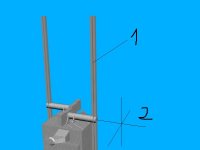
And there is a screen how it appears in "real":
p6.jpg
1. This is the panel which I want to scale.
2. This is the REF_PNT.
I think you can imagine the direction of scaling :)

Thanks in advance for your help :)
 
Just a cursory glance:

I notice there's a discrepancy between your REF_PNT definitions between Comp_0 and Comp_2. This may be a real problem.

Also, I need to check the docs, but I'm wondering about having both your translation and scaling using the same three groups. Does anyone know if this is a problem as well?

I'll try to come back to this one later today with a more detailed look.

Cheers
 
You have to know at least two, 0 axis points to scale properly, sometimes three.
 
I made new config for mesh. Here it is:
Code:
[CONFIG]
MESHNAME="p6my"
SIZE=6
EMPTY_MASS=7711

[ANIM_SEQ_0] ; Rotate left panels
Key=K
DURATION=100
REPEAT=0

[ANIM_SEQ_1] ;deploy arrays
Key=G
DURATION=200
REPEAT=0

[ANIM_COMP_0]
SEQ=0
GROUPS=6,7,12
TYPE=ROTATE
ROT_PNT=(-0.335,1.839,2.872)
ROT_AXIS=(0,1,0)
ANGLE=90

[ANIM_COMP_1]
SEQ=0
GROUPS=5,8,10
TYPE=ROTATE
ROT_PNT=(-0.335,1.839,2.872)
ROT_AXIS=(0,1,0)
ANGLE=-90

[ANIM_COMP_2]
SEQ=0
GROUPS=5,6,7,8,9,10,11,12
TYPE=ROTATE
ROT_PNT=(-0.335,1.839,2.872)
ROT_AXIS=(0,1,0)
ANGLE=-20

[ANIM_COMP_3]
SEQ=1
GROUPS=7,8,9
TYPE=TRANSLATE
SHIFT=(0,31.5,0)

[ANIM_COMP_4]
SEQ=1
GROUPS=6
TYPE=SCALE
SCALE=(1,-10,1)
REF=(-0.578,2.2,0.0)

[ANIM_COMP_5]
SEQ=1
GROUPS=5
TYPE=SCALE
SCALE=(1,-10,1)
REF=(-0.178,2.2,0.0)

And there are some screens from deploying arrays:
1. Fully stowed: http://i25.tinypic.com/2ur5iip.jpg
2. Arrays ready to scale: http://i31.tinypic.com/x8v36.jpg
3. Zonk :X http://i26.tinypic.com/35cg02q.jpg

I made two REF's but it doesn't working :<
 
Back
Top