
Seams on cylindric meshes

FordPrefect

Addon Developer
Addon Developer
Donator
Joined
Feb 7, 2008
Messages
422
Reaction score
105
Points
43
Anybody know how I can get rid of that seam I generally have on all objects originally derived from the basic shape of a cylinder?
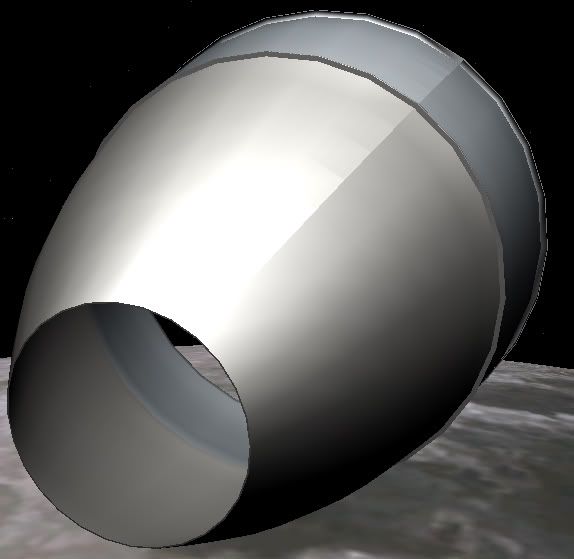
Seam_onCylinder.jpg


Here you see the broken shading on the surface. I tried different Material tension values, however that seam is always visible.

Any help is appreciated. Thanks!
 
Last edited:
Which 3D application are you using? I get this with AC3D if I reimport an Orbiter .msh file. I solve it by doing an "Optimise vertices" operation that, I assume, removes redundant identical vertices. Maybe redundant vertices are adding unwanted normals that upset the crease angle smoothing thing.

Can you tell I'm no expert? :whistle:
 
Makes sure you merge overlapping points together on anim8or, when you want no hard edges.
 
Streb and Urwumpe: Thanks for the hints. I do all my modeling with editable Polygons. I save them as *.3ds files and convert them using Meshmaker 2.0. After importing that mesh in Max, I found the overlapping vertices and collapsed them accordingly. Here with this example, the Apollo SPS engine bell, this worked okay, this whole procedure might be a little cumbersome for more complex geometries. Anyway, at least now I know how to remove the seams. Thanks again.
 
You have a problem of normals. In that sharp border, vertex normals point in different directions. See the manual of Mesh Wizard to understand what normals are for.
[ame="http://www.orbithangar.com/searchid.php?ID=2740"]Mesh Wizard 1.9d[/ame]
 
As much as I wanted to use your probably great MeshWizard, for some reason the prog does not run on my machine. Still thanks for the input, Pablo! *BIGEDIT* Well, it used not to run in the past, right now it looks like its working; will have a look into its manual!
 
If it does not run, you may try running this in the background.
[ame="http://www.orbithangar.com/searchid.php?ID=1057"]EU2US converter[/ame]

Mesh Wizard does not solve your problem.
Manual helps you to understand how to solve the problem.
It would help to solve problem only under the following circumstances:
-No UV coordinates or identical coordinates of vertices sharing the same position.
-No normal data for those vertices

If you had that, you should merge identical vertices (identical xyz coordinates, no normals, identical or no UV for vertices along the sharp edge) and then you should generate normals for that group.
 
Back
Top