
Problem Skin question

Burgh

New member
Joined
Sep 6, 2016
Messages
8
Reaction score
0
Points
0
I installed the skin in the screenshot below for the default Delta-Glider. I notice on the screenshot you can see SYL-G on the right wing. In my Orbiter installation itself the text shows as GL-01 same as on the original Delta-Glider skin. Same thing happens on the winglets. (Hope I'm calling the areas by their correct names???)

My question, why is GL-01 and not SYL-G showing and how can you change or even completely remove all the text from those areas?
I would like to know this because I wish to create my own skin but can't get rid of the GL-01 text on the wing and winglets. I notice this skin maker has managed to do it but also appears maybe he just edited his screenshots to show SYL-G but in the game it is always GL-01??? Screenshots aren't high res enough to get a decent look to be certain if they were edited or not.
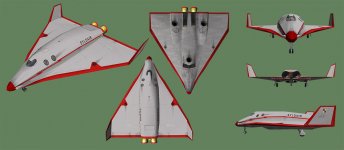
133-17_gallery2.jpg
 
Last edited:
I'll take a crack at this. I'm pretty sure that is a skin for the DGIV (or DG3 is it's been around for a long while). The DGIV is an addon that you can get here - http://orbiter.dansteph.com/

It's not been updated (yet) for Orbiter 2016, but once it has been (or you go and get it for Orbiter '10) there is a skin selection box in the scenario editor that you can use to choose your skin of choice (and there are a ton of them out there).
 
I'll take a crack at this. I'm pretty sure that is a skin for the DGIV (or DG3 is it's been around for a long while). The DGIV is an addon that you can get here - http://orbiter.dansteph.com/

It's not been updated (yet) for Orbiter 2016, but once it has been (or you go and get it for Orbiter '10) there is a skin selection box in the scenario editor that you can use to choose your skin of choice (and there are a ton of them out there).

I'm running the skin in Orbiter 2010 atm. I'm very new to Orbiter and haven't tried Dan's stuff yet, only running the default DGIV and it states the skin was created specifically for it. The download link for the skin is below. I'm looking to skin the default glider myself but it appears the GL-01 text cannot be removed from the default glider? I'm guessing with Dan's addons there is no such problem.

http://francophone.dansteph.com/?page=addon&id=193
 
I'm running the skin in Orbiter 2010 atm. I'm very new to Orbiter and haven't tried Dan's stuff yet, only running the default DGIV and it states the skin was created specifically for it. The download link for the skin is below. I'm looking to skin the default glider myself but it appears the GL-01 text cannot be removed from the default glider? I'm guessing with Dan's addons there is no such problem.

http://francophone.dansteph.com/?page=addon&id=193
You're confusing the two DGs. The default DG is the DG-MKIV while Dan's DG is the DGIV.
 
You're confusing the two DGs. The default DG is the DG-MKIV while Dan's DG is the DGIV.

Sorry, I thought they were both referred to as DGIV. In any case, default DG is the one causing the skin issue. Don't know who actually uses the default one other than noobs like me but I would like to paint it while I'm learning using it but can't find how to remove the GL-01 text. It's not an editable texture is what I am thinking.
 
Sorry, I thought they were both referred to as DGIV. In any case, default DG is the one causing the skin issue. Don't know who actually uses the default one other than noobs like me but I would like to paint it while I'm learning using it but can't find how to remove the GL-01 text. It's not an editable texture is what I am thinking.
The text is generated from the vessel name of the DG. There isn't anyway to remove other than by editing the source code of the default DG and recompiling it.
 
The text is generated from the vessel name of the DG. There isn't anyway to remove other than by editing the source code of the default DG and recompiling it.

That's what I initially thought but the skin screenshot I attached appeared to demonstrate otherwise so I was looking for clarification. You just clarified, thanks, much appreciated!
 
Back
Top