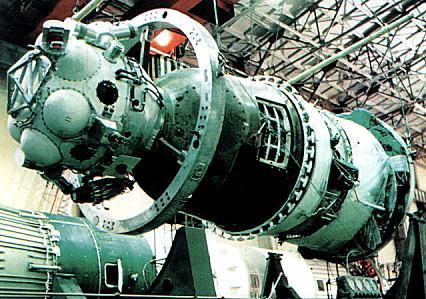
Soyuz 7K-TM

I've been thinking on how could I help in this project. I think I could help with some textures, maybe the Soyuz rocket ''old'' textures. Is there a way to edit the already existing textures and change them?
 
Here's an updated version of the Soyuz, this time with Soyuz-T besides T-AF.
http://www.mediafire.com/?6l2z94ptewuw4b7

It features the SA landing thruster exhaust by DiogoM and updated textures for Salyut 6 for the Soyuz 34 mission. Launch situations are included.
110109221631tpaoservice.jpg


There are still a lot of issues to solve but (if I didn't forget to include any files) it should be functional and fun ;)


DiogoM, in my opinion, a good help would be with the service module RCS jets.

As for the launcher, you can duplicate the existing fairing mesh and re-texture it with a CCCP flag :). See the launcher configs and docs for that (custom fairing).
 
Ok, I'l give the RCS and Fairings a try, but I don't promisse much with the RCS jets, I'm still a beginner on Configs, but if I could add the landing exhaust, I can do this.:)

---------- Post added 01-10-11 at 12:21 AM ---------- Previous post was 01-09-11 at 11:49 PM ----------

Your update is really nice!:thumbup: I don't see anything malfunctioning in it.

I just need to know how do I create my own textures and apply them to the mesh, and it should be easy. I don't know much about texturing, but I think it would be easier to copy and edit the original fairing texture instead of creating my own (that's the problem).
 
I'm happy that it works :) !

RCS is just time consuming. No pressure, you don't need to add all of it, just try to get the placement right, and then the axes / keys. But take it step by step. You can use the reentry module config as a rough guide. I'm no expert, so the only advice I can give is patience, trial and error!


"I think it would be easier to copy and edit the original fairing texture instead of creating my own"

That's exactly what I meant. Please look at the Soyuz launcher (not Soyuz spacecraft): [ame="http://www.orbithangar.com/searchid.php?ID=4545"]http://www.orbithangar.com/searchid.php?ID=4545 [/ame]and check the documentation regarding fairings. I'm using the stock Soyuz TMA faring that comes with it, but It's easy to create a custom one, just by duplicating it. To be completely acurate, the mesh itself should be modified, but I'd be happy just by re-texturing it.

Here's a rough guide on what you need to do. You might need to search the forum for help on the specific steps, but I think that this will get you on the right direction.

You need to identify the faring mesh in use, duplicate and rename it, and change the launcher setup in the scenario definition in order to use it. Then you can open (notepad) your "new" mesh and identify the texture file names that it uses. Again, duplicate the textures you need, rename them and change those names on the mesh file.
Finally, you just need to change the texture itself. For that, you will need to be able to open the .dds file in a photo editing application and save it back again.

 
Got it! :thumbup: I've been trying to install GIMP, alternatively to the payed Photoshop, but I don't know what to do with a BZ2 file. :confused: However, there's no problem if it doesn't work, I'l just download Photoshop's free trial.
Thanks for the help on the textures and meshes, that was exactly what I have been trying to learn for a long time.

---------- Post added at 08:58 PM ---------- Previous post was at 06:06 PM ----------

OK, it might be easier like this:
What photo editing program do you use for your textures? Because I downloaded Photoshop (trial version, CS5) and it can't open .dds files. :beathead:
 
Thanks a lot! BTW, the PAO now has pitch RCS jets! Slow but steady progress!
 
Last edited:
:cheers:
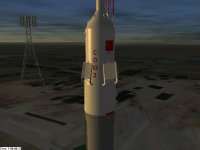
Here is the texture. In my opinion, it's not bad for a first texture, but of course it requires some corrections (somehow I get 1/4 of a Soviet flag on the bottom of the fairing that isn't even in the Texture files :), other than that, I think it's ok :thumbup:).
You just need to copy the files to the Orbiter directory, and, in the scenario file, on Fairings #1 and #2, add _old to the mesh names.
Meshes are included!
 

Attachments

Screenshot of the fairing, notice the ''little mistake'' on the bottom, don't know how to fix it.
 

Attachments

  • 11.01.12 00-03-44 T-AF_PAO_servicemodule.jpg
    11.01.12 00-03-44 T-AF_PAO_servicemodule.jpg
    356.5 KB · Views: 67
don't know how to fix it.
There are 2 ways. Either move the USSR flag a little lower in the texture, or edit the UV map in the lower part of fairing in the mesh.
 
Great project! I thing that doesn't goes in the right way; As soon as I quit Orbiter it stucks at the close simulation state...
 
Last edited:
I thing that doesn't goes in the right way; As soon as I quit Orbiter it stucks at the close simulation state...

I have the same problem. It must be a confict between the Soyuz FG addon and the 2010P1 version, because I don't have that problem on my old 2006 install.
Orb, thanks, I will see if it works.
 
Updated Texture for the rocket, to place in the Textures/r7_SZ/ folder. ''Extra'' Soviet flag fixed, I plan an updated texture soon.

--------------------------------------------------------------------------

Updated texture.
 

Attachments

Last edited:
The PAO RCS jets are finished! :thumbup:
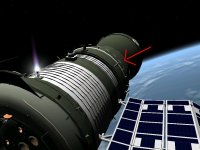
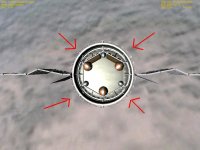
Along with the Configs for the spacecraft, I add some screenshots, because the RCS's placement on this old Soyuz confused me. The Yaw and Pitch RCS jets I'm 100% sure they are at the right place, although I think the Roll RCS jets aren't on the right place, but my confusion was, if not there, where else would they be? :confused: On one screenshot, with only one red arrow, it indicates where I placed a Roll jet. On the other one, the 4 arrows indicate the RCS engines.
Are the Roll jets on the right place?

BTW, translation RCS jets are on the way, should have them uploaded soon.
 

Attachments

  • one arrow.jpg
    one arrow.jpg
    96.5 KB · Views: 52
  • 4 arrows.jpg
    4 arrows.jpg
    79.2 KB · Views: 47
  • Soyuz PAO RCS jets.zip
    Soyuz PAO RCS jets.zip
    3.2 KB · Views: 12
Last edited:
Looks very good so far. I plan to download & test sometime in the near future.

If there are any plans to do the Zond 7K-L1 variant, there is a further variant on that mentioned at the astronautix.com website, the 7K-L1s

l1sinrig.jpg


Supposedly these were the spacecraft carried aboard the various failed N-1 launches. The structure atop the Descent module was a 'Propulsion Module' containing equipment from both the LK and LOK spacecraft.

For information see:

1. http://www.astronautix.com/craft/soy7kl1a.htm

2. http://www.svengrahn.pp.se/histind/N1target/n1target.htm

And a final, slightly related Lunar Soyuz variant, the Soyuz spacecraft that would have been used for manned orbital docking tests had the N1-L3 program gone ahead.

There are hypothetical reconstructions on astronatutix as well.

Soyuz Kontact (Active)

soykonta.jpg


Soyuz Kontact (Passive)

soykontp.jpg


See:

http://www.astronautix.com/craft/soyntakt.htm
 
Last edited:
Graham2001, the current structure can accommodate any version. It's all a mater of having the mesh and config file and defining the right jetting / dock placement.

diogom, I did some research on the Soyuz RCS (named DO and DPO). Your placements are right for the translation thrusters, placed near the center of gravity. Rotation thrusters are mainly at the back from what I read.

Here's some information regarding the curent Soyuz versions:
http://www.russianspaceweb.com/soyuz.html
http://i88.photobucket.com/albums/k166/suzymchale/soycom
/soycom3-9.gif

http://i88.photobucket.com/albums/k166/suzymchale/soycom/soycom3-11.gif
http://books.google.pt/books?id=dbGchpi1HP8C&pg=PA60&lpg=PA60&dq=soyuz+DPO&source=bl&ots=SbvXb7Tf7G&sig=zSsraGrUADnDYS1wwd129t_C0w0&hl=pt-PT&ei=ETQzTc_VE4_04Qb4t9zBCg&sa=X&oi=book_result&ct=result&resnum=1&ved=0CBkQ6AEwAA#v=onepage&q=soyuz%20DPO&f=false

Please look at page 22 of this document that features our old Soyuz: http://ntrs.nasa.gov/archive/nasa/casi.ntrs.nasa.gov/19750015550_1975015550.pdf
The RCS components are labeled 5 and 21. The engine is labeled 22 and 23.


I'd say that the config for RCS would be something like this:


;--------- Main Engine Exhaust ----------

[EX_MAIN_0]
OFF=(0.0,0.0,-3.6)
DIR=(0.11,0.11,-0.988)
LENGTH=3
WIDTH=0.25


;----- Attitude Thrusters -----


[EX_ATT_0]
OFF = (-1.2, -0.0, -0.77) ; Yaw set 1, thruster 1
DIR = (-0.8, 0.0, 2.3)
LENGTH = .2
WIDTH = 0.04
ROT_AXIS = Y
ROT_CW = 0 ; CW=1, CCW=0

[EX_ATT_1]
OFF = (1.2, -0.0, -0.77) ; Yaw set 1, thruster 2
DIR = (0.8, 0, 2.3)
LENGTH = .2
WIDTH = 0.04
ROT_AXIS = Y
ROT_CW = 1 ; CW=1, CCW=0


[EX_ATT_2]
OFF = (0.925, 0.875, -1.11) ; Roll set 2, thruster 1
DIR = (3.5, 3.5, 0.0)
LENGTH = .2
WIDTH = 0.04
ROT_AXIS = Z
ROT_CW = 1 ; CW=1, CCW=0

[EX_ATT_3]
OFF = (-0.925, 0.875, -1.11) ; Roll set 2, thruster 2
DIR = (-3.5, 3.5, 0.0)
LENGTH = .2
WIDTH = 0.04
ROT_AXIS = Z
ROT_CW = o ; CW=1, CCW=0


[EX_ATT_4]
OFF = (0, -1.2, -2.93) ; Pitch set 1, thruster 1
DIR = (0.0, -3.5,0.0)
LENGTH = 0.2
WIDTH = 0.06
ROT_AXIS = X
ROT_CW = 1 ; CW=1, CCW=0

[EX_ATT_5]
OFF = (0, 1.2, -2.93) ; Pitch set 1, thruster 2
DIR = (0.0, 3.5,0.0)
LENGTH = 0.2
WIDTH = 0.06
ROT_AXIS = X
ROT_CW = 0 ; CW=1, CCW=0


[EX_ATT_6]
OFF = (0, -0.4271989, -3.5) ; Pitch set 1, thruster 1
DIR = (0, 0, -3.5)
LENGTH = 0.2
WIDTH = 0.06
ROT_AXIS = X
ROT_CW = 1 ; CW=1, CCW=0

[EX_ATT_7]
OFF = (0, 0.4271989, -3.5) ; Pitch set 1, thruster 2
DIR = (0, 0, -3.5)
LENGTH = 0.2
WIDTH = 0.06
ROT_AXIS = X
ROT_CW = 0 ; CW=1, CCW=0


[EX_ATT_8]
OFF = (0.4278386, -0.0, -3.5) ; Yaw set 1, thruster 1
DIR = (0, 0, -3.5)
LENGTH = .2
WIDTH = 0.04
ROT_AXIS = Y
ROT_CW = 0 ; CW=1, CCW=0

[EX_ATT_9]
OFF = (-0.4278386, -0.0, -3.5) ; Yaw set 1, thruster 2
DIR = (0, 0, -3.5)
LENGTH = .2
WIDTH = 0.04
ROT_AXIS = Y
ROT_CW = 1 ; CW=1, CCW=0
 
Last edited:
Thanks!
So, the Roll RCS jets are on the back of the Soyuz, on the same place as the engines ? It's gonna be fun figuring out the jets' placement. :lol:
I had a feeling they weren't in the right place. They should be placed on at least 2 of these 4 smaller engines on the back, right?
BTW, I think that, either the SA's parachute isn't slowing the capsule enough, or the landing thrusters have too few power, because with chute and thrusters, it allways lands at 20 m/s +. That isn't a very soft landing! :lol:
I will start work on the translation thrusters, and I'm happy to know the flag looks good.

---------- Post added at 07:11 PM ---------- Previous post was at 06:50 PM ----------

Yeah, it looks good like that! :thumbup: They just need some small adjustments for perfect alignment with the engines, and that's all.
 
I think that the RCS placement is right. What needs to be figured out is in what combination(s) they work to translate/orient the spacecraft in a balanced way.

As for the parachute, the values are fictional. I based the parameters on the Shenzhou and Zond add-ons to get a stable reentry on the right orientation.
Please correct it and try to find a reference value for the actual landing velocity.
 
Re: RCS. I have written the optimizer into the Precession MFD (status page). Just load a scenario with the craft, press OPT, enter thrust setting, save scenario and read the rcs settings from the file - thruster numbers correspond one-to-one to the GetThrusterByIndex. The MFD screen will BTW display the number of RCS thrusters participating in the action.
 
Back
Top