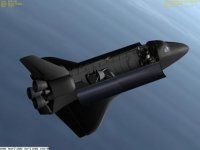
General Question Space Shuttle Skin Missing?

EaslMar

New member
Joined
May 31, 2010
Messages
41
Reaction score
0
Points
0
Location
Grand Rapids
As soon as I opened a scenario containing Atlantis I noticed that it seemed to be missing a skin. I thought perhaps that was it for the default version, but all the pictures in the documentation (doc folder, anything relating to Atlantis), as well as in Go Play In Space, have the actual Shuttle skin. Everything else about the shuttle works fine. Is the skin part of an addon, or is there something wrong with my files? I'll try to attach a picture but since I've never done it before I don't know if it will work.
ShuttleAtlantis.bmp
 
You can't use a Windows file path as a URL. :P

Try attaching the image, or upload it to another site and link it here.

As to your problem, it looks like you're missing the texture files for Atlantis, or maybe even your whole Textures folder. Look for "[Your Orbiter Folder]>Textures>Atlantis."
 
Last edited:
I've got a Textures folder and a Textures2 folder, and both contain an Atlantis folder full of .dds files. If it helps, Textures/Atlantis contains 17 items and Textures2/Atlantis has 8.
 
That checks out. :shrug:

Can you post orbiter.log? It should be in your Orbiter folder near the Orbiter executable.
 
This is the .log, but it looks fine to me, no obvious error messages....

**** Orbiter.log
Build Sep 29 2006 [v.060929]
Found 0 joystick(s)
Module AtlantisConfig.dll [API v.060425]
Module DGConfig.dll [API v.060425]
Module undo.dll [API v.060425]
**** Creating simulation session
DirectDraw interface OK
Direct3D interface OK
Zbuffer: 16 bit
Render device: Fullscreen 1024 x 768
Device has no hardware T&L capability
Module Sun.dll [API v.050206]
VSOP87(E) Sun: Precision 1e-006, Terms 554/6634
Module Mercury.dll [API v.050206]
VSOP87(B) Mercury: Precision 1e-005, Terms 167/7123
Module Venus.dll [API v.050206]
VSOP87(B) Venus: Precision 1e-005, Terms 79/1710
Module Earth.dll [API v.050206]
VSOP87(B) Earth: Precision 1e-008, Terms 2564/2564
Module Moon.dll [API v.041022]
ELP82: Precision 1e-005, Terms 116/829
Module Mars.dll [API v.060425]
VSOP87(B) Mars: Precision 1e-005, Terms 405/6400
Module Phobos.dll [API v.060425]
Module Deimos.dll [API v.060425]
Module Galsat.dll [API v.041022]
Module Jupiter.dll [API v.050206]
VSOP87(B) Jupiter: Precision 1e-006, Terms 1624/3625
Module Io.dll [API v.041022]
Module Europa.dll [API v.041022]
Module Ganymede.dll [API v.041022]
Module Callisto.dll [API v.041022]
Module Satsat.dll [API v.050206]
Module Saturn.dll [API v.060425]
VSOP87(B) Saturn: Precision 1e-006, Terms 2904/6365
Module Mimas.dll [API v.050206]
SATSAT Mimas: Terms 113
Module Enceladus.dll [API v.050206]
SATSAT Enceladus: Terms 33
Module Tethys.dll [API v.050206]
SATSAT Tethys: Terms 101
Module Dione.dll [API v.050206]
SATSAT Dione: Terms 59
Module Rhea.dll [API v.050206]
SATSAT Rhea: Terms 68
Module Titan.dll [API v.050206]
SATSAT Titan: Terms 100
Module Hyperion.dll [API v.050206]
SATSAT Hyperion: Terms 595
Module Iapetus.dll [API v.050206]
SATSAT Iapetus: Terms 605
Module Uranus.dll [API v.050206]
VSOP87(B) Uranus: Precision 1e-006, Terms 1827/5269
Module Miranda.dll [API v.060425]
Module Ariel.dll [API v.060425]
Module Umbriel.dll [API v.060425]
Module Titania.dll [API v.060425]
Module Oberon.dll [API v.060425]
Module Neptune.dll [API v.050206]
VSOP87(B) Neptune: Precision 1e-006, Terms 391/2024
Module Triton.dll [API v.060425]
Finished initialising world
Module ShuttlePB.dll [API v.041022]
Module DeltaGlider.dll [API v.060425]
Module MG_Atlantis.dll [API v.060425]
Finished initialising status
Finished initialising camera
Finished initialising panels
Finished setting up render state
 
Next step would be reproducing this in a clean Orbiter installation. So do you have this problem with a clean Orbiter installation? This would answer the question whether or not this is caused by an add-on and then the next step would be to narrow down which one by simply testing things one-by-one.
 
Code brackets would help. ;)

It looks like you're using MG_Atlantis instead of the normal Atlantis. Can you try that instead? Go to the scenario editor and add the vessel 'Atlantis' instead of 'MG_Atlantis.'

**If anyone with any better knowledge can help, it would be nice. I'm just shooting in the dark here.**
 
This is what it says in the scenario file: (Just for Atlantis and Carina)

STS-101:Atlantis
STATUS Orbiting Earth
RPOS 4230523.84 963810.02 -5040773.75
RVEL 5623.591 1562.311 5090.305
AROT 96.69 -74.93 -5.17
PRPLEVEL 0:1.000
NAVFREQ 0 0
CONFIGURATION 3
GEAR 0 0.0000
ARM_STATUS 0.5000 0.0000 0.0000 0.5000 0.5000 0.5000
SAT_OFS_X 0.000
SAT_OFS_Y 0.000
SAT_OFS_Z 0.000
CARGO_STATIC_MESH Carina_cradle
CARGO_STATIC_OFS 0.000 -1.650 0.050
CARGODOOR 1 1.0000
END
Carina:Carina
STATUS Orbiting Earth
RPOS 4230523.84 963810.02 -5040773.75
RVEL 5623.591 1562.311 5090.305
AROT 96.69 -74.93 -5.17
ATTACHED 0:0,STS-101
NAVFREQ 0 0
END

I'd rather not install it again, I already have 3 (!) installations (one general, one to test addons, and one for Continuous Reality) and don't know what a 4th would to to the frame rate or anything else.

PS. Newbie question: What are code brackets?
 
I'd rather not install it again, I already have 3 (!) installations (one general, one to test addons, and one for Continuous Reality) and don't know what a 4th would to to the frame rate or anything else.
It would do nothing. That is what is great about Orbiter, it doesn't care how many installations you have as they doesn't interact with each other. For all Orbiter is concerned, you only have one installation and you can only run one instance of Orbiter at the time.
 
Code:
Cookies hooray! :D
Quote my post and look at what I put in. There should be a little grey CODE button on the top of the posting window, too. :thumbup:

In the Orbiter launchpad, do you have Atlantis' texture or mesh resolution (or both) set to Low instead of High?

Also, having more installs has no effect on Orbiter's performance. It's one of the great things about the program.
 
What tab is it under in the Launchpad? I can't find it.

I already know that having multiple Orbiter installations does not effect Orbiter's performance--however the Orbiter base file overall is a large file and lots of files slow down computers! (I wonder if my PC has ports for extra RAM????) Actually I've already decided to do a clean install if nothing else works...

I see the code brackets, and the buttons, but I still don't get what they do?
 
What tab is it under in the Launchpad? I can't find it.

I already know that having multiple Orbiter installations does not effect Orbiter's performance--however the Orbiter base file overall is a large file and lots of files slow down computers! (I wonder if my PC has ports for extra RAM????) Actually I've already decided to do a clean install if nothing else works...

I see the code brackets, and the buttons, but I still don't get what they do?
Once again, they don't affect in-game performance! And they don't affect performance at all, since they're just static on your HDD.

What affects performance is things loaded into RAM. That is what affects performance, not things on your HDD.
 
What tab is it under in the Launchpad? I can't find it.

I already know that having multiple Orbiter installations does not effect Orbiter's performance--however the Orbiter base file overall is a large file and lots of files slow down computers! (I wonder if my PC has ports for extra RAM????) Actually I've already decided to do a clean install if nothing else works...

I see the code brackets, and the buttons, but I still don't get what they do?
The Extra tab. Find Vessel Configuration, pick Atlantis and set your resolution to High.

For code brackets, simply type (code)Your log or scenario here(/code), except use square brackets like this instead of parentheses: [ ]

Example:
Code:
BEGIN_DESC
Voskhod 1 was the first manned flight of the Voskhod 3KV spacecraft
and the 11A57 rocket. The crew consisted of Boris Yegorov (medical doctor), Konstantin
Feoktistov (engineer), and Vladimir Komarov (command pilot). Liftoff was at 10:30:01 Moscow Time
on October 12, 1964. (The scenario starts at T-10 minutes)
END_DESC

BEGIN_ENVIRONMENT
  System Sol
  Date MJD 38680.3055702082
END_ENVIRONMENT

BEGIN_FOCUS
  Ship blc1arms
END_FOCUS

BEGIN_CAMERA
  TARGET blc1arms
  MODE Extern
  POS 2.09 -101.87 39.07
  TRACKMODE GlobalFrame
  FOV 40.00
END_CAMERA

BEGIN_HUD
  TYPE Surface
END_HUD

BEGIN_MFD Left
  TYPE Surface
  SPDMODE 1
END_MFD

BEGIN_MFD Right
  TYPE Orbit
  PROJ Ship
  FRAME Ecliptic
  ALT
  REF Earth
END_MFD


BEGIN_SHIPS
blc1arms:blc1arms
  STATUS Landed Earth
  POS 63.3420950 45.9201670
  HEADING 35.50
  PRPLEVEL 0:1.000
  THLEVEL 0:1.000 1:1.000 2:1.000 3:1.000 4:1.000 5:1.000
  NAVFREQ 0 0
  ARMS 0 0.0000
  ROT 0 0.0000
  TWR 0 0.0000
  UMB 0 0.0000
END
Voskhod_11A57:Multistage\Voskhod_11A57
  STATUS Landed Earth
  POS 63.3420950 45.9201670
  HEADING 0.00
  ATTACHED 0:0,blc1arms
  PRPLEVEL 0:1.000 1:1.000 2:1.000
  NAVFREQ 0 0
  CONFIG_FILE Config\Multistage\Voskhod_11A57.ini
  GUIDANCE_FILE Config\Multistage\Voskhod_Guidance.txt
  CONFIGURATION 0
  STAGE_STATE 2
  STAGE_IGNITION_TIME 0.000
  CURRENT_BOOSTER 1
  CURRENT_STAGE 1
  CURRENT_INTERSTAGE 1
  CURRENT_PAYLOAD 1
  FAIRING 1
END
END_SHIPS

That's just a random Voskhod scenario; I was just demonstrating.
 
That's it--they were both set to high. With both on low, restarted the Current State and finally saw the exterior!

And I finally understand the code brackets, too. I suppose that's just to reduce the amount of space it takes up in the post....

---------- Post added at 11:07 PM ---------- Previous post was at 11:03 PM ----------

Just curious, what is the difference between Atlantis and MG_Atlantis?
 
On a related subject, also in the Config folder is a file called "mplm.cfg." It is different from the Leonardo_mplm file, and when inserted into a scenario it looks like an earlier model of Leonardo, complete with RMS grapple points. Yet it is not included in any of the Legacy Scenarios in the folder of the same name. It's not referenced in anything and I have no idea what it might be. Wierdly, when docked to something, it is fixed with its docking port several feet out from the station port, giving it the appearence of floating unattached nearby! :P
 
That is called Module 1 in the scenario editor, and appears in one or two Dragonfly scenarios, I think.
 
Actually I don't think it is. The Dragonfly scenarios all contain one or two Module1's, a basic module, as well as a Module2, a node. This is from the scenario file:
Code:
Module2A:Module2
STATUS Orbiting Earth
RPOS -4067510.33 -4909620.86 2172373.43
RVEL -5966.746 4848.011 -211.174
AROT 39.17 -20.59 -129.03
NAVFREQ 0 0
END
Module1A:Module1
STATUS Orbiting Earth
RPOS -4067507.69 -4909616.43 2172378.88
RVEL -5966.746 4848.011 -211.174
AROT 39.17 -20.59 -39.03
NAVFREQ 0 0
END
...while this is what the mplm looks like:
Code:
mplm:mplm
STATUS Orbiting Earth
RPOS 4465042.29 -5009357.21 548663.35
RVEL -5580.011 -4718.193 2412.876
AROT 92.10 -73.87 -111.31
DOCKINFO 1:4,ISS
NAVFREQ 0 0
END
...and it's different than Leonardo, which has only 1 docking port and says Leonardo:Leonardo_mplm in the scenario file.


Also, back to the posts about Orbiter not using RAM.... If not your RAM than what factors negatively influence your frame rate? Whenever a view shows mostly a planet the frame rate is reduced to ~1sec, but when it is just stars it is very continuous. :hmm: Also in my "continuous reality" scenario when I eventually added enough (~15) vessels things stopped working and orbits went wonky.

---------- Post added at 08:57 PM ---------- Previous post was at 08:56 PM ----------

Hmmm... looks like my code brackets didn't work.... :huh:

----------

Thanks Star Voyager!
 
Last edited:
Back
Top