
Space Shuttle Ultra 1.25 Revision B development

Like adding some detail to the next work platform near the player.
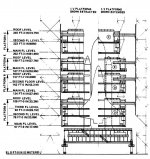
Well, the problem here is that the work platforms are very near each other. Almost sitting on top of each other. See the attached schematic of the integration cell access platforms.
 

Attachments

  • Integration cell access platforms.jpg
    Integration cell access platforms.jpg
    117.1 KB · Views: 536
Well, the problem here is that the work platforms are very near each other. Almost sitting on top of each other. See the attached schematic of the integration cell access platforms.

Yes, but if you are inside the VAB, you can hardly see more than 3 work platforms from close distance.
 
Yes, but if you are inside the VAB, you can hardly see more than 3 work platforms from close distance.
True. The least used platforms are the C platforms. They give access to the LOX tank ogive area. Currently HB3 is missing it's north C platforms as it was removed in 2008 to make room for Ares 1X.

---------- Post added at 03:30 PM ---------- Previous post was at 03:26 PM ----------

Report time: Bare structure interior with nothing but the vertical and horizontal beams, the poly count is 9258. That's the bare minimum. Using AC3D's built-in reduction tool for some reason increases the poly count rather than decreasing it.
 

Report time: Bare structure interior with nothing but the vertical and horizontal beams, the poly count is 9258. That's the bare minimum. Using AC3D's built-in reduction tool for some reason increases the poly count rather than decreasing it.

That is still a lot for the structure...
 
That is still a lot for the structure...
Yes, but with the west High Bays(2 and 4) mostly done, the total poly count is 12222.
 
Yes, but with the west High Bays(2 and 4) mostly done, the total poly count is 12222.

At least better than the current value... must be at least better by 90% or so.
 
The low-res VAB is about ready for testing. So far the total poly count is 11652. However, I have hit another stumbling block in the form of the cranes. Due to their truss design they're rather poly heavy. The best I can do for the 250 ton crane bridges is 2260 each. With the trolley/drums/wires/hook each will have about 3772 polys each.
 
The low-res VAB is about ready for testing. So far the total poly count is 11652. However, I have hit another stumbling block in the form of the cranes. Due to their truss design they're rather poly heavy. The best I can do for the 250 ton crane bridges is 2260 each. With the trolley/drums/wires/hook each will have about 3772 polys each.

8000 polygons for the cranes is good enough, at least tolerable. Maybe the cranes can even be hidden some distance away.
 
8000 polygons for the cranes is good enough, at least tolerable. Maybe the cranes can even be hidden some distance away.
OK. By using the same 3D-to-2D technique on the crane truss sections I have managed to cut the bridge poly count from 2260 to 1760. That's a save of 22%.
 
OK. By using the same 3D-to-2D technique on the crane truss sections I have managed to cut the bridge poly count from 2260 to 1760. That's a save of 22%.

Fine :)
 
So total for all three cranes is 10218.
 
So all together around 30k now?
About 21k actually. That should be more acceptable for most machines.

---------- Post added 03-23-10 at 12:12 AM ---------- Previous post was 03-22-10 at 09:23 PM ----------

About 21k actually. That should be more acceptable for most machines.
I have checked in the new low-res structure interior under the name of VAB_interior_structure_low-res.msh. Hope you have better luck with this one.
 
I understand it's hard to delete alot of work you've done, but if people won't use it, what's the point?
 
I understand it's hard to delete alot of work you've done, but if people won't use it, what's the point?

At least not use it now. I think the DX7 interface is one big limitation there.
 
The reason you are seeing more polys when you reduce, is because the original is still there. After you reduce, hide the selected mesh/groups. That will leave the original ones visible. Select the entire original mesh or just parts of it, delete them. Now unhide the reduced ones.
 
The reason you are seeing more polys when you reduce, is because the original is still there. After you reduce, hide the selected mesh/groups. That will leave the original ones visible. Select the entire original mesh or just parts of it, delete them. Now unhide the reduced ones.
That's only if tick the "Keep the original(s)" check box which I didn't. Repeated it several times with the same result and made sure there was no unwanted elements that were screwing up the end result.
 
I just tried it on one of my meshes, at a 90% reduction. The surfaces reduced from 33k to 30k and vertices went from 18k to 16k. I'm not sure why your's is increasing.
 
I just tried it on one of my meshes, at a 90% reduction. The surfaces reduced from 33k to 30k and vertices went from 18k to 16k. I'm not sure why your's is increasing.

Depends on the mesh shape... most algorithms are optimized for simple meshes, that have no holes in them - holes can cause some trouble for such algorithms.

Especially truss structures should be damn hard to be optimized properly.
 
I didn't optimize a simple mesh. Although trusses might be different.
 
Back
Top