OHM Spider Lunar Lander *Beta v2.3*

OrbitHangar

Addon Comments
Joined
Apr 9, 2008
Messages
3,832
Reaction score
18
Points
0

Author: hlynkacg

Spider is based on NASA's Extended Stay Lunar Module, aka the "Lunar Taxi" which incorporated Lessons Learned from the first production run of LMs and would have provided the manned portion of the Apollo Aplications Project's dual launch lunar missions. The Idea of this project is to balance a historically accurate performance envelope with accessibility and ease of play. 

This Addon is very much a work in progress, please post feedback, suggestions, bug reports, and offers of assistance to [email protected] or the orbiter forum developement thread at "http://orbiter-forum.com/showthread.php?t=28266".
 
External Dependancies
OrbiterSound 3.0 or higher required 

Special Thanks to…
...Glider, Wishbone, N_molson and others who have graciously allowed me to exploit their knowledge and their code samples.
 
...Moach, Jedia, Urwumpe, marooder86, Orb and the rest of the regular on the SDK forum for putting up with my constant question.
...Max Grueter on the google Sketchup forums who's Astronaut 3d model was used as the basis for my own.
…Vlad32768 for his excellent Blender import/export utility.
…and finaly Professor Martin Schweiger, and the Orbiter Development Team for giving us all such a cool sandbox to play in.


DOWNLOAD
 
Does it have any working autopilots, because I remember you mention some from the development thread.
 
All the standard autopilots work and have been rewritten to work with a tail stitter. They will actually point the engine towards the selected vector not the nose.

Activate them using the standard orbiter shortcut keys.

There is also a launch and landing autopilot but they're very buggy when they work at all and you're probably better of using manual control. Press [alt] + [A] to activate the ascent AP and [alt] + [L] to crash into the moon (activate the landing AP).
 
When I load the Brighton Beach scenario, the lander is invisible both inside and out. And when I load the orbit scenario, I CTD. Is there something else I need to download?
 
There is a discussion of this issue going on in the developement thread here

Short term solution is to install runtime and copy appropriate DLLs into orbiter directory.

Longterm solution will be incorperated into next version.

Hate to be a dick about it but this is why it's called a "beta"
 
There is a discussion of this issue going on in the developement thread here

Short term solution is to install runtime and copy appropriate DLLs into orbiter directory.

Longterm solution will be incorperated into next version.

Hate to be a dick about it but this is why it's called a "beta"

Yes, I noticed the development thread contained reference to the issue shortly after posting, and apologise for repeating it here.

Yes, I realise it's a "beta".

I highlighted the 'D', because in my dim and distant software testing past, it was my understanding that this indicated a debug build, hence the 'runtime' installation will likely not contain the 'debug' dll.

I look forward to the final release version, and shall now crawl back under my rock.
 
Always build modules you release to public in "Release" configuration.

I hope the longterm solution is rebuilding it and not including the C++ debug library within the package instead.
 
Updated!

New in version 2:

  • Lower and side control panels added
  • Cockpit displays overhauled
  • ADI ball and associated Attitude reference programs added
  • Switches on panels 3, 4, & 5 now have in game effects
  • Support for orbiter-sound added
  • Thruster and propellant management code rewritten
  • VC switch control logic rewritten
  • Framework for future implimentation of Life-support and consumables added
  • New exterior meshes
  • New textures

Known issues (AKA why you still see "Beta" in the title)
  • Autopilots are still unstable
  • Landing Gear animations are glitched
  • Yaw Rate needle on ADI is non functional

Planned Features
  • ECS and thermal modeling
  • Consumables and Life Support Management
  • UMMU support
  • An autopilot that wont get you killed
 
Nice it works great for me, good work.
I had to find the DLL on google, easy enough.
I just wish someone would make an MFD for these lunar modules to make it easier to align yourself with the landing site, I know you are supposed to use the autopilots but what do they use if that fails? instinct?
 
Nice it works great for me, good work.
I had to find the DLL on google, easy enough.
I just wish someone would make an MFD for these lunar modules to make it easier to align yourself with the landing site, I know you are supposed to use the autopilots but what do they use if that fails? instinct?

Thank you.

Updated versions of this addon are filed under "AAPO"

see sig :hailprobe:
 
Last edited:
I keyword searched AAPO and didn't see any updated versions.
 
Click the link in my sig below
 
Just how does the top section get back into orbit?

The engine doesn't fire, and the thrusters won't get it off the surface, so how is it done?
 

Attachments

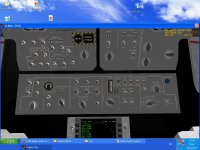
  • interior.JPG
    interior.JPG
    87.4 KB · Views: 65
Over one thousand downloads does indeed show someone has given a try with this addon. This poster in particular gave Spider a chance as well; be glad I'm here to give what advice I can.

Now, if I remember correctly(might not, been out most of the night, and it's been a while since I last used this addon), pressing J or Ctrl+J should separate the ascent stage from the descent stage. The readme included should tell you how to engine controls work, which involves using the virtual cockpit's switches to open some valves and arm the engine you wish to use. There isn't too many switches to throw, and at most it's ten seconds of switching before you can start doing some burns.
 
Alt+J is the actual key.

Well that is what I was wondering about. In my screenshot there are those switches on show. Mr Cernan being the last crew member on the moon stated the engine took seven minutes and fourteen seconds for take off.

I thought perhaps the file developer made it that way.

When I did the standard engine turn on via the remote control box, the legs went up and then soon came down. I was like firing those thrusters hoping that top section would go up.:lol:

I made it into orbit, but I'm notsure when to roll the craft and at what altitude. I almost made it a circular orbit, but the module ran out of fuel.

I had to use the hover scroll to take off.

I also can't really understand the actual way it was done, but I think a bit more pitch movements were needed, reminds me of the shuttle attempt.

http://history.nasa.gov/afj/loressay.htm
 
Last edited:
General rule of thumbs for reaching orbit, both in this addon and for the actual LM...

  • Open Ascent engine pressure and shutoff valves (ASC He Regs 1 & 2 on Panel One Ox & Prop SOVs on panel 2)
  • Optional, open RCS crossfeed and ascent valves (this will enable sharing of fuel between Ascent Engine and RCS)
  • Fire explosive bolts (alt J)
  • Start ascent engine.
  • count to 10 and rotate to point your nose East as you start to rise.
  • at T+10 seconds begin to pitch over.
  • Watch your climb rate and attempt to maintain between 10 and 20 meters a second of climb. (if you are climbing faster pitch over more, if slower level off a bit)
  • At 10% fuel remaining, shutdown the engine and take a sighting (or rather check your MFDs) You should be pretty close to a stable orbit. Make any adjustments needed and start working your intercept solution.

Real world the margins were very slim, you should be using your translational RCS for most of your orbital maneuvers.
 
Last edited:
A video tutorial would be better.

I did try this a few times, I never managed to make it into a circular orbit. I have to state, that orbiting the moon is quite a bland task.:thumbsdown: It's the craft that made it worth a try.:thumbup: Not suprising why nobody wants to orbit that rock of dirt! The craters are interesting, but just to darn bland.
 
Back
Top