
You are using an out of date browser. It may not display this or other websites correctly.
You should upgrade or use an alternative browser.
You should upgrade or use an alternative browser.
SSU Development thread (4.0 to 5.0) [DEVELOPMENT HALTED DUE TIME REQUIREMENTS!]
- Thread starter DaveS
- Start date
- Status
- Not open for further replies.
asdad
Womens From Your City - No Verify - Anonymous Sex
- Joined
- Feb 25, 2015
- Messages
- 138
- Reaction score
- 2
- Points
- 18
- Location
- USA
- Website
- privateladyescorts.com
guys i have problem with KSC15 final approach.scn when opening left main landing gear door can you fix it ?

guys i have problem with KSC15 final approach.scn when opening left main landing gear door can you fix it ?
Thanks! The orbiter mesh was changed and the meshres wasn't updated.
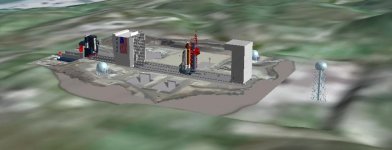
So, I created a rectangular plateau to put the pad vessel (and the water tower).

It's about half-way between the elevations on the east and west side, higher looks bad on one side, lower looks bad on the other... :shrug:
The pad is placed such that the lowest point in the mesh is above the ground, but that means that the high portions of the mesh are way up, something that is probably easier to fix by working the mesh.
I also tried to create flame ducts in hopes of directing the SRB plumes, but the resolution isn't good enough to have both the SSME and SRB ducts, and also it doesn't help in having the pad "landed".
Good enough to commit, so I can level the runway area?
BTW, the other pads in VAFB are also half-buried... should I have the bulldozer make a visit to them? :lol:
It's about half-way between the elevations on the east and west side, higher looks bad on one side, lower looks bad on the other... :shrug:
The pad is placed such that the lowest point in the mesh is above the ground, but that means that the high portions of the mesh are way up, something that is probably easier to fix by working the mesh.
I also tried to create flame ducts in hopes of directing the SRB plumes, but the resolution isn't good enough to have both the SSME and SRB ducts, and also it doesn't help in having the pad "landed".
Good enough to commit, so I can level the runway area?
BTW, the other pads in VAFB are also half-buried... should I have the bulldozer make a visit to them? :lol:
Attachments
- Joined
- Feb 4, 2008
- Messages
- 9,753
- Reaction score
- 1,024
- Points
- 203
If you need them, here's the dimensions of the pad mesh upon which everything sits:
East/West: 538.57 m
Height: 11.9088 m
North/South: 536.058 m
Is the resolution of existing elevation tiles high enough to essentially create a quadrangular depression 11.9088 m deep? This would give the ground mesh something to slot into without clipping any native terrain.
It's a quadrangle with an alpha map added to the texture to blend out the the corners. This is a screenshot of the ground mesh in its raw untextured form in a wire-frame mode so you can see how it actually looks: https://www.dropbox.com/s/kbbss81r7cnks4o/SLC-6_ground_mesh.jpg?dl=0
East/West: 538.57 m
Height: 11.9088 m
North/South: 536.058 m
Is the resolution of existing elevation tiles high enough to essentially create a quadrangular depression 11.9088 m deep? This would give the ground mesh something to slot into without clipping any native terrain.
It's a quadrangle with an alpha map added to the texture to blend out the the corners. This is a screenshot of the ground mesh in its raw untextured form in a wire-frame mode so you can see how it actually looks: https://www.dropbox.com/s/kbbss81r7cnks4o/SLC-6_ground_mesh.jpg?dl=0
Last edited:
If you need them, here's the dimensions of the pad mesh upon which everything sits:
East/West: 538.57 m
Height: 11.9088 m
North/South: 536.058 m
Is the resolution of existing elevation tiles high enough to essentially create a quadrangular depression 11.9088 m deep? This would give the ground mesh something to slot into without clipping any native terrain.
It's a quadrangle with an alpha map added to the texture to blend out the the corners. This is a screenshot of the ground mesh in its raw untextured form in a wire-frame mode so you can see how it actually looks: https://www.dropbox.com/s/kbbss81r7cnks4o/SLC-6_ground_mesh.jpg?dl=0
The current plateau is +/- the size of the mesh, with a bit more in the East side to accommodate the water tower.
On the vertical side of things, I see 3 options:
1) level it at the elevation of the West side (lower), but that will leave a big wall next to the mountains in the East side;
2) level it at the elevation of the East side (higher), but that will leave a big step on the West side;
3) level it about half elevation between the 2 sides (current setup in the image above).
IMO, #3 only needs to have the mesh edges lowered to meet the ground, and maybe a bit more plateau on the West side. #1 would also work, but then the mesh would have to be made to match the mountains, which in my opinion will be harder to do.
- Joined
- Feb 4, 2008
- Messages
- 9,753
- Reaction score
- 1,024
- Points
- 203
I should really separate the water tower from the main mesh as it really sits quite aways from the pad on a hill: https://www.dropbox.com/s/b2uz96npjamlp6v/VAN-084-19850300-35_DoD-photo.jpg?dl=0The current plateau is +/- the size of the mesh, with a bit more in the East side to accommodate the water tower.
On the vertical side of things, I see 3 options:
1) level it at the elevation of the West side (lower), but that will leave a big wall next to the mountains in the East side;
2) level it at the elevation of the East side (higher), but that will leave a big step on the West side;
3) level it about half elevation between the 2 sides (current setup in the image above).
IMO, #3 only needs to have the mesh edges lowered to meet the ground, and maybe a bit more plateau on the West side. #1 would also work, but then the mesh would have to be made to match the mountains, which in my opinion will be harder to do.
---------- Post added at 09:43 PM ---------- Previous post was at 09:24 PM ----------
After consulting various photos, I'd go with option#1. This is a good aerial photo overview of the entire pad looking SE.
---------- Post added at 09:44 PM ---------- Previous post was at 09:43 PM ----------
This is a view in the new Google Earth that shows the terrain pretty well: https://earth.google.com/web/@34.57....88329236d,35y,121.39396597h,84.33593994t,-0r
I should really separate the water tower from the main mesh as it really sits quite aways from the pad on a hill: https://www.dropbox.com/s/b2uz96npjamlp6v/VAN-084-19850300-35_DoD-photo.jpg?dl=0
---------- Post added at 09:43 PM ---------- Previous post was at 09:24 PM ----------
After consulting various photos, I'd go with option#1. This is a good aerial photo overview of the entire pad looking SE.
---------- Post added at 09:44 PM ---------- Previous post was at 09:43 PM ----------
This is a view in the new Google Earth that shows the terrain pretty well: https://earth.google.com/web/@34.57....88329236d,35y,121.39396597h,84.33593994t,-0r
Should the plateau go to the water tower (as it is), or to the end of the mesh?
- Joined
- Feb 4, 2008
- Messages
- 9,753
- Reaction score
- 1,024
- Points
- 203
The end of the mesh. The actual pad mesh only extends as far west as the airlock of the PPR and as far east as the launch park position of the MST: https://www.dropbox.com/sh/eh1ru2yogbrupp7/AACuqOznifgHEok1CGrw1lnZa?dl=0Should the plateau go to the water tower (as it is), or to the end of the mesh?
Just committed the elevation mod for the SLC-6 area (and SLC-8 nearby)! It doesn't look as bad as I thought it would. 
I'll now move up the coast, dealing with each pad on the way to the runway area.
---------- Post added at 10:44 PM ---------- Previous post was at 10:42 PM ----------
It has a limit on how close the object can be: 100ft.
I'll now move up the coast, dealing with each pad on the way to the runway area.
---------- Post added at 10:44 PM ---------- Previous post was at 10:42 PM ----------
Can the SSU KU lock on to another vessel in close proximity with it.
It has a limit on how close the object can be: 100ft.
- Joined
- Feb 4, 2008
- Messages
- 9,753
- Reaction score
- 1,024
- Points
- 203
Yes. You just have to follow the procedure KU-BD MANUAL ACQUISITION (COMM) in the generic Orbit Ops checklist on page 2-7. Just skip the TV/COMM steps in step 1 SETUP and replacing MODE - COMM with MODE - RDR PASSIVE. Then you need to slew the dish (MODE - MAN SLEW, and use the SLEW switches on A1U) so it points in the general direction of your target. Then once you have the dish pointed in the correction direction, follow step 2 to lock on.Can the SSU KU lock on to another vessel in close proximity with it.
---------- Post added at 11:50 PM ---------- Previous post was at 11:48 PM ----------
You can use Google Earth to get a sense of how the area should look like as I believe it uses the most detailed terrain data available which is high resolution SRTM data so it should be very accurate. Here's a position just off the coast looking SW showing just how flat the area around the airfield really is: https://earth.google.com/web/@34.71...0.29159017d,35y,148.75665478h,80.86546968t,0rJust committed the elevation mod for the SLC-6 area (and SLC-8 nearby)! It doesn't look as bad as I thought it would.
I'll now move up the coast, dealing with each pad on the way to the runway area.
I don't think I got that to work... :facepalm: the spiral search will always be centered at the top, so the target has to be +/- above the PLB.Yes. You just have to follow the procedure KU-BD MANUAL ACQUISITION (COMM) in the generic Orbit Ops checklist on page 2-7. Just skip the TV/COMM steps in step 1 SETUP and replacing MODE - COMM with MODE - RDR PASSIVE. Then you need to slew the dish (MODE - MAN SLEW, and use the SLEW switches on A1U) so it points in the general direction of your target. Then once you have the dish pointed in the correction direction, follow step 2 to lock on.
- Joined
- Feb 4, 2008
- Messages
- 9,753
- Reaction score
- 1,024
- Points
- 203
Well, the procedure says within 5° so it has to be fairly accurate.I don't think I got that to work... :facepalm: the spiral search will always be centered at the top, so the target has to be +/- above the PLB.
---------- Post added 04-22-17 at 12:18 AM ---------- Previous post was 04-21-17 at 11:58 PM ----------
I just checked it out and I agree, it doesn't look bad at all from a terrain perspective. In fact in looks rather close to the actual SLC-6 area. All that's missing is a higher resolution image of the area.Just committed the elevation mod for the SLC-6 area (and SLC-8 nearby)! It doesn't look as bad as I thought it would.

- Joined
- Feb 6, 2008
- Messages
- 38,965
- Reaction score
- 3,937
- Points
- 203
- Location
- Wolfsburg
- Preferred Pronouns
- Sire
Does the target vessel need a transponder freq ?
Should not be necessary.
- Joined
- Feb 4, 2008
- Messages
- 9,753
- Reaction score
- 1,024
- Points
- 203
Don't think so. The only requirement is for it to be within the range of the radar (30k ft, IIRC). Just maneuver the orbiter so the target is above the payload bay and initiate the search and the radar should lock on and begin the auto tracking of it. When the radar has locked on, the Track TB on A1U should be grey.Does the target vessel need a transponder freq ?
- Joined
- Feb 4, 2008
- Messages
- 9,753
- Reaction score
- 1,024
- Points
- 203
Yes, both the A2 LEDs and X-pointer is operational.Does it work with the range finder ?
- Status
- Not open for further replies.
Similar threads

- Replies
- 12
- Views
- 3K
- Replies
- 137
- Views
- 22K


- Replies
- 143
- Views
- 35K


- Replies
- 21
- Views
- 18K

