
You are using an out of date browser. It may not display this or other websites correctly.
You should upgrade or use an alternative browser.
You should upgrade or use an alternative browser.
Project SSU HI RES Textures
- Thread starter Wolf
- Start date
- Joined
- Feb 4, 2008
- Messages
- 9,762
- Reaction score
- 1,031
- Points
- 203
Textures look really nice Wolf. Sorry, the creasing on the payload bay doors looks so horrible. The mesh got messed up some how.
I think you need the new updated mesh that’s currently only available through the SSU SVN repository. As you probably can tell by going through this thread, alot of texture mapping issues were found and fixed which makes these textures look bad with the run of the mill SSU 4.2 mesh.

I think you need the new updated mesh that’s currently only available through the SSU SVN repository. As you probably can tell by going through this thread, alot of texture mapping issues were found and fixed which makes these textures look bad with the run of the mill SSU 4.2 mesh.
The mesh I m using is AFAIK the latest available. Have you released a new update in the last week?
- Joined
- Feb 4, 2008
- Messages
- 9,762
- Reaction score
- 1,031
- Points
- 203
The mesh I m using is AFAIK the latest available. Have you released a new update in the last week?
Nope, haven’t touched it. I think Donamy isn’t using SVN so he doesn’t have the latest SSU resources which include the meshes.
I'm not using anything, just looking at Wolf's pictures.
I think Donamy referring to this:
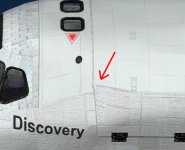
Am I right?
BTW my textures have been changed a lot to fit the latest mesh uploaded via SVN. If anyone is using any previous mesh they will show a lot of mis-matchings in many areas
Last edited:
I have uploaded some pictures on my album "SSU Photoreal" in case you are curious. I love the level of visual detail and realism that Orbiter 2016 brought. I will post more pics with SSU mated to Donamy's wonderful ISS AtoZ. I think they will be a nice looking couple 
- Joined
- Feb 4, 2008
- Messages
- 9,762
- Reaction score
- 1,031
- Points
- 203
Fixed that: https://www.dropbox.com/s/otr6f3czsyyvb81/Atlantis_on_pad.jpg?dl=0I think Donamy referring to this:
View attachment 15661
Am I right?
BTW my textures have been changed a lot to fit the latest mesh uploaded via SVN. If anyone is using any previous mesh they will show a lot of mis-matchings in many areas
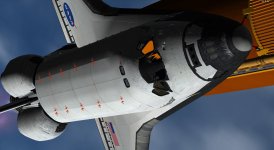
- Joined
- Feb 4, 2008
- Messages
- 9,762
- Reaction score
- 1,031
- Points
- 203
I was referring to the creases in the doors. They should be smooth.
Those have been taken care of. I noticed them myself and dealt with them when I fixed the texture mapping around the forward area of the PLBDs.
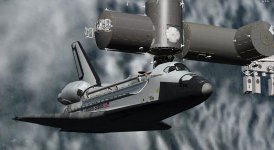
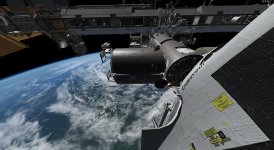
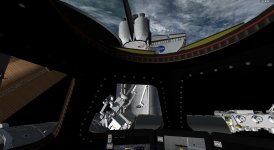
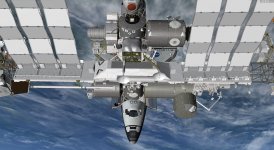
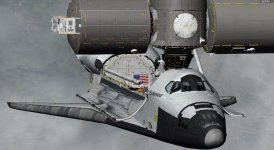
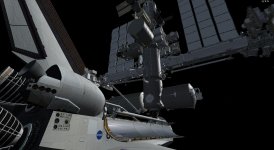
Exactly 37 years ago tomorrow, on April 12th 1981, this wonderful piece of engineering soared to the skies for the first time.
What better occasion to post the first shots of OV-102 Space Shuttle Columbia SSU version HI RES textures?
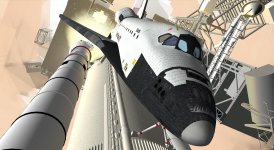
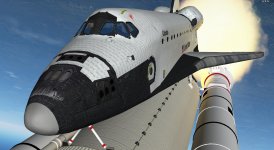
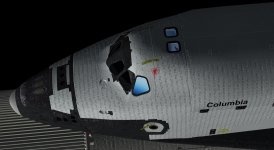
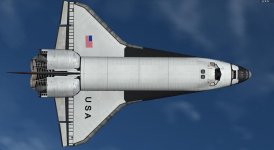
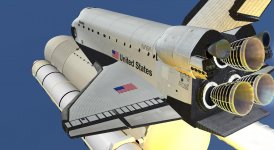
What better occasion to post the first shots of OV-102 Space Shuttle Columbia SSU version HI RES textures?
Don't forget about the OMS pods! The OMS pod textures can be changed by adding LOMSPodTexture= and ROMSPodTexture= to the appropriate mission file.
I thought there was no way to have dedicated OMS pods for Columbia (and Challenger). How can I add them?
- Joined
- Feb 4, 2008
- Messages
- 9,762
- Reaction score
- 1,031
- Points
- 203
Just do what I wrote in the previous post. These two lines control what textures are used for the OMS pods for that particular mission. The SSU mission files are just regular ASCII text files and can be edited by any text editor.I thought there was no way to have dedicated OMS pods for Columbia (and Challenger). How can I add them?
So the STS-1 mission file would look something like this:
Code:
Name=STS-1
Orbiter=Columbia
OrbiterTexture=Columbia_original
LOMSPodTexture=PORT_OMSpod_STS1
ROMSPodTexture=STBD_OMSpod_STS1
ET=SWT
ETFRL=TRUE
SRM=SRM
LaunchSite=KSC
LaunchPad=LC-39A
MLP=1
TargetInc=40.300000
TargetLAN=0.000000
MECOAlt=116676.000000
MECOVel=7824.216000
MECOFPA=0.296000
PerformRollToHeadsUp=FALSE
OMSAssistEnable=FALSE
OMSAssistDuration=59.000000
MaxSSMEThrust=100
UseRMS=FALSE
UseKUBand=FALSE
UseSTBDMPM=FALSE
UseODS=FALSE
UseExtAL=FALSE
UseTAA=FALSE
AftTAA=FALSE
HasBulkheadFloodlights=TRUE
HasDragChute=FALSE
Bridgerails=8
PayloadZPos9=8
SILTS=FALSE
LogSSMEData=TRUE
UseCISS=FALSE
CISS_GPrime=TRUE
UseASE_IUS=FALSE
ASE_IUS_AftLocation=FALSE
InternalPRSDTankSets=2
HasEDOKit=FALSE
EDOPallets=0Just do what I wrote in the previous post. These two lines control what textures are used for the OMS pods for that particular mission. The SSU mission files are just regular ASCII text files and can be edited by any text editor.
So the STS-1 mission file would look something like this:
Code:Name=STS-1 Orbiter=Columbia OrbiterTexture=Columbia_original LOMSPodTexture=PORT_OMSpod_STS1 ROMSPodTexture=STBD_OMSpod_STS1 ET=SWT ETFRL=TRUE SRM=SRM LaunchSite=KSC LaunchPad=LC-39A MLP=1 TargetInc=40.300000 TargetLAN=0.000000 MECOAlt=116676.000000 MECOVel=7824.216000 MECOFPA=0.296000 PerformRollToHeadsUp=FALSE OMSAssistEnable=FALSE OMSAssistDuration=59.000000 MaxSSMEThrust=100 UseRMS=FALSE UseKUBand=FALSE UseSTBDMPM=FALSE UseODS=FALSE UseExtAL=FALSE UseTAA=FALSE AftTAA=FALSE HasBulkheadFloodlights=TRUE HasDragChute=FALSE Bridgerails=8 PayloadZPos9=8 SILTS=FALSE LogSSMEData=TRUE UseCISS=FALSE CISS_GPrime=TRUE UseASE_IUS=FALSE ASE_IUS_AftLocation=FALSE InternalPRSDTankSets=2 HasEDOKit=FALSE EDOPallets=0
That means I have to add the related textures since they do not exist in the SSU/textures folder..
- Joined
- Feb 4, 2008
- Messages
- 9,762
- Reaction score
- 1,031
- Points
- 203
Shouldn't be a problem if you include the modified mission files.That means I have to add the related textures since they do not exist in the SSU/textures folder..
IMHO. The printing on the white tiles, should be smaller and lighter. It also looks like it is indented on the tiles, where in fact it is just printed on the surface. Nice job though.
IMHO. The printing on the white tiles, should be smaller and lighter. It also looks like it is indented on the tiles, where in fact it is just printed on the surface. Nice job though.
Thanks for the feedback Donamy
The white tiles texture is taken from a real picture so the size of the printing is correct, maybe a lighter one would be better (normal map also enhances the effect). As far as the indenting effect the problem is again related to normal mapping, I am afraid there is no solution other than not using normal maps.
For the above reasons I was considering this alternate LRSI texture
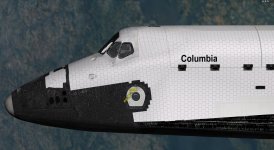
What do you think?
- Joined
- Feb 4, 2008
- Messages
- 9,762
- Reaction score
- 1,031
- Points
- 203
There is: Just don't apply normal mapping to the labels, just the tile gaps. See what I did with the OMS pods.I am afraid there is no solution other than not using normal maps.
Similar threads

- Replies
- 36
- Views
- 13K

- Replies
- 32
- Views
- 12K

- Replies
- 2
- Views
- 4K

- Replies
- 13
- Views
- 6K