
Terrain become flat and dark grey/white

Disconnect

New member
Joined
May 5, 2008
Messages
98
Reaction score
0
Points
0
Location
Budapest
Today i was installed UMMU and shuttle fleet to my orbiter 2016 installation with all of the highest resolution terrain and elevation maps, and started old replays.
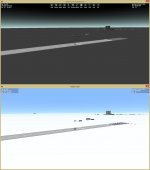
When i've started some of the replays, there was no terrain just dark grey solid color in D3D9Client and the same, but white terrain in legacy graphics engine (see the attached screenshots).
In other replay there was normal graphics, then grey again in another replay. Now it's always grey if i open normal scenarios too. I've reset graphics settings, but did not help.
What is this?
 

Attachments

  • grey.jpg
    grey.jpg
    55.6 KB · Views: 28
Is this everywhere or just around KSC & Edwards? Shuttle Fleet has a few bases that are written into the config folder in order for AutoFCS to work. I've noticed that sometimes this causes some problems wit the graphics.
 
It's everywhere the lit side of earth is black except the horizon. But i've fixed it now, i've downloaded orbiter again, and overwritten the config folder with the things in it. So the config files did something wrong.
 
Orbiter is One fragile game, One thing in changed wrong in the config files and something ends up wrong which is especially bad when you are modifying alot in a row, try slow steps and always make backups of the config files you have changed!
 
Do a search for JSGME (Jonesoft Mod Enabler). It's a great way to manipulate what addons are running in your Orbiter installation. You move mods in and out with the click of a mouse.

That way if an addon "breaks" Orbiter, you can get it out without having to reinstall the whole thing, or manually dig through and delete the files individually.
 
Last edited:
First thing that comes in my mind is the TileFormat that might have been changed. If the Earth.cfg is replaced by ShuttleFleet then copy paste the configuration parameters from original Earth.cfg
 
Back
Top