Scorch
Member
Hey everyone!
It's been a long time...but I still lurk a few times a week
Anyway, I love 2016. Fantastic textures....just beautiful. I sat down to play around a bit tonight and noticed a few things. I did some forum searches and didn't see anything *quite* like this...so forgive me if this is repetitive:
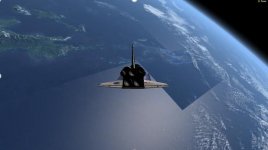
I noticed on the "Atlantis Cockpit" scenario, I get some funky effects in the water (see first image). Now, I can make this go away by turning off specular reflections from objects, but I was wondering if anyone had an idea of how this issue could be repaired? I do have the high res textures installed, and I did try reverting back to the standard textures. It seems to happen with both.
The second issue I noticed is a "banding" effect in the clouds (see image 2). This issue disappears when you turn off the cloud layer. Has anyone else seen this? I'm running a brand new 64 bit Dell with Windows 10, Intel Core i7-6500U CPU, 2.5 GHz, 12 GB RAM.
It's been a long time...but I still lurk a few times a week
Anyway, I love 2016. Fantastic textures....just beautiful. I sat down to play around a bit tonight and noticed a few things. I did some forum searches and didn't see anything *quite* like this...so forgive me if this is repetitive:
I noticed on the "Atlantis Cockpit" scenario, I get some funky effects in the water (see first image). Now, I can make this go away by turning off specular reflections from objects, but I was wondering if anyone had an idea of how this issue could be repaired? I do have the high res textures installed, and I did try reverting back to the standard textures. It seems to happen with both.
The second issue I noticed is a "banding" effect in the clouds (see image 2). This issue disappears when you turn off the cloud layer. Has anyone else seen this? I'm running a brand new 64 bit Dell with Windows 10, Intel Core i7-6500U CPU, 2.5 GHz, 12 GB RAM.