News The Space Shuttle for Flightgear 3.6

Wayne's milestone for the cockpit: every surface of the flightdeck properly uv-mapped and textured (most surfaces also are grain-mapped, i.e. show fine sub-mm sized details as if a 20k texture sheet had been used - GLSL rocks...)

prog2.jpg


Now onward to the rear displays and the overhead gauges, re-computed lightmaps and (yet more) switch animations...
 
Last edited:
Some details of the aft panels with CRT4 activated, many talkbacks hooked up and the various timers and digital readouts alive

shuttle_aft_panels01.jpg


shuttle_aft_panels02.jpg
 
Small nitpicking: That is not CRT4. CRT4 is on the right side panel (R12), what you are talking about is the AFD, the Aft flight display.(Contrary to the CRT4, the AFD can't display any DPS displays, because it is never driven by a GPC)
 
Small nitpicking: That is not CRT4. CRT4 is on the right side panel (R12), what you are talking about is the AFD, the Aft flight display.(Contrary to the CRT4, the AFD can't display any DPS displays, because it is never driven by a GPC)
Small nitpicking #2 :P : not on panel R12 but R11U, and yes it can display DPS displays.
nasa-photo-2.jpg
 
Small nitpicking: That is not CRT4. CRT4 is on the right side panel (R12), what you are talking about is the AFD, the Aft flight display.

Ah - good to know. I wonder where I got the idea from... (they're actually both active - I need to switch the designator then.)

the AFD can't display any DPS displays, because it is never driven by a GPC)

They're both driven by an IDP in any case - on the schematics I have AFD1 is hooked up to primary port 4 and secondary 2 and CRT4 just to primary 4, so the question would be whether IDP 4 talks to the GPCs or not, not whether the MDU does.

I guess the picture doesn't answer this conclusively because DPS could theoretically be accessed via IDP 2, but I've never found any statement that IDP 4 could not access the GPCs (also, displaying all of the RMS related management pages would make more sense on the aft displays - I imagine it's very hard to use the software override switches for the RMS if you need to look over your shoulder all the time...)

(Edit: Also the MON AXIS switch - item 22 on OPS 201 - from -X to +X - is described to be specifically intended for piloting looking out of the aft windows in the Orbital Insertion Workbook)
 
Last edited:
Big thanks to the SSU developers for giving permission to use fonts they've created for the Shuttle displays.

I've now implemented the option to access them as alternative to the Liberation fonts (following a feature request by amalahama).

shuttle_ssu_fonts.jpg


---------- Post added at 12:02 PM ---------- Previous post was at 08:36 AM ----------

How to install this to Flight Gear?

If you have a recent FG installation, the default launcher (also called the Qt-launcher to distinguish it from other OS-specific options) has the option to browse a list of aircraft on the repository and automatically download it. The last stable milestone of the Shuttle is listed there under SpaceShuttle - you ought to be able to simply select/click and load it.

The development snapshot has to be pulled from the repository and moved into the Aircraft/ subfolder of your installation by hand (beware, the full checkout contains lots of artwork with change history and it pretty large).
 
Yes - that's the issue and the solution. It's fixed in the devel version.

(At some point, I had imagined a 'general' config which a power-user could init in any mission phase by passing suitable flags, but this turned out to be completely not viable as the systems definitions grew - from the POV of a flightsim, there's plenty of trickery going on with a rocket with mission phases posing as aircraft variants etc.... so please make good use of the FG Shuttle manual)
 
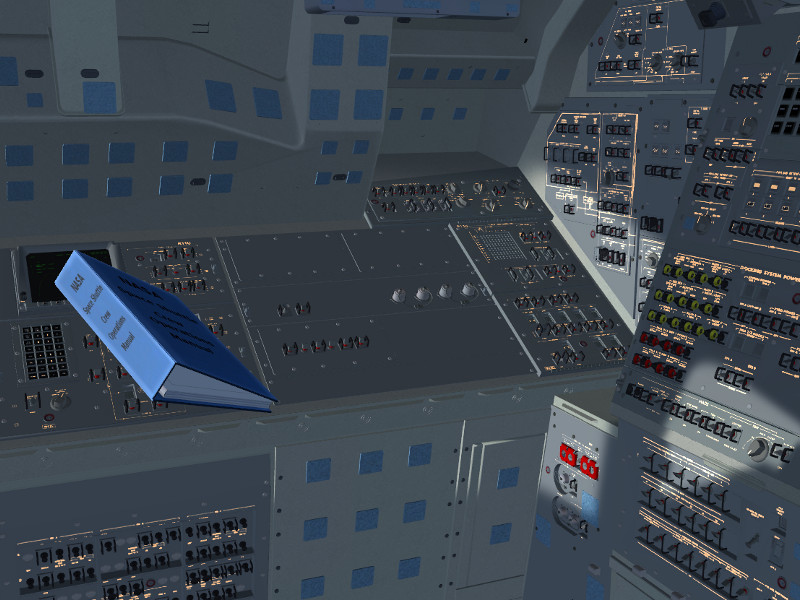
I've been thinking for a while on how to improve immersion into the setting that there's zero gravity in orbit, and I've finally settled for a piece of code that simulates objects floating around in the cabin, slowly rotating, drifting to the walls with every thruster firing and having inelastic bounces there.

It's not very advanced yet, but it is kind of cool to watch a folder tumble in mid-air, drift when you hit the thrusters and come to float somewhere else...

shuttle_zerog01.jpg
 
Going through some simulated failure scenarios today.

Houston - we have a problem.

electrical_failure01.jpg


Electrical bus MN A seems to have issues, the MDUs powered by it blank, the CWS matrix comes on like a Christmas tree.

Okay, first keep calm, take a deep breath, then look at SM SPEC 67 to find out what the trouble actually is.

electrical_failure02.jpg


Seems something is drawing a LOT of amps here, that's why the voltage is collapsing - seems like a circuit shorted out.

Okay, we can't have that - so first MN A gets disconnected from the fuel cell.


electrical_failure03.jpg


Checking back on SPEC 67, yes, voltage at the cell is back to normal and amps are fine, but of course AC 1 is now unpowered. Can't be helped, but that means we have to take care of some equipment now.

electrical_failure04.jpg


First order of business - avionics bay cooling (they'll overheat within 5-10 minutes if not properly cooled). All fans and water loop pumps need to be switched to either AC 2 or AC 3:

electrical_failure05.jpg


Next are hydraulic circulation pumps - hydraulic system 1 needs to be powered by MN B now.

electrical_failure06.jpg


Payload bay door and payload mechanical power get switched to sys 2.

electrical_failure07.jpg


Now we can take down the fuel cell as it isn't connected to anything, so the shutdown command gets issued and the reactant valves closed next.

electrical_failure08.jpg


Also, since the load is now a bit unevenly distributed, we can tie the remaining buses to drain both surviving cells equally.

Again a look at SPEC 67 - yes, everything properly taken down, the fuel cell shows no voltage any more, voltages on MN B and MN C are equal, power consumption is normal.

electrical_failure09.jpg


Short look at the radiator loops - loop 1 has been affected, loop 2 has been running on fine, so we just switch loop 1 freon pump and controllers away from AC 1.

electrical_failure10.jpg


Whew - all critical systems (cooling mostly...) are back to nominal, quick check of the antenna shows the status okay, so... we're good to continue and discuss options with mission control.

 
I'm somewhat surprised to write the words, but work on the 3d cockpit is actually drawing to a close. One of the last items that are being worked on right now are the forward overhead panels with the analog gauges - several temperature gauges are already working (with the quantity to be displayed selectable on the switches and rotary knobs below), the rest is to follow over the next days.

shuttle_cockpit_O1-3.jpg


The majority of switches on the flightdeck is animated and working (I haven't actually counted the number, but it must be in the low hundreds) - we've refrained from doing circuit breakers so far, there's only very few done.

Credit goes to Wayne Bragg for tirelessly working through endless switch animation request lists.

I'm now amusing myself ironing out inconsistencies - like the SM COMM page should not show any temperature readings if the Ku-antenna has been jettisoned... (that one was rather hilarious when I discovered it...)

---------- Post added 04-03-17 at 05:17 PM ---------- Previous post was 04-02-17 at 05:41 PM ----------

Some work on the planet visuals as well - the atmosphere got a gentle Rayleigh term in addition to the diffuse scattering, and the clouds got augmented by a gentle parallax mapping to improve the 3d appearance

earthview_clouds.jpg


And this is going to be super-cool - Wayne asked me whether we could add lightning seen from orbit, so I'm coding how to illuminate selected cloud patches for a split second during the night.

earthview_thunderstorm.jpg
 
Pushed the update to planet visuals today, so this will be with the next stable FG release (hires textures need to be downloaded and installed extra).

Using some serious GLSL trickery, the clouds really appear 3d-ish under most conditions, and change color according to the haze parameters. There's lightning storms visible on the night side in four different locations, and the aurora borealis also received some improvements - the auroral rings now meander gently around the poles.

earthview_2.1_01.jpg


earthview_2.1_02.jpg


earthview_2.1_03.jpg


earthview_2.1_04.jpg


I've spent 30 minutes testing this today, and if you have the computing resources, it feels like right being there.

(Probably need to convince someone to work on the Shuttle exterior texturing - ironically it's now the least realistic element in the scene...)
 
After a week of hard work, the set of lightmaps for the full 3d cockpit is finally in. Was totally worth the work.

Rather compelling shading.

shuttle_lightmap_detailed01.jpg


shuttle_lightmap_detailed02.jpg


Different hues of light dependent on source.

shuttle_lightmap_detailed03.jpg


Panels can be illuminated by backlighting (left) or by glare shield lights

shuttle_lightmap_detailed04.jpg


shuttle_lightmap_detailed05.jpg


Center console spotlight

shuttle_lightmap_detailed06.jpg


Light sources interact with backlighting, where there's bright external light, backlighting goes extinct.

shuttle_lightmap_detailed07.jpg


shuttle_lightmap_detailed08.jpg


shuttle_lightmap_detailed09.jpg


All lights, panel backlights, instrument lights and MDUs can be dimmed individually via their brightness controls.

shuttle_lightmap_detailed10.jpg


Cockpit ambient light and irradiance mapping is computed by summing how much light from Earth and Sun reaches into the cockpit to be scattered around and how much artificial light is there, the hue is determined by a sum under the log.

It's as close as I could get matching various in-cockpit Shuttle photographs I have.
 
Spent an unreasonable amount of time to get the three second visuals of main engine ignition more or less right.


animated_ignition.gif


(this ought to be an animated gif)

There's plenty of GLSL magic involved in changing flame turbulence, density, color and shock diamond formation continuously during the sequence, but the outcome (especially when seen in real time) is reasonably close to ignition footage I've looked at in the net.
 
The engines need to be in start position before gimbaling into launch position.
 
Yeah, what can I say? :-)

Engine gimbal is a controller problem, flame properties a rendering problem, I've been on the GLSL coding spree...

---------- Post added at 04:57 PM ---------- Previous post was at 05:41 AM ----------

Some impressions from flight-testing, bringing it all together.

milestone9_01.jpg


milestone9_02.jpg


milestone9_03.jpg


milestone9_04.jpg


milestone9_05.jpg


I have to say, I'm very pleased with the touch the floating folder adds to the feeling of immersion...
 
Flight testing the next milestone... It's amazing how much room for error there is after you have two dozen systems tested all in isolation when you bring it together...

These came out particularly nice:

evening_launch02.jpg


evening_launch01.jpg
 
Back
Top