General Question Two questions, can anyone help?? :D

vava2930

New member
Joined
Dec 23, 2009
Messages
4
Reaction score
0
Points
0
Hi all,

I've been using orbiter for a while, hopefully someone can help me with these two things:

1. I have a pretty nice joystick (Saitek X52 pro) with lots of buttons and sliders on it. I'd really like to program some functions into it, but can't find any options within the program to let me do this. For example I have a slider that I would love to assign to control the hover thrusters, but I can't find any way to do this. How can I assign joystick commands to orbiter functions?

2. Is there any way to engage reverse thrusters on the delta glider? I can't even do it with the mouse in cockpit view--it's quite difficult to land on the moon without them, I wish I could just assign it so that I could go into reverse just by pulling my throttle all the way back...

Thanks in advance!
 
You are looking for joy2key and Fly By Wire (FBW).

Happy Orbiting
 
Thank you! I have no idea what that means. Could you tell me exactly what to do?

You could have used a search engine. The forum has one and google is a pretty well known one too. Both would have helped you out.
But since I am in a good mood right now, I just did it for you.

Get Fly By Wire here: [ame="http://www.orbithangar.com/searchid.php?ID=3223"]Fly-By-Wire 0.9.1 beta[/ame]

And Joy2Key here: http://www.electracode.com/4/joy2key/JoyToKey English Version.htm

Read the provided documentation and use the forum search if you have any trouble.

Happy Orbiting
 
2. Is there any way to engage reverse thrusters on the delta glider? I can't even do it with the mouse in cockpit view--it's quite difficult to land on the moon without them, I wish I could just assign it so that I could go into reverse just by pulling my throttle all the way back...

Sounds like the retro doors are closed. Unfortunately I don't remember where exactly on the panel the button for that is, and I don't have Orbiter on my current machine (which is single-boot Linux).

I think it may be on the upper or lower panel. Try ctrl-up arrow and ctrl-down arrow to access those panels (I think, I'm working from memory here).

Also, you can just point your nose in the opposite direction to the direction you're traveling in and use the main engines to slow down. You can get all the information you need to land from MFD's, so your view doesn't need to be pointed forward.
 
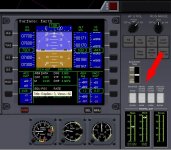
Yes. You must open the retro doors. In the normal panel right there are white switches. Look for the retro doors and open them.
 
Saitek controllers comes with SST software which is capable of defining mouse and keyboard functions to joystick buttons and axes. It's not very useful in defining axial controls though, for that I'm using Fly-By-Wire guys talked about earlier in this thread. Still you can assign many Orbiter hotkeys to your joystick buttons: like basic autopilots, gears, etc.
 
To stop the guessing and recalling, the switch is on the right side of the main panel. See the attached screenshot.
They can also be operated by the "Animation control box" which can be accessed by pressing ctrl+space.

Happy Orbiting
 

Attachments

  • OFDGretro.jpg
    OFDGretro.jpg
    90.2 KB · Views: 12
2. Is there any way to engage reverse thrusters on the delta glider?!p

if you're talking about "stock" DeltaGlider, retro doors button is on the right. On DeltaGliderIV you have to press Ctrl+down arrow and scroll the panel to the bottom. right on the left there are two switches, Hover doors and Retro doors. switch from AUTO to OPEN, if you keep it on AUTO, doors will open after you engage retro thrusters, but this will cause a gap between command and thrusters' burn
 
Last edited by a moderator:
Back
Top