Project Universal Car for Orbiter (UCO)

Cool dan ! Now all we need is a conference table, a few "comfy" chairs and some video-conference cameras and we can control our evil empire from the moon ! :D

Maybe UMMU 3.0 will come with weaponry support so I can bomb your moon base from orbit. :P
 
Instead of making the interior static, how about having some of these things made into potential cargo?
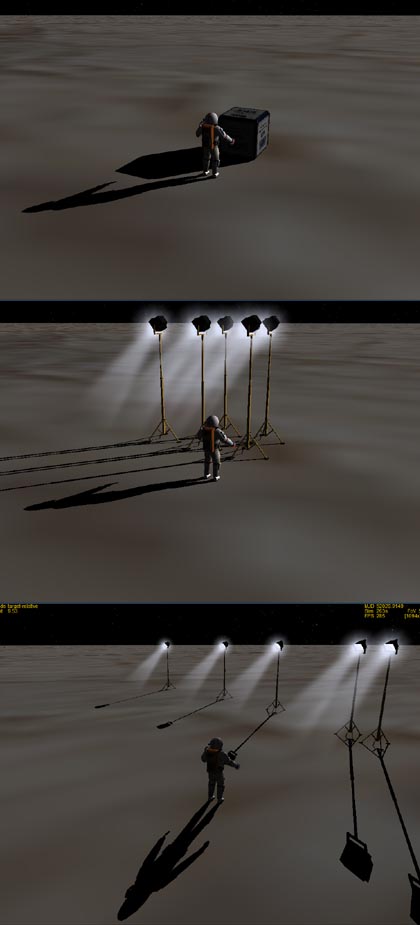
Yes that's a good idea, in fact it's maybe THE idea of UCGO: everyone can populate the "world" by adding a piece even a small one.

With multi-item-package one cargo and you can have 10 chairs or 10 computer console.

UcgoPreviewcargo23.jpg


Usually I would have ameliorated a bit the "uggly moon base", 1 hour and I can add marking and some details, but I think I'll leave it like that. First it will save my time and second it will push peoples to add things ;)

Dan
 
It...just...keeps...getting...better!

*starts chanting* Tuesday...Tuesday...Tuesday!
 
Neat. You can populate your moon base with tables, chairs, telepresence, labs, computers, bathrooms, beds, bunks, dressers, alcohol, books.

You thought moving day was hard on Earth, wait till you are unpacking on the moon!
 
UCGO is quickly turning into another reason to have a persistent Orbiter world on a server somewhere... :)
 
BY JOVE!!!
trucdeouf.gif


Some recall that my wife's PC broke and that I had to mount & install a new one.
Dual core 3Ghz, 2Gb ram, GTX260 with 880mb ram, XP oem. Not the latest but not bad.

Went to store today to get all the material and found that the 19' screen was really ridiculous, so I took a... 26'' 1900x1200...
0002.gif


I'm reinstalling all and tested my son's Red Alert 3 and some other games and of course the Arrow's VC. This is why I said "by Jove" ;)

This Pc rock ! And the screen is monstruous !

Dan
 
26" is very immersive. I'd like to go with dual 19", but don't know if you can get Orbiter to run on two screens.
 
26" is very immersive. I'd like to go with dual 19", but don't know if you can get Orbiter to run on two screens.

On my computer I have two 19'' dual screen for a total of 2560x1024. Orbiter run fine until 2048x1024. The problem with two screens are the screen's border wich are always in the midle of the action

Dan
 
Seeing the installer's image, for those that wonder where is the version 1.0 of UCGO :)

I've decided to start with "2.0" because UMMU 2.0 and DGIV-2 will also have this number, so it's more consistent and more simple to understand. "upgrade all to 2.0 and voila"

Dan

I thought it was because you went way beyond you expected from UCO to UCGO. Kind'a the second release coming before the first.:lol:
 
You should try Orbiter on a 67" DLP Projection TV at 1920 x 1080.Now that is what I call immersive!!!! I used to have three 19" LCD monitors with a TripleHeadtoGo Digital but Orbiter could only get up to 2000 pixels horizontal.Maybe they will fix that in the next release?Still sitting on the edge of my seat waiting for December...Hopefully X-mas will fall on a
Tuesday this year and Santa Steph will bring us all a wonderful new present in our O stockings.Wouldn't that be just a grand gift this year!
Thanks for all your hard work Dan.Especially since you didn't HAVE to do any of it.BTW how's your leg doing?
L8R
 
.BTW how's your leg doing?
L8R

Perfect, rock solid (or should I say "Titanium solid" ?)
205 more surgery and I'll be the first bionic addon author in the community :)
(For those that don't know: no I don't have an artificial leg ;) it's just that I broke it two years ago and that they put a titanium bar inside)
Dan

---------- Post added at 03:43 AM ---------- Previous post was at 01:17 AM ----------

NEWS:
-------

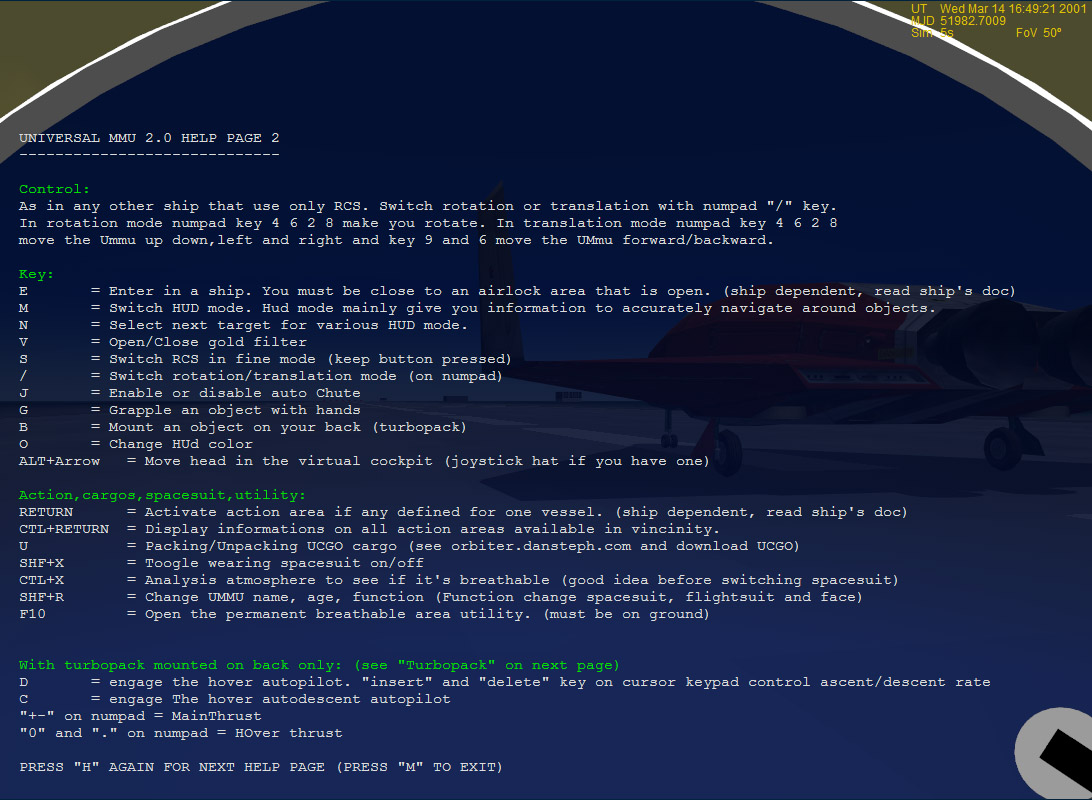
UMmu's help display now on a dimmed background for better readability, added a SHF-R key that allow you to rename and change age and function. (Function si important as it change also your spacesuit and UMMU's face)
Added a CTL+RETURN key that display information about the number of action area in vincinity and the distance from the closest one.(if any). This should be usefull to know if a ship have such area and how much.

Here's the full key list:
UcgoPreviewtruck13.jpg


Dan
 
Last edited:


NEWS:
-------

UMmu's help display now on a dimmed background for better readability, added a SHF-R key that allow you to rename and change age and function. (Function si important as it change also your spacesuit and UMMU's face)
Added a CTL+RETURN key that display information about the number of action area in vincinity and the distance from the closest one.(if any). This should be usefull to know if a ship have such area and how much.

Here's the full key list:

{SNIP}

Dan
:jawdrops:(I prefer the old 'jaw-drop' smilie; this one reminds me of pac-man!)
AWESOME stuff Dan! Cannnot WAIT for UMMU and UCGO 2.0 NOW! (Not that I could wait earlier; it's just that it just got doubly AWESOME!)
 
Yeah, this is Really titillating :tiphat:
...Couple a few IF/THENs in there (ie: 'IF ActionArea1Activated, THEN Action2 Opened/created') and you have full mission potential.
:cheers:
 
Back
Top
