
You are using an out of date browser. It may not display this or other websites correctly.
You should upgrade or use an alternative browser.
You should upgrade or use an alternative browser.
What do i need to open/edit dll files?
- Thread starter Gydrik
- Start date

- Joined
- Oct 16, 2007
- Messages
- 1,886
- Reaction score
- 11
- Points
- 0
- Location
- USA-WA
- Website
- www.orbiter-forum.com
When I try to open them with the Microsoft Visual C++ 2008 it tells me i need to use a different editor... :sorry:
Unless I am mistaken, you cannot open .dll files. You can however open the source code to view/edit it.
What .dll are you trying to open? The SDK comes with a few examples.
Edit, there are some programs that hack into the .dll file available on the internet, but is unrecommended because you may corrupt the file.

- Joined
- Feb 6, 2008
- Messages
- 38,938
- Reaction score
- 3,937
- Points
- 203
- Location
- Wolfsburg
- Preferred Pronouns
- Sire
You can open DLLs with any PE viewer, which deal with Microsofts COFF file format.
But you can't edit them that way. You need the source code for that.
But you can't edit them that way. You need the source code for that.
- Joined
- Feb 6, 2008
- Messages
- 38,938
- Reaction score
- 3,937
- Points
- 203
- Location
- Wolfsburg
- Preferred Pronouns
- Sire
Inside the source code, in the function clbkConsumeBufferedKey for vessels.
Otherwise, you might have to look on Martins development PC for getting the sources of Orbiter. Of course you will have to get the access rights out of his pale cold dead hands.
(Yes, that means no. With your limited skills, you shouldn't attempt reverse engineering)
Otherwise, you might have to look on Martins development PC for getting the sources of Orbiter. Of course you will have to get the access rights out of his pale cold dead hands.
(Yes, that means no. With your limited skills, you shouldn't attempt reverse engineering)
- Joined
- Oct 16, 2007
- Messages
- 1,886
- Reaction score
- 11
- Points
- 0
- Location
- USA-WA
- Website
- www.orbiter-forum.com
Awesome thanks. i dont suppose you might know where to look as far as editing keyboard commands goes?
under root directory
keymap.cfg
I would back up your .cfg first though

Edit,
Oh did you mean for ships? or for editing the general keyboard commands for orbiter?

Gydrik
New member
- Joined
- Apr 22, 2008
- Messages
- 4
- Reaction score
- 0
- Points
- 0
Inside the source code, in the function clbkConsumeBufferedKey for vessels.
Otherwise, you might have to look on Martins development PC for getting the sources of Orbiter. Of course you will have to get the access rights out of his pale cold dead hands.
(Yes, that means no. With your limited skills, you shouldn't attempt reverse engineering)
Alrighty... thanks again
 :axehead:
James.Denholm
Addon ponderer
You can open DLLs with any PE viewer, which deal with Microsofts COFF file format.
But you can't edit them that way. You need the source code for that.
If you can't edit them with a PE viewer, can you use the PE viewer to view the code and re-make the DLL?
Suddenly no-one wants me to do beta-testing...

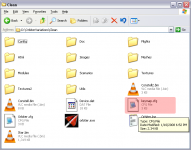
(keymap.cfg)
You mean, this one right here?

It should be there.
I'm kind of wary of changing my general key commands, however, since add-on authors will choose vessel-specific key commands to not conflict with the general ones.
(Aack... gotta dissociate .bin files with the media player.)
You mean, this one right here?
It should be there.
I'm kind of wary of changing my general key commands, however, since add-on authors will choose vessel-specific key commands to not conflict with the general ones.
(Aack... gotta dissociate .bin files with the media player.)
Attachments
- Joined
- Feb 6, 2008
- Messages
- 38,938
- Reaction score
- 3,937
- Points
- 203
- Location
- Wolfsburg
- Preferred Pronouns
- Sire
If you can't edit them with a PE viewer, can you use the PE viewer to view the code and re-make the DLL?
Suddenly no-one wants me to do beta-testing...
Only if you are skilled in assembler and have lot of time (which knowing assembler already implies). The pretty comfortable viewer I have here, has a useful disassembler.
But you can get information about the public functions inside a DLL and their parameters.
James.Denholm
Addon ponderer
He has a viewer with a disasembler thingy... which I assume is something used to reverse engineer dlls or something...
Let me think. The average mass of a bread-crumb is 0.0002 grams, so if I just run that through the system...
Urwumpe's favorite colour is blue!
Seriously, any chance of telling us what this viewer / dissasembler is called?
Let me think. The average mass of a bread-crumb is 0.0002 grams, so if I just run that through the system...
Urwumpe's favorite colour is blue!
Seriously, any chance of telling us what this viewer / dissasembler is called?
- Joined
- Feb 6, 2008
- Messages
- 38,938
- Reaction score
- 3,937
- Points
- 203
- Location
- Wolfsburg
- Preferred Pronouns
- Sire
http://www.smidgeonsoft.prohosting.com/
PS: All other answers are wrong. And if you don't understand what I was talking about, you should not use it - you might only use it once and break down in despair afterwards. The Portable Executable file format has more complex terminology as Orbiter...
PS: All other answers are wrong. And if you don't understand what I was talking about, you should not use it - you might only use it once and break down in despair afterwards. The Portable Executable file format has more complex terminology as Orbiter...
James.Denholm
Addon ponderer
*smashes head on wall*
It was red, wasn't it?
It was red, wasn't it?
Should be, but it is not there.
Comparing with your install, I don't have the orbiter.cfg, device.dat and orbiter.log either.
This is my install from "orbiter060929_base.zip"! (I've checked the contents of the zip file, but no keymap inside)
What now?
Comparing with your install, I don't have the orbiter.cfg, device.dat and orbiter.log either.
This is my install from "orbiter060929_base.zip"! (I've checked the contents of the zip file, but no keymap inside)
What now?
- Joined
- Oct 16, 2007
- Messages
- 1,886
- Reaction score
- 11
- Points
- 0
- Location
- USA-WA
- Website
- www.orbiter-forum.com
Should be, but it is not there.
Comparing with your install, I don't have the orbiter.cfg, device.dat and orbiter.log either.
This is my install from "orbiter060929_base.zip"! (I've checked the contents of the zip file, but no keymap inside)
What now?
run orbiter once, just to make sure, if you cannot do anything with your keys then you missing it

otherwise, Ursus posted a really nice pic of where it should be.
James.Denholm
Addon ponderer
Tune in next week for the thrilling conclusion of:
The Case of the Missing File
*du du du duuuuum.....*
The Case of the Missing File
*du du du duuuuum.....*
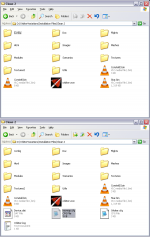
Fellows, thanks for the help
Actually I had run Orbiter several times, without any problem.
But I'm running Vista, and after a few tests, I found out that even granting all kind of permissions to the Orbiter folder the files were not created because my Orbiter folder was inside the Program Files directory.
I did a new unzip to another Orbiter folder placed in "Documents", launched Orbiter Launch Pad and voila ... the magic worked.
Conclusion: In Vista never put your Orbiter folder inside "Program Files"
Actually I had run Orbiter several times, without any problem.
But I'm running Vista, and after a few tests, I found out that even granting all kind of permissions to the Orbiter folder the files were not created because my Orbiter folder was inside the Program Files directory.
I did a new unzip to another Orbiter folder placed in "Documents", launched Orbiter Launch Pad and voila ... the magic worked.
Conclusion: In Vista never put your Orbiter folder inside "Program Files"
Similar threads

- Replies
- 5
- Views
- 1K


- Replies
- 12
- Views
- 5K