
Where/What is Orbiter.log?

Bullethead

New member
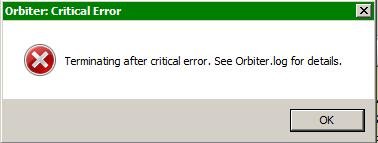
Joined
Mar 19, 2008
Messages
212
Reaction score
3
Points
0
Location
Wakefield, LA
Website
www.stormeaglestudios.com
Howdy-

I've got a problem: I can't make any of Greg Burch's add-ons work at all. This is a problem unique to his stuff--everybody else's add-ons seem to work fine. When I try to run one of the scenarios that come with a Burch add-on, however, it's always the same story (regardless of add-on/scenario I try):
  1. I pick the scenario I want to run off the Orbiter launchpad thing
  2. The splash screen comes up as normal, with the progress showing what all is being loaded running in the lower left corner.
  3. The splash screen crashes to desktop, leaving the error message shown in the attached pic.
Problem is, I can't find this "Orbiter.log" anywhere on my system. So what is it, and where can I find it?

As background info, I've got spacecraft3.dll in the Orbiter/Modules folder. I've also got all the other Burch mods his docs say are needed for various of his add-ons. And as mentioned above, all the other add-ons I've got work fine--it's just Burch's stuff that causes this problem.

Any help would be appreciated. Thanks.
 

Attachments

  • BurchCrash.jpg
    BurchCrash.jpg
    9.4 KB · Views: 25
Orbiter.log is the Orbiter log file. It is a plain text file that can be opened with Windows NotePad. It can be found in the main Orbiter folder.
 
It tells you basically whether Orbiter ran successfully or not.
 
Orbiter.log is the Orbiter log file. It is a plain text file that can be opened with Windows NotePad. It can be found in the main Orbiter folder.

Thanks for the quick reply. That's what I figured. But even running the Windows Search thingy, I couldn't find it. The file simply didn't exist on my computer.

Funny thing is, now it does. Bizarre. I swear I'm not drunk. It wasn't there before, now it is. Oh well.

Anyway, I'm looking at it now and I see the following at the very end, which I assume is where the crash occurred.

>>> ERROR: No vessel class configuration file found for:
>>> ERROR: Spacecraft\spacecraft3
>>> [C:\Source\Orbiter\Vessel.cpp / 248]
>>> TERMINATING <<<

Anybody got an idea what this means?

Thanks again.
 
If an error occurs, it will show the problem.
 
Thanks for the quick reply. That's what I figured. But even running the Windows Search thingy, I couldn't find it. The file simply didn't exist on my computer.

Funny thing is, now it does. Bizarre. I swear I'm not drunk. It wasn't there before, now it is. Oh well.

Anyway, I'm looking at it now and I see the following at the very end, which I assume is where the crash occurred.

>>> ERROR: No vessel class configuration file found for:
>>> ERROR: Spacecraft\spacecraft3
>>> [C:\Source\Orbiter\Vessel.cpp / 248]
>>> TERMINATING <<<

Anybody got an idea what this means?

Thanks again.
Try downloading Spacecraft3.dll on Vinka's site.
 
Try downloading Spacecraft3.dll on Vinka's site.

I've already got that. It's in the Orbiter\Modules folder, which I was told is where it should be. Should it be somewhere else? Do I need separate copies of it for every ship that uses it? If so, where do they go?

NOTE: I've got a number of other add-ons that require spacecraft3.dll, and they all work just fine.
 
It is in the right place. What scenario are you running?
 
I works for other people.
 
It is in the right place. What scenario are you running?

Thanks again for the quick reply.

I'm trying to run the Descartes Shakedown Cruise scenario. The Descartes docs say this one needs no other add-ons. However, because other Descartes and its sister ships' scenarios require other Burch add-ons (Celestium 3, LST and patch, and SSBB), I've got all those add-ons as well. I've also got most of Burch's other add-ons, just be sure I've got everything covered.

As noted above, I have other add-ons by other people that require spacecraft3.dll, and they work just fine. This is only a problem with Burch's stuff.
 
You could ask him what the problem is because if it works for other add-ons, it should work for his.
 
Are you positive?
 
I've had similar problems with Burch's add-ons. Some work for me, and other's don't no matter what. It's quite baffling.

I've gone in and messed with the scenarios and even the configuration files to no avail. It's too bad really, because I learned more about Vinka's spacecraft(#).dll animations from studying Burch's add-ons than any other source.

But the animations I really wanted to see (drydock is one) have been add-ons I haven't been able to load.

Bullethead -

I suggest installing all Vinka's spacecraft(#).dll's as I don't believe they're necessarily backwards compatible (anyone know differently here?). Some of the 'older' add-ons use previous versions, and you'll find they will work with the right Vinka product installed.
 
I've had similar problems with Burch's add-ons. Some work for me, and other's don't no matter what. It's quite baffling.

That makes me feel better.

I suggest installing all Vinka's spacecraft(#).dll's as I don't believe they're necessarily backwards compatible (anyone know differently here?). Some of the 'older' add-ons use previous versions, and you'll find they will work with the right Vinka product installed.

Will do, thanks.
 
Can you post the non-working scenario here? It may help.
 
Here's one I haven't been able to work:

DryDock1.scn

Code:
BEGIN_DESC

END_DESC

BEGIN_ENVIRONMENT
  System Sol
  Date MJD 51991.0310027878
END_ENVIRONMENT

BEGIN_FOCUS
  Ship DryDock1
END_FOCUS

BEGIN_CAMERA
  TARGET DryDock1
  MODE Extern
  POS 2.34 118.20 34.20
  TRACKMODE GlobalFrame
  FOV 50.00
END_CAMERA

BEGIN_HUD
  TYPE Surface
END_HUD

BEGIN_MFD Left
  TYPE Docking
  NAV 0
END_MFD

BEGIN_MFD Right
  TYPE Orbit
  PROJ Ship
  REF Earth
END_MFD


BEGIN_SHIPS
Ley1:Spacecraft
  STATUS Orbiting Earth
  RPOS 5806062.50 -1348114.74 3106584.22
  RVEL -3880.160 -2647.208 6102.353
  AROT -21.11 66.82 -39.92
  RCSMODE 2
  PRPLEVEL 0:0.999
  DOCKINFO 0:1,DryDock1
  NAVFREQ 0 0
  CONFIGURATION 1
  CURRENT_PAYLOAD 0
  SEQ 0 -2 0.000000
  SEQ 1 -2 0.000000
END
Beta:DeltaGlider
  STATUS Orbiting Earth
  RPOS 5805768.49 -1348159.60 3106701.50
  RVEL -3880.160 -2647.208 6102.353
  AROT 158.89 -66.82 -140.08
  RCSMODE 2
  PRPLEVEL 0:0.999 1:0.852
  DOCKINFO 0:1,DryDock2
  NAVFREQ 0 0 0 0
  XPDR 0
  NOSECONE 1 1.0000
  TRIM 0.015
END
Celestium:Spacecraft
  STATUS Orbiting Earth
  RPOS 5805944.41 -1348241.72 3106673.59
  RVEL -3880.160 -2647.208 6102.353
  AROT -73.54 -14.63 -161.82
  PRPLEVEL 0:0.999
  DOCKINFO 1:0,Con1 2:0,UMod 3:0,UMod3 4:0,UMod2
  NAVFREQ 0 0
  CONFIGURATION 1
  CURRENT_PAYLOAD 0
  SEQ 0 -1 0.294800
END
UMod3:UMod
  STATUS Orbiting Earth
  RPOS 5805797.87 -1348155.54 3106689.94
  RVEL -3880.160 -2647.208 6102.353
  AROT 158.89 -66.82 -50.08
  DOCKINFO 0:3,Celestium 1:0,DryDock2
  IDS 0:540 100 1:550 100
  NAVFREQ 0 0
  XPDR 450
END
DryDock2:Spacecraft
  STATUS Orbiting Earth
  RPOS 5805771.90 -1348159.55 3106700.32
  RVEL -3880.160 -2647.208 6102.353
  AROT -21.11 66.82 140.08
  RCSMODE 2
  DOCKINFO 0:1,UMod3 1:0,Beta
  NAVFREQ 0 0
  CONFIGURATION 1
  CURRENT_PAYLOAD 0
  SEQ 0 -2 0.003000
END
UMod2:UMod
  STATUS Orbiting Earth
  RPOS 5806034.12 -1348119.11 3106595.56
  RVEL -3880.160 -2647.208 6102.353
  AROT -21.11 66.82 50.08
  DOCKINFO 0:4,Celestium 1:0,DryDock1
  IDS 0:540 100 1:550 100
  NAVFREQ 0 0
  XPDR 450
END
DryDock1:Spacecraft
  STATUS Orbiting Earth
  RPOS 5806060.09 -1348115.11 3106585.19
  RVEL -3880.160 -2647.208 6102.353
  AROT 158.89 -66.82 39.92
  RCSMODE 2
  DOCKINFO 0:1,UMod2 1:0,Ley1
  NAVFREQ 0 0
  CONFIGURATION 1
  CURRENT_PAYLOAD 0
  SEQ 0 2 0.998180
END
Con1:Con1
  STATUS Orbiting Earth
  RPOS 5805925.76 -1348191.14 3106646.41
  RVEL -3880.160 -2647.208 6102.353
  AROT 21.20 -17.57 164.64
  DOCKINFO 0:1,Celestium 1:0,PodBay2
  IDS 0:540 100 1:550 100
  NAVFREQ 0 0
  XPDR 450
END
PodBay2:Spacecraft
  STATUS Orbiting Earth
  RPOS 5805922.25 -1348195.14 3106636.10
  RVEL -3880.160 -2647.208 6102.353
  AROT 21.20 -17.57 164.64
  DOCKINFO 0:1,Con1
  NAVFREQ 0 0
  CONFIGURATION 1
  CURRENT_PAYLOAD 0
  SEQ 0 -2 0.003200
  SEQ 1 -2 0.000000
END
UMod:UMod
  STATUS Orbiting Earth
  RPOS 5805936.05 -1348179.38 3106676.72
  RVEL -3880.160 -2647.208 6102.353
  AROT -158.80 17.57 -74.64
  DOCKINFO 0:2,Celestium 1:0,AirLock2
  IDS 0:540 100 1:550 100
  NAVFREQ 0 0
  XPDR 450
END
AirLock2:Spacecraft
  STATUS Orbiting Earth
  RPOS 5805940.88 -1348173.87 3106690.94
  RVEL -3880.160 -2647.208 6102.353
  AROT 21.20 -17.57 164.64
  DOCKINFO 0:1,UMod
  NAVFREQ 0 0
  CONFIGURATION 1
  CURRENT_PAYLOAD 0
  SEQ 0 2 1.000000
END
END_SHIPS
Notice the release date: Release 20050227

Here's the Config files:
Con1.cfg
Code:
; === Configuration file for Utility Module ===

Meshname = Connector1
Mass = 1500
Size = 15
Inertia = 10 10 10
CrossSections = 10 8 10
EnableFocus = True
EnableXPDR = TRUE
XPDR = 482

; === Docking ports ===
BEGIN_DOCKLIST
 0 0  3.1   0 0  1   0 1 0   540
 0 0 -3.1   0 0 -1   1 0 0   550
END_DOCKLIST
UMod.cfg
Code:
; === Configuration file for Utility Module ===

Meshname = UMod
Mass = 2000
Size = 15
Inertia = 10 10 10
CrossSections = 10 8 10
EnableFocus = True
EnableXPDR = TRUE
XPDR = 482

; === Docking ports ===
BEGIN_DOCKLIST
 0 0  12.5   0 0 1   1 0 0   540
 0 0 -12.5   0 0 -1   1 0 0   550
END_DOCKLIST
And finally the related .ini's
DryDock1.ini
Code:
[LIFT]


[CONFIG]
MESHNAME="DryDock1"
SIZE=30
EMPTY_MASS=8000
FUEL_MASS=0
MAIN_THRUST=0
RETRO_THRUST=0
ATTITUDE_THRUST=0
ISP=3844
TRIM=0.05
PMI=(58.2,62.1,7.7)
CW_Z_POS=0.2
CW_Z_NEG=0.5
CW_X=1.5
CW_Y=1.5
CROSS_SECTION=(234.8,389.1,80)
COG=7
PITCH_MOMENT_SCALE=0.00001
BANK_MOMENT_SCALE=0.00002
ROT_DRAG=(.5,1.5,1.5)
WING_ASPECT=0.7
WING_EFFECTIVENESS=0.0

FOCUS=1

[DOCK_0]
POS=(0,0,-15.75)
DIR=(0,0,-1)
ROT=(0,1,0)

[DOCK_1]
POS=(0,0,-6.5)
DIR=(0,0,1)
ROT=(0,-1,0)


[ANIM_SEQ_0]
; Doors
KEY=K
DURATION=5
REPEAT=0

[ANIM_COMP_0]
; Door1
SEQ=0
GROUPS=25,28
RANGE=(0.1,0.9)
TYPE=TRANSLATE
SHIFT0=(0,0,0)
SHIFT=(0,-13.8,0)

[ANIM_COMP_1]
; Door 2
SEQ=0
GROUPS=26,27
RANGE=(0.1,0.9)
TYPE=TRANSLATE
SHIFT0=(0,0,0)
SHIFT=(0,13.8,0)
DryDoc2.ini
Code:
[LIFT]


[CONFIG]
MESHNAME="DryDock1"
SIZE=30
EMPTY_MASS=8000
FUEL_MASS=0
MAIN_THRUST=0
RETRO_THRUST=0
ATTITUDE_THRUST=0
ISP=3844
TRIM=0.05
PMI=(58.2,62.1,7.7)
CW_Z_POS=0.2
CW_Z_NEG=0.5
CW_X=1.5
CW_Y=1.5
CROSS_SECTION=(234.8,389.1,80)
COG=7
PITCH_MOMENT_SCALE=0.00001
BANK_MOMENT_SCALE=0.00002
ROT_DRAG=(.5,1.5,1.5)
WING_ASPECT=0.7
WING_EFFECTIVENESS=0.0

FOCUS=1

[DOCK_0]
POS=(0,0,-15.75)
DIR=(0,0,-1)
ROT=(0,1,0)

[DOCK_1]
POS=(0,0,-6.5)
DIR=(0,0,1)
ROT=(0,-1,0)


[ANIM_SEQ_0]
; Doors
KEY=K
DURATION=5
REPEAT=0

[ANIM_COMP_0]
; Door1
SEQ=0
GROUPS=25,28
RANGE=(0.1,0.9)
TYPE=TRANSLATE
SHIFT0=(0,0,0)
SHIFT=(0,-13.8,0)

[ANIM_COMP_1]
; Door 2
SEQ=0
GROUPS=26,27
RANGE=(0.1,0.9)
TYPE=TRANSLATE
SHIFT0=(0,0,0)
SHIFT=(0,13.8,0)
 
I suggest installing all Vinka's spacecraft(#).dll's as I don't believe they're necessarily backwards compatible (anyone know differently here?). Some of the 'older' add-ons use previous versions, and you'll find they will work with the right Vinka product installed.

Well, that did the trick. Suddenly all of Burch's scenarios work. Thanks.

BTW, which add-on is that DryDock scenario part of? I don't seem to have that one.
 
Back
Top