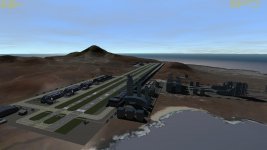
Question Wideawake hills just "stuck on"

TachyonDriver

Donator
Donator
Joined
May 14, 2008
Messages
168
Reaction score
0
Points
0
Can anyone help with this problem? I only noticed the "un-blended" textures (dark rectangular borders) after installing an addon, but not sure which one :facepalm: XR5 Vanguard maybe?

wideawakemesh_zpsrdpxavpe.jpg


:cheers: in advance.
 
looks like the alpha channel is only 50% transparent maybe? Sorry, I have no clue why that would be, but it looks hilarious :rofl:
 
I know - need to get the garden maintenance team out to the runway immediately - I've got a Vanguard waiting to load cargo then refuel & a G42 sitting at the end of that runway.. :chainsaw:
 
Hi,
did it perhaps happen after you switched to the D3D9 graphics client?
I had similar issue with many base meshes. Try to un-check the "Object shadows" tick-box in the "Visual Effects" tab of the Orbiter launchpad menu and see if that helps.

I find that the D3D9 client seems to give shadows to all base meshes when that option is enabled, regardless of the presence or absence of the "SHADOW" flag in the mesh entry in the base config file. That causes edges like that for semitransparent meshes, at least in my case. The correct behaviour (as in the in-line client) should be to show shadows only for the meshes that have the "SHADOW" flag present.

 
I think this is a known issue with external graphics client. It should look fine with the in-line graphics.

For some real eye candy, find the all new and improved WideAwake beta. All new island (more true to size) with some really cool hangars and launch facilities. And checklists! Hurrah checklists!.
 
Ripley - that sorted it - now all that's left is the shadow below the mesh of the various objects on top of those hills. Going to see if I can't edit the cfg to fix those too! :cheers:
 
there is a checkbox in D3D9 client...I forget exactly what it is, building shadows maybe? I forget exactly which checkbox, but you uncheck it and this goes away.
 
You might be thinking of the object shadows box perhaps? That would no doubt work, but the all the building shadows disappear too ;)
 
Welcome to the future dudes. :cool:
 

Attachments

  • 15.04.04 17-48-09 AU-Main.jpg
    15.04.04 17-48-09 AU-Main.jpg
    109 KB · Views: 54
Ripley - that sorted it - now all that's left is the shadow below the mesh of the various objects on top of those hills. Going to see if I can't edit the cfg to fix those too! :cheers:

I found a different workaround: edit the .msh file of the terrain meshes (e.g. in WordPad) by adding "FLAG 1" between the TEXTURE and GEOM entries, like this:
Code:
MSHX1
GROUPS 1
MATERIAL 1
TEXTURE 1
FLAG 1
GEOM 38119 45397	; mesh01 material01 0
...

This way you don't need to use the UNDERSHADOWS tag and the other objects will not cast shadows on the terrain.
 
Hey Cosmonaut, that FLAG entry works a treat! It's sitting right there on page 30 of the Orbiter Config manual. Proof that we should all RTFM :rolleyes:

Cheers for the fix :cheers:

---------- Post added at 12:55 AM ---------- Previous post was at 12:53 AM ----------

Welcome to the future dudes. :cool:

How did Altea Aero get planning permission for all that? :blink: :lol:
 
Last edited:
Can someone post or paste their fixed base cfg file?
 
It's not the base.cfg where you insert the FLAG entries, rather each mesh file which has the effect on Wideawake, namely the following ones within the AIAmsh subfolder of the Meshes directory:

hill_80, Hill_228, hill_north, hill_plain, hill_small, mountain

(not sure if they all had structures on their summits, but I edited them all to make sure :) )
 
Back
Top