Project XR Rolling Repair

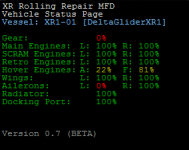
Change to the MFD is complete, damage status displays as percentages now.

percentagestatus.png
 
Last edited:
picture.php


Beautiful job, Xyon! It's just the beta, and I love it already!

:hail: XRRR!
 
Hehe, thanks.

A word on the note in the image, those systems you can't reach from the ground should be logical ones, for example the landing gear (since the XR will have bellyflopped on top of it) - and they'll be different when the gear is destroyed since the touchdown points of the vessel are different too. I recall one of the XR2 ailerons being reachable from the ground simply due to the angle that she collapses into - theoretically, both should be reachable, as they're flat on the ground and the vessel isn't in the way.

If there are any points which are a real PITA to get to, or you can't get to on the ground and you think you should be able to, give me a shout and I'll take a look at it - as already stated I'm already looking at the area sizes and seeing which to fine-tune.
 
A word on the note in the image, those systems you can't reach from the ground should be logical ones, for example the landing gear, and they'll be different when the gear is destroyed since the touchdown points of the vessel are different too. I recall one of the XR2 ailerons being reachable from the ground simply due to the angle that she collapses into - theoretically, both should be reachable, as they're flat on the ground and the vessel isn't in the way.

I noticed that as well. With the XR2 bellied out you can fix the gear by walking through the ship, but then one must take off using hover thrusters and then extend gear manually. But, odds are that the hover thrusters were damaged when the ship bellied out, so... :beathead:

In the image, I was just playing around with the XR2 Test scenario. I found that you can use the turbopack's hover AP to stay at the same height, then use translation to move around the ship.
 
Just for a giggle, and in case anyone was wondering what I spent the first month of this project actually doing, here's a capture of four of my eight pages of notes, both front and back (the other pages are somewhere... misplaced... at present). They cover coordinates for the action areas in MAX format, ready for being converted to the right values for use in XRRR.

notes.jpg


notes2.jpg
 
So I've been testing the XR2 with XRRR. The manual for XR2 repairs seems to be a carbon copy of the XR1 instructions, at least for the RCS. I ran it on Medium difficulty, and I was having trouble figuring our which RCS bank is where, and the manual got me confused even more :)
I'm not sure what the airlock / nosecone damage should behave like. I was docked with the ISS, and that part "randomly" failed, and it undocked me with open airlock doors. The crew didn't like it.
Faileron repairs were probably the most straightforward, the wing repair zones are easy to understand. For the rest, I think it would be great if there was some schematic for locating the action areas. A few views from top/bottom/side would be enough. Some HUD or MFD navigation aid would be cool, but that's probably too much work. Thrusting around blindly to try and get the direction to the closest action area can get strange and tedious, regardless of difficulty level.
 
So I've been testing the XR2 with XRRR. The manual for XR2 repairs seems to be a carbon copy of the XR1 instructions, at least for the RCS.

Yes it is, I got lazy and copy-pasted. I'll take another look at it.

I ran it on Medium difficulty, and I was having trouble figuring our which RCS bank is where, and the manual got me confused even more :)
I'm not sure what the airlock / nosecone damage should behave like. I was docked with the ISS, and that part "randomly" failed, and it undocked me with open airlock doors. The crew didn't like it.

:lol: I can imagine they didn't! I'll throw in a catch so that it won't fail the docking port while the ship is docked, that should solve that one. Nice catch! :thumbup:

Faileron repairs were probably the most straightforward, the wing repair zones are easy to understand. For the rest, I think it would be great if there was some schematic for locating the action areas. A few views from top/bottom/side would be enough. Some HUD or MFD navigation aid would be cool, but that's probably too much work. Thrusting around blindly to try and get the direction to the closest action area can get strange and tedious, regardless of difficulty level.

My idea for this is basically the currently empty REP page of the MFD, though of course while in the UMMU the MFD has to be an EXTMFD window because there are no MFDs in UMMUs. I can't work out how to get an image into the MFD, though, which would make life easy, but I want to look into some sort of system whereby an individual system can be selected and the distance / direction to said system's action areas can be presented to make life easier. My issue with action areas has always been the hit 'n miss implementation as you mention, whereby you're thrusting around trying to kill off that 0.1 or even 0.0 m distance to the area itself.

Anyone with any bright ideas on how to get a bitmap into an MFD, do share. I work with textures so rarely I've no idea what to do with that. :P
 
Ok, the check against whether or not the ship is docked is in and seems to work fine.

I've also added in elements to the action areas to allow for finer control of their radii as mentioned, so next up is to go back through and see which ones need to be bigger and which need to be smaller, and manipulate them as-such.

I feel this may result in more scribbled notes. :)

---------- Post added at 11:38 ---------- Previous post was at 03:07 ----------

A new version, 0.7.2 (No longer current, see first post for current version):

In this version:

  • Changed MFD to read out values in % for vessel status display page - change to RCS page will come later
  • Fixed major bug with bad pointers. Should not code while half asleep. Apologies to my compiler for making it use bad pointers and then swearing at it for crashing... >.<
  • Altered backend to allow for individual action area groups to be differently sized (All currently retain the radius of 1m, will grab values for version 0.8)

For 0.8:

  • Change MFD RCS status page to read in % instead of GO / NOGO / NOGO
  • Grab decent values for area sizes and implement
  • Review documentation and update w.r.t. action area appendices.
 
Last edited:
Thrusting around blindly to try and get the direction to the closest action area can get strange and tedious, regardless of difficulty level.

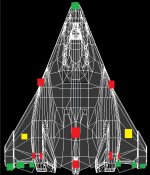
I came up with an idea for another page in Xyon's MFD earlier today to solve this problem.

It goes like this:

(In this case, the XR2's Ailerons[both] would be Good, Radiator would be Not Good, NoseCone would be Good, and the Wings[both] would be Not good(yellow))

I guess there would also need to be a picture of the underside as well, for the Gear and Hoverdoors and such...

I don't know what the exact Action Area locations are, but this is just to present an idea to 'get the ball rolling', so to speak...
 

Attachments

  • Untitled.jpg
    Untitled.jpg
    158.3 KB · Views: 56
Last edited:
Yes, that's sort of what I meant, I probably didn't say it clearly. A few images in the ops handbook with area positions and designations will do for starters.

As for MFDs and bitmaps ... doesn't the stock Map MFD display bitmaps?
I also found some bitmap related code that's distributed with AeroBrake MFD. (unpacks into Orbitersdk\samples\AeroBrakeMFD). Maybe it can help you.
 
I came up with an idea for another page in Xyon's MFD earlier today to solve this problem.

It goes like this:

That's essentially what I had in mind for the REP page. I like your thinking though. :)

Yes, that's sort of what I meant, I probably didn't say it clearly. A few images in the ops handbook with area positions and designations will do for starters.

As for MFDs and bitmaps ... doesn't the stock Map MFD display bitmaps?
I also found some bitmap related code that's distributed with AeroBrake MFD. (unpacks into Orbitersdk\samples\AeroBrakeMFD). Maybe it can help you.

Didn't think about map MFD, will have a gander at yonder sources. :)

MapMFD incorporates vector graphics too, now. :thumbup:

ooOOOooo.

---------- Post added at 08:02 ---------- Previous post was at 05:10 ----------

Heh, that'd be why I didn't look at the source for MapMFD - it's not in the SDK. As for the AeroBrake sources, they're a little interesting, but I'm not sure where the bitmap portions are in use.

I assume I'm wanting to blit it, but really I have no idea. :shrug:
 
bliting is at least the commonly used term for drawing a bitmap into a buffer, so yes, that's most probably what you want to do ;)
 
This is why I don't work with images, animals or children - I have no idea. At all. :/
 
awesome work, ill give the newest version a try, maybe ill come across some bugs for you as i cruise to the moon and back

and if i get any good ideas, ill drop them here

keep up the awesome work!
-=Grover=-
 
just a small thing:

on the config setup, it would be good to see the percentages next to the probability ratings (eg Common- 25%) so you dont have to refer to the manual to take a look at it.

also, it caused a CTD when i tried loading a scenario with a broken RCS bank and one UMMU outside the craft, i think this has already been reported though. (i forgot to get the info from the log, so ill have to give it back if it happens again)

thanks, and keep up the good work
-=Grover=-
 
just a small thing:

on the config setup, it would be good to see the percentages next to the probability ratings (eg Common- 25%) so you dont have to refer to the manual to take a look at it.

I can do that :)

also, it caused a CTD when i tried loading a scenario with a broken RCS bank and one UMMU outside the craft, i think this has already been reported though. (i forgot to get the info from the log, so ill have to give it back if it happens again)

thanks, and keep up the good work
-=Grover=-

What helps in those circumstances is if you can make a scenario in which it always happens, and then pass me that scenario over so I can do some debugging on it.
 
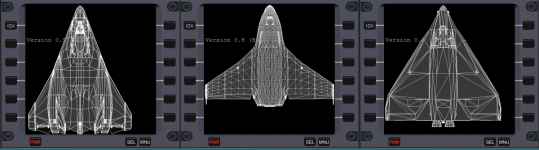
maps.png

Needs some work, but that's the bit that was giving me trouble sorted out.

I need a stiff drink, anyone got any single malt knocking about?

Edit:

For those looking for a similar solution, this works well for me:

Code:
// grab the relevant map from the file
 
LPTSTR XR2tex = ".\\Textures\\XRRR\\XR2MFDMap.bmp";
 
HANDLE XR2Map = LoadImage(NULL, XR2tex, IMAGE_BITMAP, 0, 0, LR_CREATEDIBSECTION | LR_LOADFROMFILE);
 
if (!XR2Map) // handle errors - the return value is NULL from LoadImage
{
        DWORD error = GetLastError();
        HRESULT b0rk = HRESULT_FROM_WIN32(error);
        skp->SetTextColor(MFD_RED);
        txt = b0rk;
        skp->Text(3, linespacing*lineNo, txt.c_str(), (int)txt.length());
        lineNo++;
}
else
{
        BITMAP bm; // Create a BITMAP object to store our image
        GetObject( XR2Map, sizeof(BITMAP), &bm);
        HDC hMemDC = CreateCompatibleDC(skp->GetDC()); // This replaces hDC in the sketchpad way of doing stuff
        SelectObject(hMemDC, XR2Map); // Load our object above into the memory canvas
 
        BitBlt( skp->GetDC(), 0, 0, bm.bmWidth, bm.bmHeight,
                hMemDC, 0, 0, SRCCOPY ); // blit from above memory canvas onto our MFD 
}

In this snippet, bm is simply a BITMAP object declared a few lines above (there's a lot of conditional code in the way in my current sources).
 
Last edited:
Back
Top