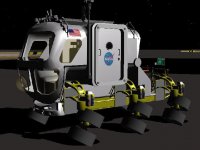
Request Lunar Electric Rover

Great what you done so far.

---------- Post added at 05:20 PM ---------- Previous post was at 05:18 PM ----------

Doug, you made the mesh, right?
It looks really cool.

Heavens, no. I converted a file we found online, but did none of the improvements.

It does look really cool though! :)
 
Second post in thread.

Oh yes. Didn't checked the whole thread.;)

---------- Post added at 06:02 PM ---------- Previous post was at 05:52 PM ----------

I had also the problem with the crazy wheels.

And I noticed that when I apply thrust and press 1/3 to rotate rover while driving the wheels suddenly flip to left and right and thrust goes to zero.
 
Oh yes. Didn't checked the whole thread.;)

---------- Post added at 06:02 PM ---------- Previous post was at 05:52 PM ----------

I had also the problem with the crazy wheels.

And I noticed that when I apply thrust and press 1/3 to rotate rover while driving the wheels suddenly flip to left and right and thrust goes to zero.

I have encountered that too. I am going to redo the thrust altogether. I am going to try to have 2 main and 2 retro. One on each side of the vessel. Then tie the thrust to the wheel direction. If you want to rotate then get the wheels into position and press a key and then one side main thrust will fire and the other side retro will fire, thus spinning it. I may have a seperate key for left rotate and right rotate.

I have added the sunscreen and rear controls:
LER4.jpg

Sunscreen down:
LER5SCREEN.jpg
 
Last edited:
Ok. Thanks to Tblaxland I recoded the thrust.

here is a new mesh and module.:http://www.4shared.com/file/141922221/50d0fd44/LER2c.html

New keys: M raises/lowers the sunscreen.
4-straights wheels
Hold 7/8 down to rotate the wheels release when you get to where to want them.
keypad 1/3 rotate(spin) hold down til you get the direction you want.
added new camera location on the rear platform.

I think I need to get the animation of the wheels if just rotating. The animation for the wheels is based off the main thruster firing.

Also I need help on getting a governor for the speed that applies force to the reverse vector.

This works for most vehicles.
Code:
    VECTOR3 speedvec; // first we define our vector which will recieve the data
oapiGetFocusShipAirspeedVector(&speedvec);//then we retrieve its x,y,z

if (GroundContact()==true && GetAirspeed() >10 && (speedvec.z>0))
{AddForce(_V(0,0,-9e3),_V(0,0,0));}

if (GroundContact()==true && GetAirspeed() >10 && (speedvec.z<0))
{AddForce(_V(0,0,9e3),_V(0,0,0));}
but because this vessel can travel along the x axis it doesn't work. Any ideas how to add force to the reverse vector?
 
Thanks for the new version. I like how 7/8 works better than before.

As for the speed governor, can't the vesselstatus parameters be monitored/adjusted directly?
 
Thanks. Maybe but not sure what you mean. I think if we get the speed vec and just add force to the opposite vector then that would work. This get the vector:

VECTOR3 speedvec; // first we define our vector which will recieve the data
oapiGetFocusShipAirspeedVector(&speedvec);//then we retrieve its x,y,z


So then maybe some like if airspeed >10 add force to the opposite speedvec. Not sure how to get that?
 
Thanks. Maybe but not sure what you mean. I think if we get the speed vec and just add force to the opposite vector then that would work. This get the vector:

VECTOR3 speedvec; // first we define our vector which will recieve the data
oapiGetFocusShipAirspeedVector(&speedvec);//then we retrieve its x,y,z

So then maybe some like if airspeed >10 add force to the opposite speedvec. Not sure how to get that?

Well, what I was thinking was something like using GetStatusEx() to grab the LER's vesselstatus, converting vs.rvel to local coordinates, trim the velocity values as necessary, then GlobalRot the trimmed value back into vs.rvel. No force addition at all, just brute force clipping.
 
Thanks. Not sure what the code would look like?


Other than the speed issue any other issues?
 
No other issues so far, all seems good. The clipping code would look something like:

Code:
  VESSELSTATUS2 vs ;
  VECTOR3 vel_local, clipped_vel_global ;
  double vel_mag ;
 
  GetStatusEx( &vs ) ;
  Global2Local( vs.rvel, vel_local ) ;
  vel_mag = length( vel_local ) ;
  if vel_mag > 10 )
  {
     vel_local *= (10/vel_mag) ;  // scales velocity clipping in all directions
  }
  GlobalRot( vel_local, clipped_vel_global ) ;
  vs.rvel = clipped_vel_global ;

though I'm not sure Global2Local is the correct way to convert a velocity. I'm terrible with rotations, maybe a real guru can suggest the proper method.
 
Thanks. I'll try that. the only other thing I need to fix is the rotation of the wheels when rotation ( Spinning). The wheel rotation is based on airspeed and thrust applied. but if you are spinning I think the airspeed would be small if none. So it may be based of something else.

---------- Post added at 04:51 PM ---------- Previous post was at 12:13 PM ----------

This worked:
Code:
    VECTOR3 speedvec; // first we define our vector which will recieve the data
oapiGetFocusShipAirspeedVector(&speedvec);//then we retrieve its x,y,z


VECTOR3 newspeedvec;
newspeedvec.x=(speedvec.x*-1.5);
newspeedvec.y=(speedvec.y*-1.5);
newspeedvec.z=(speedvec.z*-1.5);

if (GetAirspeed() >10){
AddForce(newspeedvec,_V(0,0,0));}

Now max speed on the moon is around 10.

Here is a new mesh and module:
http://http://www.4shared.com/file/142274343/5fe26b2b/ler2d.html

I increased the emmissive on the gauge and panel
No other issues so far, all seems good. The clipping code would look something like:

Code:
  VESSELSTATUS2 vs ;
  VECTOR3 vel_local, clipped_vel_global ;
  double vel_mag ;
 
  GetStatusEx( &vs ) ;
  Global2Local( vs.rvel, vel_local ) ;
  vel_mag = length( vel_local ) ;
  if vel_mag > 10 )
  {
     vel_local *= (10/vel_mag) ;  // scales velocity clipping in all directions
  }
  GlobalRot( vel_local, clipped_vel_global ) ;
  vs.rvel = clipped_vel_global ;
though I'm not sure Global2Local is the correct way to convert a velocity. I'm terrible with rotations, maybe a real guru can suggest the proper method.
 

Attachments

  • grab_010.jpg
    grab_010.jpg
    47.6 KB · Views: 19
Back
Top