Poll Orbiter Galaxy - figuring out why it isn't used

Why are you not using Orbiter Galaxy? (multiple answers possible)

  • I'm actually using it regularly!

    Votes: 9 13.8%
  • I'm not interested in interstellar flight in orbiter anyways!

    Votes: 21 32.3%
  • texture export is too slow!

    Votes: 8 12.3%
  • There are too few custom systems supporting it!

    Votes: 6 9.2%
  • The interface is too clunky!

    Votes: 15 23.1%
  • I don't know how to use the add-on, and the manual doesn't help!

    Votes: 10 15.4%
  • other, please elaborate below

    Votes: 11 16.9%

  • Total voters
    65
Might be a bit tricky to do as a standalone, but I probably could integrate an interface that lets people define custom "jumppoints".

If I ever get back to playing Orbiter alot, this would be a huge draw.

Loading is the wrong word. The textures are made, pixel by pixel, each time a new solar system is visited for the first time.
That needs a lot of computational resources.

Would there be any way to reduce the resolution at which textures are generated without reducing the resolution at which they are displayed? For example, building textures out of predefined 4x4 pixel blocks instead of calculating individual pixels?
 
Development on this project began after I disappeared from Orbiter-Forum, so this thread is actually the first I've heard of it.

I must admit the idea is certainly intriguing, though I still haven't finished really exploring our local neighborhood yet.
 
If I ever get back to playing Orbiter alot, this would be a huge draw.

Well, if I continue developement, you'll have your jumppoints anyways, since they're pretty much canonical by now... ;)

Would there be any way to reduce the resolution at which textures are generated without reducing the resolution at which they are displayed? For example, building textures out of predefined 4x4 pixel blocks instead of calculating individual pixels?

That would require a completely different generation method, I'm afraid, and I can't quite imagine it looking any good... Do you have any examples of textures generated in such a way? Anyways, it would probably be too much work to do a whole new generator. Artlav's is pretty good really, it's just that... well... Orulex is a hack, Orbiter Galaxy is a hack, it all gets only more hacky over time.
Plus, I even doubt it would be any faster in the end... The problem is that Lvl 7 and 8 textures are freaking huge, and they have to be pre-generated no matter how you turn it...
 
Last edited:
sorry about not finishing my compatability with orbiter galaxy. Some resent events with my family have inhibited me from working. I'll get back to it as soon as i can. But anyway ill attach wat i have finished to this.
 

Attachments

I have to confess, though, that I don't quite get what's going on in the second screenshot there.
Graphics glitches, as the terrain hits the far plane or something similar.

The Orulex microtextures would at least take some pressure of the texture generation
Orulex microtextures are made in fundamentally the same way of pixel-interpolating the input.
There is no multitexturing support in Orbiter renderer.

Would there be any way to reduce the resolution at which textures are generated without reducing the resolution at which they are displayed? For example, building textures out of predefined 4x4 pixel blocks instead of calculating individual pixels?
Which would make an Lv8 texture identical to Lv7? I fail to see the point - you can just make an Lv7 instead.
The sphere mesh issue can be avoided by having an Lv8 with 128x128 textures.

There is another method, which is to collage the textures out of pre-made pieces (FSX does that), but this once again won't work without altering Orbiter rendering engine. Orulex-style hack can't do that.
 
I am really interested in interstellar travel for Orbiter and OG sounds to me like an awesome project but there are several factors that keep me from using it on a regular basis. Back when I had a Radeon X300 GPU the texture generation took forever but now that I've upgraded my card the wait time is not at all prohibitive. The problem is the black texture bug which is a severe impediment to use. My main gripe in terms of features is that the interstellar travel is not all that smooth. The jumps are fine if that's what you want but I prefer to use warp drive or conventional engines which means that the discontinuity of reloading the sim is annoying.
 
I didn't realize it had been released yet.
 
The jumps are fine if that's what you want but I prefer to use warp drive or conventional engines which means that the discontinuity of reloading the sim is annoying.

There's simply nothing that can be done about that...
there were suggestions about replacing the splash screen with a screen grab on the fly, which might be a future possibility and might smoothen the expierience a bit, but there's still the desktop flashing for a short time and then staring at an unmoving screen for a while...

I didn't realize it had been released yet.

Still alpha stage, but easily stable enough to check wheather or not it gets actually used. Or to determine why it doesn't...
 
There is another method, which is to collage the textures out of pre-made pieces (FSX does that), but this once again won't work without altering Orbiter rendering engine. Orulex-style hack can't do that.

I was basically thinking of this method of collaging being used to generate textures, with the textures thus constructed being saved to a normal Orbiter texture file (it's not being fed to Orbiter as a collage, the collage is used to generate a texture that Orbiter uses normally). The idea is to save on generation time (instead of calculating a value for each pixel you're calculating which collage piece to use for a wider area), at the expense of your textures being more repetitive (but still fairly highly detailed).
 
Orulex microtextures are made in fundamentally the same way of pixel-interpolating the input.
There is no multitexturing support in Orbiter renderer.

I know, but Orulex microtextures still help a lot on lower altitudes, without requiring gigantic textures...


I was basically thinking of this method of collaging being used to generate textures, with the textures thus constructed being saved to a normal Orbiter texture file

We're basically talking about a tiling enginge here, right? Might get a bit complicated to do on a mercator projection...
 
I am not using it because of waiting for a full version. :yes:
 
I picked "Not interested in interstellar flight", but that is not quite the truth.

There is just still a lot for me to do in the local solar system. I had been flying the Shuttle (Fleet), a lot in Orbiter, did some additions to the ISS, now I am phasing that out and am planning on building more of a space port rather than a research station in low earth orbit, than plan on building a station around the Moon, on the Moon, Mars, the Jupiter Moons, Saturn moons, so there is a lot I have on my plate in terms of what is already in Orbiter for me to have yet conisdered blasting off to another star. But at somepoint, I bet I will give it a shot. Once the entire solar system is colonized, there will be no where left to go then further out and to a new star.
 
I checked "I'm not interested in interstellar flight in orbiter anyways!", as Cras said there's still a lot for me to do in the Solar System: apart from Europa and Titan, I never visited the moons of our gas giants, and I've never even been as to Neptune. Still lots to do for me!
 
This thread has actually led me to rediscover this awesome addon and realize that I forgot how much I like it. Strangely, the black texture bug has gone away as long as I generate the textures with the standalone executable before entering the Orbiter simulation. I will be doing plenty of interstellar exploration in the near future and possibly even making some custom systems and I really hope that this project is put back in active development.:thumbup:
 
There it is...

Poll Options:
x Never knew it existed!

- B

:tiphat:
 
Strangely, the black texture bug has gone away as long as I generate the textures with the standalone executable before entering the Orbiter simulation. I will be doing plenty of interstellar exploration in the near future and possibly even making some custom systems and I really hope that this project is put back in active development.:thumbup:


That is... most weird. You're absolutely positive about that?
 
That is... most weird. You're absolutely positive about that?

I haven't done extensive testing but I have a theory as to why this happened and it doesn't have anything to do with the standalone executable. Just out of curiosity I tried running OG under d3d9 but the map crashed Orbiter. Ever since then I have noticed that when I open up the map d3d9's enb series tweaks are present. The only way this could happen is that the map is somehow using d3d9 instead of the default engine and that this has somehow fixed the bug. Is this even possible?
 
Sorry, you lost me there... :lol:

You can run Orbiter Galaxy in OpenGL or in DirectX9, you can set that in the config. D3D9 isn't supposed to crash orbiter, and it's about the first time I heard that it did.

Orbiter Galaxy is run in whatever engine you specify in the config, so if your config is set to direct3d, that's where it runs. If that produces no black textures, but when running in OpenGL it does, then that means that the cause for the black texture bug is a context conflict between the two openGL threads running (Galaxy Map and texture generator). Nothing surprising there, the ultimate question, though, would be: why only on some planets? if there's a context war going on, ALL of the freaking planets should be black! Artlav, is it possible that some GPU's can handle some planets, but not others, and throw them back selectivly at the CPU?

Anyways, I won't go too much into wrapping my head around troubleshooting at the moment, I'm still deciding on wheather or not to continue. If I continue, these issues will be a primary concern and I'll take them on there.
The only thing I would really like to see currently is your config. If it's set to direct3d, I'm a little smarter, if it's set to openGL, I have no Idea what's going on...

Edit: never mind, I just noted that the latest version doesn't support engine selection anymore. I can vaguely remember it being too much trouble for its worth. So yes, if you have 6.1 installed (which you should), it runs in DirectX9. So that covers that...
I also made some tests on my own (looks like I'm getting drawn in all by myself again... arrrrgh!), and am dead certain that some textures are still procesed on the CPU... So the black texture bug could at least in some cases have been due to context problems. If I'm lucky, all of them.
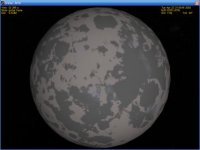
Columbia42, would you mind posting a screenshot of a rocky, terrestrial or martian planet? I need to verify something...

 
Last edited:
Sorry about the confusion, I did not mean that I was running OG in DirectX mode, I meant that I was running OG with Jarmonik's D3D9 graphics client for Orbiter installed but if the map already runs in DirectX (I thought it was OpenGL) then I was wrong about the switch. Here's a screenshot:

picture.php
 

Attachments

  • OG planet.jpg
    OG planet.jpg
    11 KB · Views: 3
Last edited:
Back
Top