Search Orbiter 2010 hi-res KSC

TitanII

New member
Joined
Jan 25, 2012
Messages
38
Reaction score
0
Points
0
Searched the forum & have read the manual.

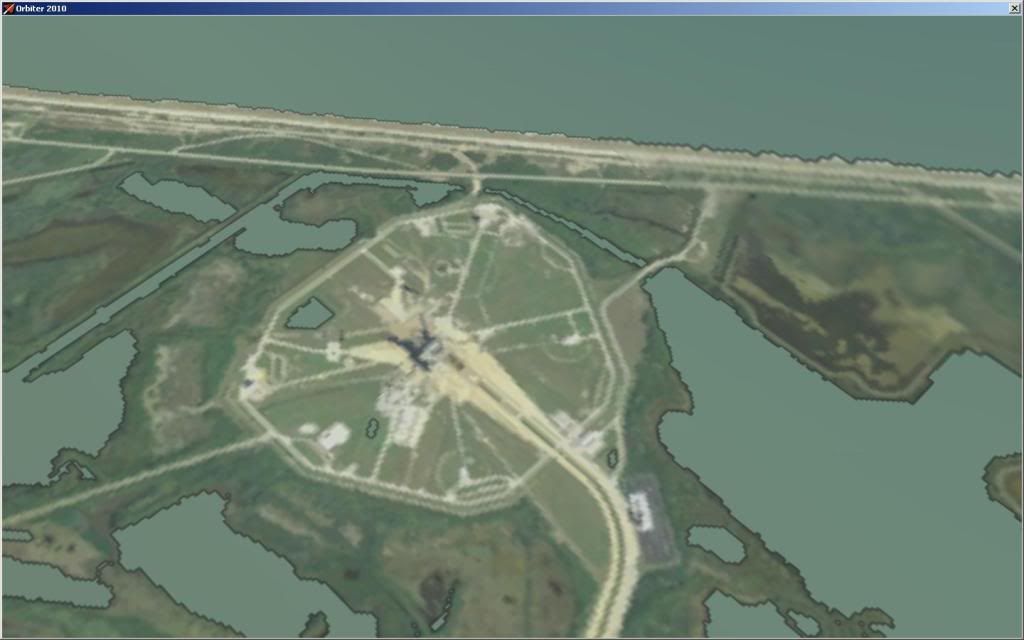
Are there hi-res KSC surface tiles for Orbiter 2010? The set by Kukanotas does not appear to line up correctly (there are also issues with the water along the coast). They looked great in Orbiter 2006 & would like something along those lines of resolution if it exists.

Or might there be a patch to line them up correctly in 2010?

Thanks in advance.
 
2010 comes with high res surface tiles for KSC already installed - just insure that level 14 tiles are enabled in the launchpad.
 
And they look much better than Hi-res KSC :). There's a huge difference in color.
But if you really want to use them one would have to combine all of them into one big image and cut them into tiles again. But don't ask me, I gave up creating surface tiles, the current system is quite hard to use.
 
I've reset the max resolution in the Earth cfg file (everything between 8 & 14) and there's no change in the appearance of the tiles when I launch Orbiter.

How do I get the level 14 resolution to show? AFAIK, they are installed (downloaded the main distribution & Earth level 11 - 14) since there are Earth textures in both the Textures & Textures2 folders. Hmm...:hmm:
 
Could be nice to have a comparison-thread with some screenshots side-by-side, just to have a quick peek, to help newbies (and ourselves) to decide.

Something like:


Vanilla Orbiter2010 P1
MGalleryItem.php


KSC Orbiter2010P1 + Earth091124_11_14
MGalleryItem.php


KSC Orbiter2010P1 + Earth091124_11_14 + Hi-res KSC
MGalleryItem.php
 
Last edited:
Okay...what've I got here?

WhatIsIt.jpg


Doesn't really look anything like what you've posted. KSC is better defined than the surrounding area, but from low/ground level, still not what I'm looking for...

WhatIsIt2.jpg


What I'd like to know is, how do I get from where I am to where I want to be? What settings will effect the change?

I'm well aware of Orbiter's graphic capability (at least previous versions of it), and what I'm currently seeing is well below that yardstick.
 
Okay, agreed.

If the Earth Level 11 - 14 files are installed, and I have the resolution set to 14 in the Earth cfg file, why do I see what I see?

How do I get to the true hi-res tiles?
 
Unlike Tommy, I don't think Orbiter comes with the high-res (11-14) tiles pre-installed. I'm not sure what level the default tiles are.
 
Unlike Tommy, I don't think Orbiter comes with the high-res (11-14) tiles pre-installed. I'm not sure what level the default tiles are.
Canaveral surface tiles are "hi-res" in stock Orbiter. Planetary tiles with L14 Florida aren't. You download the official L11+14 Earth textures from this page.
 
Yes, those are the files I downloaded, and yes, they are installed (the contents of the download were unzipped to the "Textures2" folder.

The "Earth cfg" visualization parameters are thus:

; === Visualisation Parameters ===
MaxPatchResolution = 14 ; surface texture resolution limit (1-12)
MinCloudResolution = 1 ; cloud layer from this resolution
MaxCloudResolution = 8 ; highest cloud resolution level
SpecularRipple = TRUE ; enable specular water microtexture


Why do I still not see the level 14 textures/tiles for Florida/KSC? What else needs to be modified or changed so they are visible?
 
MaxPatchResolution = 14 ; surface texture resolution limit (1-12)

What version are you using? 1 -12? It should be 1-14! Maybe you're using a beta version, or what? Looks like your orbiter version supports textures until lvl12...
 
What version are you using? 1 -12? It should be 1-14! Maybe you're using a beta version, or what? Looks like your orbiter version supports textures until lvl12...

I think the comment in the Earth.cfg file is just outdated. My Earth.cfg also says 1-12 in the comment section.
 
Yes, it's like blixel said...

What about your Launcher parameter -> Visual effects tab -> Max resolution level ?
 
Also set to 14.

Tried a "clean" install too. No add-ons what-so-ever. Just the "Earth091124_11_14" files.

Set all "max resolution levels" to 14.

Getting the same thing as before. I'm stumped.
 
Go into your Textures2 folder and tell us all of the contents you have in there, including file sizes and folders you might have.
 
Textures2 folder contains:

FOLDERS: Atlantis/ DG/ Dragonfly

TEXTURES: Eath_Cloud.tex TEX FILE (32,019 kb)
Earth_tile BIN FILE (434 kb)
Earth_tile.tex TEX FILE (440,042 kb)
Earth_tile_lmask.tex TEX FILE (294,458 kb)
Moon_tile BIN FILE (967 kb)
Moon_tile.tex TEX FILE (982,254 kb)

AFAIK, there's nothing in the folders that should relate to this issue (they're all dds files that are specific to those vessels), but if you need to know the contents, I can post those as well.

FWIW, I have 3 seperate installations of Orbiter 2010 on the drive. Have downloaded the Earth Level 11 - 14 files 2X (exact same contents & file sizes) and alternated their installation as well (just to be sure that there wasn't a problem with those). Max resolution is set to 14 in all Earth cfg files and the Visual Effects tabs in the Launch Pad.

The inability to bring up the hi-res tiles/textures affects all 3 installations.

Unless the file list posted above is incomplete (though in that case, wouldn't Orbiter crash due to the inability to find/load the files it's looking for?), I'm not sure what I'm missing here.
 
Hmm, strange. Nothing looks wrong there.

Does the moon work at level 11?
What GPU do you have? I think some older ones have problems with Level 11 and higher.
 
It's an overclocked GeForce GTX 580, but the whole system was upgraded last October (new graphic card/ 1200w PSU/ liquid cooling system for the CPU). I doubt the problem is the PC.

When the demands of the application exceeded the capability of older cards, it still loaded, it just ran poorly. Orbiter loads fine, no error messages in the log, and runs fine. It just doesn't display the hi-res Earth/Florida/KSC tiles.

I still have sevaral installations of Orbiter 2006 on the drive which are loaded with add-ons, hi-res tiles, high-poly models, etc, and they run perfectly.

I'm positive this is an "operator error," I just can't figure out what I'm missing.
 
Back
Top