
You are using an out of date browser. It may not display this or other websites correctly.
You should upgrade or use an alternative browser.
You should upgrade or use an alternative browser.
OHM US ISS A to Z v.3
- Thread starter OrbitHangar
- Start date
cosmoswonder
New member
For those having problems docking with the PMA2dummy I think I found a way to solve this issue: Just delete all the lines corresponding to the [DOCK_0] and [DOCK_1] in the config\spacecraft folder (PMA2dummy.ini and PMA2.ini). For me it worked fine I hope for you too 
Last edited:
Smasher77th
New member
- Joined
- Jan 28, 2009
- Messages
- 14
- Reaction score
- 0
- Points
- 1
For those having problems docking with the PMA2dummy I think I found a way to solve this issue: Just delete the lines corresponding to the [DOCK_0] and [DOCK_1] in the mesh conf. files (PMA2dummy.ini and PMA2.ini). For me it worked fine I hope for you too
Are you referring to files in the config\spacecraft? also, do you mean to delete the whole thing, eg:
Code:
[DOCK_0]
;to shuttle
POS=(0,0.625,1.082)
DIR=(0,0,-1)
ROT=(0,1,0)

DOCK_1]
;to node
POS=(0.00,-0.086,-1.278)
DIR=(0,0,1)
ROT=(0,1,0)
I had a problem of my rectangles appearing at the back, leading me in through the back of iss (meaning I had to penetrate all the other modules and dock to pma2 from the inside. Is this the problem you're referring to?
Thanks
cosmoswonder
New member
Are you referring to files in the config\spacecraft? also, do you mean to delete the whole thing, eg:
Code:[DOCK_0] ;to shuttle POS=(0,0.625,1.082) DIR=(0,0,-1) ROT=(0,1,0) DOCK_1] ;to node POS=(0.00,-0.086,-1.278) DIR=(0,0,1) ROT=(0,1,0)
I had a problem of my rectangles appearing at the back, leading me in through the back of iss (meaning I had to penetrate all the other modules and dock to pma2 from the inside. Is this the problem you're referring to?
Thanks
Yes! The files (PMA2dummy.ini and PMA.ini) are in the config\spacecraft and you have to delete the whole thing for proper working :yes:
The problem I was refering to was the incapability of docking to PMA2dummy (ISS AtoZ by Donamy) -You just can't dock to it, you fly all the through the PMA2-.
In the Docking MFD don't set the PMA2dummy as target because it won't work as long as you've deleted the Dock_0/Dock_1 in the config\spacecraft\PMA2.ini. and config\spacecraft\PMA2dummy.ini.. When you're in front of the docking port (PMA2) Set visual in the Docking MFD then it will guide you all the way to the contact point.
P.S.: You're not actually docking to the PMA2 but to the Harmony Module :tiphat:
-Sorry for my bad English :blush:
The reason you cannot dock to the PMA2, is because it is a child of the Harmony when it is attached. If you dock the PMA2 to the Harmony, then it will work. The list of things docked to everything else was too confusing, that's why I changed to attachments instead. The docking point were just never deleted.
cosmoswonder
New member
The reason you cannot dock to the PMA2, is because it is a child of the Harmony when it is attached. If you dock the PMA2 to the Harmony, then it will work. The list of things docked to everything else was too confusing, that's why I changed to attachments instead. The docking point were just never deleted.
Thank you for clarifying the reason we can't dock to the PMA2 :thumbup:
I deleted the docking points on my own, because was the only way I found to solve this issue. If you know another way to make it work feel free to share it with us :tiphat:
D
Deleted Orbinaut
Guest
Beautiful add-on. I noticed in my installation that the sun facing solar panels have no texture; they're blank white no matter what angle I view them from. The dark side of the panel (side away from the sun) looks normal:

I also noticed that this add-on overloads OrbiterSound. I get multiple lines in OrbiterSound_Log.txt that say:
My XR vessels don't have custom sounds as a result.
I also noticed that this add-on overloads OrbiterSound. I get multiple lines in OrbiterSound_Log.txt that say:
Code:
Only 60 vessel allowed
Reinstall the addon's textures and it'll work fine.
D
Deleted Orbinaut
Guest
Reinstall the addon's textures and it'll work fine.
Tried that, still get the blank solar panels. I reloaded both A2Z and Thornton's ISS 3.2. Orbiter.log excerpt:
Code:
Module SouyzTMA.dll .......... [Build 100902, API 100830]
Module Progress_M1.dll ....... [Build 100902, API 100830]
Module SouyzTM.dll ........... [Build 100902, API 100830]
Module Strela.dll ............ [Build 100904, API 100830]
Module CMG2.dll .............. [Build 110727, API 100830]
**** WARNING: Mesh not found: .\Meshes\lightpole.msh
D3D9Client::clbkStoreMeshPersistent(lightpole) hMesh is NULL
Module OTD.dll ............... [Build 100904, API 100830]
Module spotlight.dll ......... [Build 110308, API 100830]
Module evatether.dll ......... [Build 110406, API 100830]
Finished initialising status
Finished initialising camera
Finished initialising panels
Finished setting up render state
**** WARNING: Mesh not found: .\Meshes\.msh
**** WARNING: Mesh not found: .\Meshes\.msh
**** WARNING: Mesh not found: .\Meshes\.msh
Code:
**** WARNING: Mesh not found: .\Meshes\.msh
D3D9Client: [Scene Initialized]
Module Train.dll ............. [Build 120629, API 100830]
Module XR5Crane.dll .......... [Build 120519, API 100830]
Module ThemLPad.dll .......... [Build 120519, API 100830]
Module RadarDish.dll ......... [Build 120519, API 100830]
Module BigPad.dll ............ [Build 120519, API 100830]
D3D9Client: [Session Closed. Scene deleted.]
SketchPad Pens still in use 8
SketchPad Brushes still in use 18
**** Closing simulation session
Last edited by a moderator:
- Joined
- Feb 4, 2008
- Messages
- 9,753
- Reaction score
- 1,024
- Points
- 203
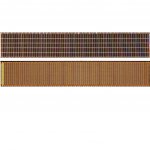
make sure your PVarray.dds looks like this.
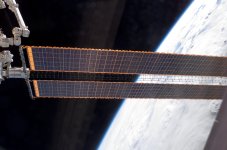
Speaking of that texture, could you make a new version that has the weird color distortions removed from the active side? They just lower the quality of the overall texture appearance and make the SAWs look bad.
Speaking of that texture, could you make a new version that has the weird color distortions removed from the active side? They just lower the quality of the overall texture appearance and make the SAWs look bad.
That doesn't tell me very much. Do you have a picture that shows the 'weird' distortions ?
- Joined
- Feb 4, 2008
- Messages
- 9,753
- Reaction score
- 1,024
- Points
- 203
Here. Note how the there's almost a diagonal "wave" of rainbow like distortion increasing in saturation near the right-hand end of th texture.That doesn't tell me very much. Do you have a picture that shows the 'weird' distortions ?


- Joined
- Feb 6, 2008
- Messages
- 38,965
- Reaction score
- 3,937
- Points
- 203
- Location
- Wolfsburg
- Preferred Pronouns
- Sire
Yes... the waves on the solar array texture are actually on the real array caused by the array not being perfectly flat - but these patterns change over time, as the ISS maneuvers.
D
Deleted Orbinaut
Guest
make sure your PVarray.dds looks like this.
Thanks for this. For some reason it only had the one texture in it. I had re-copied all the texture files from the zip folder before, but it didn't take somehow. I did it again now, made sure both textures were there, and now it's fine. Bonus is that a few other textures on the small parts that I didn't notice were missing before are there now too. I wonder how they got corrupted. Thanks again!
You may have downloaded some of the earlier payloads that I made, after the ISS AtoZ, some of the textures were probably changed in the newer version. That's all I can think of.
D
Deleted Orbinaut
Guest
Any ideas about the Orbiter Sound limit? Should I put non-A2Z vessels before the A2Z components in the scenario files? Do any of the A2Z components have custom sounds?
Similar threads

- Replies
- 67
- Views
- 22K


- Replies
- 0
- Views
- 5K

- Replies
- 7
- Views
- 4K

- Replies
- 2
- Views
- 4K

