Apollo 15: Lunar Ascent Preparation and RTCC Procedures?

Also it looks like you reburned your plane change?

Yes. No idea what I did incorrectly the first time, seemed like I repeated the same process but my dV's were different this time, and almost no residuals.
 
Yes. No idea what I did incorrectly the first time, seemed like I repeated the same process but my dV's were different this time, and almost no residuals.
Well whatever you did this time looks spot on based on that ascent pad crossrange
 
I probably messed up the RLS update or some other RTCC function, the PC process was new to me the first time through. So it's either A: Practice Makes Perfect, or B: Even A Blind Squirrel Occasionally Finds A Nut.
 
Off to a slow start.

When I power up the LGC and run V16 N65E, the LGC time displayed is 121:02, but MET is actually 167:36. Then I'm supposed to set the Mission Timer. But the time is obviously wrong, I should sync this up before I go on? But there's nothing in the checklist that indicates I'm supposed to do that at this point.

The checklist calls for an uplink to "Zero POS/NEG Cells". What's that and what do I do?

Then moving on to P57, the checklist wanted them to use Navi in Detent 03, but for me Navi is in detent 02.

Before I go any further I thought I'd get this stuff straightened out.
 
When I power up the LGC and run V16 N65E, the LGC time displayed is 121:02, but MET is actually 167:36. Then I'm supposed to set the Mission Timer. But the time is obviously wrong, I should sync this up before I go on? But there's nothing in the checklist that indicates I'm supposed to do that at this point.
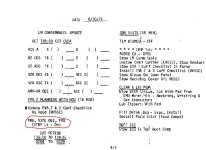
Ah this means you missed one of the exiting standby steps. You need to exit and reenter standby a few times during extended stay missions so the clock keeps updating (See attached)

In this case you need to update the LGC clock. You can if you like use the PAMFD clock update feature TELE->CLK->follow the directions on the PAMFD and this will essentially enter the appropriate DT to fix your clock. You can also use the CSM clock and update it the same way you did when you powered up the LM.

The checklist calls for an uplink to "Zero POS/NEG Cells". What's that and what do I do?
Ah don't worry about this, it isn't implemented yet its something with the error counters in the computer I believe but I need to do some homework to be sure.

Then moving on to P57, the checklist wanted them to use Navi in Detent 03, but for me Navi is in detent 02.
Is it not in both detents? What FOV is your AOT using?
 

Attachments

  • Screenshot 2022-01-08 114219.jpg
    Screenshot 2022-01-08 114219.jpg
    74.5 KB · Views: 376
Ah this means you missed one of the exiting standby steps.
Yeah, I completely missed it..... twice. So I messed up, but at least I'm consistent.
Is it not in both detents? What FOV is your AOT using?
Hmmm....I it's at 46 degrees. And I believe that should be 60 degrees? If I'm looking at the LM main panel the FoV in the upper left corner says 70 degrees, when I switch to the AOT it says 46. If I use the "X" key to zoom out to 60 I can see Navi at the very top of detent 03. So with a 60 degree FoV I see Navi in detents 02 and 03.

Is there something I can tweak in a .config file to set the AOT FoV to 60? Every time I move away from the AOT or change the detent it resets to 46. And the FoV has a huge effect on the spiral marks. I started using the Camera FoV selector to get a more accurate 60 degree FoV.

Anyway, after correcting the clock and running P57 I got a Gravity Angle error of +00067. After recycling I got +00001 so I pressed on.

Manually selecting star 03 in detent 03, I initially got a star angle difference of 000.20, where nominal is 000.10.

When I start P57 the LGC wants me to use star 12 in detent 06. Out of curiosity I re-started P57 using that and came up with a star angle difference of 003.12 (?).

So then I tried star 10 in detent 02, got a star angle difference of 005.62(!?).

Totally confused I re-did it with star 03 in detent 03 again, and got a star angle difference of 000.17.

Is that star angle difference acceptable? (FWIW I ran a V06N43 and got LAT +02609, LON +00361, the RTCC Landing Site shows LAT +02608 LON +00366).

Why would using different detent/star combinations give me such large differences?

Thanks
 
Yeah, I completely missed it..... twice. So I messed up, but at least I'm consistent.

Hmmm....I it's at 46 degrees. And I believe that should be 60 degrees? If I'm looking at the LM main panel the FoV in the upper left corner says 70 degrees, when I switch to the AOT it says 46. If I use the "X" key to zoom out to 60 I can see Navi at the very top of detent 03. So with a 60 degree FoV I see Navi in detents 02 and 03.

Is there something I can tweak in a .config file to set the AOT FoV to 60? Every time I move away from the AOT or change the detent it resets to 46. And the FoV has a huge effect on the spiral marks. I started using the Camera FoV selector to get a more accurate 60 degree FoV.

Anyway, after correcting the clock and running P57 I got a Gravity Angle error of +00067. After recycling I got +00001 so I pressed on.

Manually selecting star 03 in detent 03, I initially got a star angle difference of 000.20, where nominal is 000.10.

When I start P57 the LGC wants me to use star 12 in detent 06. Out of curiosity I re-started P57 using that and came up with a star angle difference of 003.12 (?).

So then I tried star 10 in detent 02, got a star angle difference of 005.62(!?).

Totally confused I re-did it with star 03 in detent 03 again, and got a star angle difference of 000.17.

Is that star angle difference acceptable? (FWIW I ran a V06N43 and got LAT +02609, LON +00361, the RTCC Landing Site shows LAT +02608 LON +00366).

Why would using different detent/star combinations give me such large differences?

Thanks
I think part of the issue is not using 60 FOV in the AOT. That FOV is essential for the cursor/spiral to accurately work. You can change the FOV in the AOT using the orbiter camera button. However the AOT should reset to 60 every time you back out and go back into it.

Also every time you are redoing things, are you torquing the platform? You may have propagated more error in the alignment that way causing off angle differences and such.

It could also be the case that your state vector (RLS) could be off as well. Did you update the LM SV and RLS before doing the P57?

Would you mind posting a scn I can investigate a bit as well.
 
Also every time you are redoing things, are you torquing the platform?
I wasn't clear on this. No, I just went as far as getting the star angle difference, then exited the scenario. I started all these P57s from a fresh point.

However the AOT should reset to 60 every time you back out and go back into it.
It doesn't, I have to reset the zoom for each mark.

It could also be the case that your state vector (RLS) could be off as well. Did you update the LM SV and RLS before doing the P57?
I did the RLS. And the CSM SV. But to be honest I don't remember if I did the LM SV. Let's check that out.....
 
Here's the last save after I did P57 with Navi detent 03.

Can't wait to see what new thing I've done incorrectly!:(
 

Attachments

Here's the last save after I did P57 with Navi detent 03.

Can't wait to see what new thing I've done incorrectly!:(
My FOV changes to 60 whenever I enter the AOT panel in this save. Also I misspoke when I said LM SV, it should just be the RLS on the surface.

Also the reason you cannot see Navi in detent 3 is because you are slightly at a tilt back and right with respect to the lunar surface. You can go ahead and use Navi in another detent or choose another star.

When you were redoing your P57's did you make sure to change your N06 values back to 00010 00110 00010 for the initial P57? They change if you redo it.

UPDATE: I just loaded your scn and performed a CM SV update, RLS update, and I did a P57 with the initial N06 values above (per the checklist) and got a star angle of 00004 on my first try using detent 2 (F) and Navi (03).
 

Attachments

Last edited:
When you were redoing your P57's did you make sure to change your N06 values back to 00010 00110 00010 for the initial P57? They change if you redo it.
What I did was started P57, ran it up through the gravity angle error (+00001). Then I saved the scenario. Then for all these sightings I've experimented with I started from that save point, it's as if it was the first time through. My N06 values have been 00010, 00003, 00010 which I got from the Lunar Surface Checklist p12-2.

You can go ahead and use Navi in another detent or choose another star.
When I try other stars I get really bad star angles (00312, 00562).

Let me ask this: I was switching back and forth between the microtextures and the improved Apollo Landing Site Sceneries, could that have put some strange angle into the LGC? (I'm currently using only the microtextures, so the LM should be level, right?) That's why I was puzzled with the initial gravity angle error of 00067, was the LGC starting with some bad saved orientation? Could my failure to re-visit the LGC after the EVAs thrown something off?

My FOV changes to 60 whenever I enter the AOT panel in this save.
Maybe some D3D9 setting I've got wrong? Something in the video or visual settings? I'll poke around.

Anyway I think I'll stay with the P57 until I feel like I'm getting it correct. It doesn't make sense to me that I would get such different results from sighting different stars.
 
What I did was started P57, ran it up through the gravity angle error (+00001). Then I saved the scenario. Then for all these sightings I've experimented with I started from that save point, it's as if it was the first time through. My N06 values have been 00010, 00003, 00010 which I got from the Lunar Surface Checklist p12-2.
Yep same procedure I am using.

When I try other stars I get really bad star angles (00312, 00562).

Let me ask this: I was switching back and forth between the microtextures and the improved Apollo Landing Site Sceneries, could that have put some strange angle into the LGC? (I'm currently using only the microtextures, so the LM should be level, right?) That's why I was puzzled with the initial gravity angle error of 00067, was the LGC starting with some bad saved orientation? Could my failure to re-visit the LGC after the EVAs thrown something off?
Odd I tried Polaris just now and also got a good star angle.

I dont think those should play into part as I have them all installed (micro textures, hi res textures, and landing sites.) Where you landed the LM is not level. You can load the scn file I posted above and you can see your CDR FDAI reflect the tilt.

Also the initial gravity error was always high, which is why you run it twice (V32). The second should be low.

As I said I am using your scn and having no trouble with P57s and getting good star angles, I wonder if it's your procedure/technique?
Maybe some D3D9 setting I've got wrong? Something in the video or visual settings? I'll poke around.

Anyway I think I'll stay with the P57 until I feel like I'm getting it correct. It doesn't make sense to me that I would get such different results from sighting different stars.
Not sure, I can send you my D3D9 settings if you like but I dont think that would have much of an impact here. Let me know if I can help you further or if you want me to type out my procedure for you as I am getting good results in your scn.
 
Last edited:
I wonder if it's your procedure/technique?
Must be. If you get good results using different stars and I don't, and we're both starting from the same point, it's got to be something I'm doing wrong. I'll keep playing with it.

FWIW during the marking sequence I've be alternating back and forth between the cursor and the spiral to get the 4 marks, don't know if that matters.

And what constitutes a good star angle in this procedure? What numbers are you getting?

I mean, how hard can this be? The dang LM is sitting still on the surface, the stars are almost stationary. It's just some silly thing I'm missing.

I appreciate you checking it out.
 
Must be. If you get good results using different stars and I don't, and we're both starting from the same point, it's got to be something I'm doing wrong. I'll keep playing with it.

FWIW during the marking sequence I've be alternating back and forth between the cursor and the spiral to get the 4 marks, don't know if that matters.

And what constitutes a good star angle in this procedure? What numbers are you getting?

I mean, how hard can this be? The dang LM is sitting still on the surface, the stars are almost stationary. It's just some silly thing I'm missing.

I appreciate you checking it out.
Not a problem, I am going to type out the whole thing with respect to NASSP so if I cover things that are simple I apologize in advance!

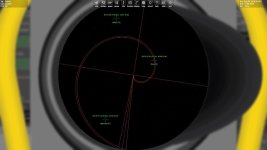
Confirm 60 FOV in AOT (this is essential if using 1920x1080)

P57 Option 4:
V04 N06 R2=00004

PRO

V06 N34 = TIG Liftoff (using your time of 171:35:11.88)

PRO

V05 N06
R1: 00010
R2: 00003 -> Gravity & Celestial Body
R3: 00010 -> No REFSMMAT defined & Stored attitude available

PRO and gravity measurement starts

N04 Gravity Error -> usually high on the first iteration so it is recycled with V32 (I got +00295 as my first)

N04 Gravity Error -> second iteration should be low (+00000 for me)

PRO and you get the stored ICDU angles (angles when you shut down) (N22) PRO again to set them

V01 N70
Star and detent -> what I do here is check the AOT first for the prescribed star and detent, in your case you cannot see Navi in detent 3. Your computer actually figures this out as well as if you put 00303 in, it will return 00203. I am just going to put 00203 in here and PRO

N79 -> Shows the expected cursor and spiral angles and position code (detent) PRO

N71-> Returns the expected detent and star to mark, if I put 00303 in N70, this would actually return 00203. Since I used 00203 in N70, and the computer figures out that Navi is in detent 2, it returns my input of 00203 -> PRO

V52 N71
R1 -> 00203 (shows the expected detent and star to mark)
R2 -> Cursor marks
R3 -> Spiral marks

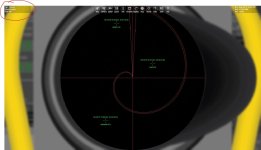
Here you begin marking, the Verb denotes if its expecting a cursor or spiral mark (V52=cursor V53=spiral.) Since we are on V52, we are going to cursor mark first. Go to the AOT detent select and select detent 2 (F) and then look into the AOT itself and verify 60 FOV (Attachment 1) *EDIT only for 1920x1080

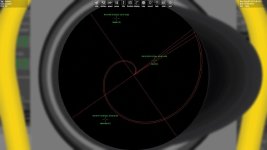
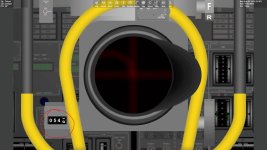
Rotate the AOT so the cursor covers the star using W and S and then fine tune it with Alt-W/Alt-S (Attachment 2.) Mark with Q. Then go to the AOT detent select to see where the counter is (Attachment 3.) The counter is XXX.X deg so you need to interpolate the hundredths digit based on where the tens is in the counter. I interpret this this to be 54.93 so then we go back to the DSKY.

V21 N79

We enter +XXX.XX deg here so +05493 and PRO

Now on V52 N71 R2 shows a 1 in A and in E. This means cursor marking is currently selected and there is 1 cursor mark stored. If we press ENTER, V52 changes to V53 and R3 A digit gets a 1 denoting ready to mark spiral.

Return to the AOT and rotate so the star is between the two spiral lines (Attachment 4) and mark. Just like we did before, go to the AOT display and interpret the angle displayed and then enter it into V22 N79.

You want to do 4 cursor and 4 spiral marks, I usually do them alternating until I have 4 marks in each. Then PRO and you will get the star angle difference here (N05) For gravity and star, you want <00010, this can be plus or minus. PRO

Lastly, like any alignment, you will be given the torqueing angles (N93) here of course you can accept or reject. To redo it, V32, or if you had a good star angle, PRO and it will torque the ICDU and bring up a N25 00014, and you can just hit ENTER and exit P57.

I ran all of this on the save you sent, so it does indeed work! Let me know if this run-through helps at all or if you identify any differences.
 

Attachments

  • Attachment 1.jpg
    Attachment 1.jpg
    49.5 KB · Views: 270
  • Attachment 2.jpg
    Attachment 2.jpg
    48.8 KB · Views: 279
  • Attachment 3.jpg
    Attachment 3.jpg
    69.4 KB · Views: 289
  • Attachment 4.jpg
    Attachment 4.jpg
    48.2 KB · Views: 332
Last edited:
I am going to add another reply here and ask what screen resolution you are running orbiter in? This also could be a reason for the FOV being incorrectly displayed for the AOT. If this is the case then your FOV gets "compensated" and will no longer be "60" (sounds like your case) and you dont want to change it to 60 like I previously mentioned. Also, are you able to "scroll" your panel around when in the AOT using the arrow keys? If so you may have moved the AOT from its default position.
 
Back
Top