Wedge313
Well-known member
Yes. No idea what I did incorrectly the first time, seemed like I repeated the same process but my dV's were different this time, and almost no residuals.Also it looks like you reburned your plane change?

Yes. No idea what I did incorrectly the first time, seemed like I repeated the same process but my dV's were different this time, and almost no residuals.Also it looks like you reburned your plane change?

Well whatever you did this time looks spot on based on that ascent pad crossrangeYes. No idea what I did incorrectly the first time, seemed like I repeated the same process but my dV's were different this time, and almost no residuals.

Bring it on.Now you get your ascent, tweak burn, and a very short rendezvous timeline
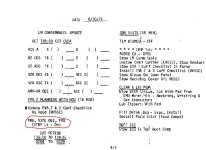
Ah this means you missed one of the exiting standby steps. You need to exit and reenter standby a few times during extended stay missions so the clock keeps updating (See attached)When I power up the LGC and run V16 N65E, the LGC time displayed is 121:02, but MET is actually 167:36. Then I'm supposed to set the Mission Timer. But the time is obviously wrong, I should sync this up before I go on? But there's nothing in the checklist that indicates I'm supposed to do that at this point.
Ah don't worry about this, it isn't implemented yet its something with the error counters in the computer I believe but I need to do some homework to be sure.The checklist calls for an uplink to "Zero POS/NEG Cells". What's that and what do I do?
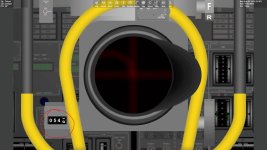
Is it not in both detents? What FOV is your AOT using?Then moving on to P57, the checklist wanted them to use Navi in Detent 03, but for me Navi is in detent 02.
Yeah, I completely missed it..... twice. So I messed up, but at least I'm consistent.Ah this means you missed one of the exiting standby steps.
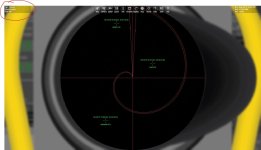
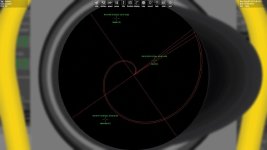
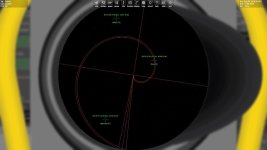
Hmmm....I it's at 46 degrees. And I believe that should be 60 degrees? If I'm looking at the LM main panel the FoV in the upper left corner says 70 degrees, when I switch to the AOT it says 46. If I use the "X" key to zoom out to 60 I can see Navi at the very top of detent 03. So with a 60 degree FoV I see Navi in detents 02 and 03.Is it not in both detents? What FOV is your AOT using?
I think part of the issue is not using 60 FOV in the AOT. That FOV is essential for the cursor/spiral to accurately work. You can change the FOV in the AOT using the orbiter camera button. However the AOT should reset to 60 every time you back out and go back into it.Yeah, I completely missed it..... twice. So I messed up, but at least I'm consistent.
Hmmm....I it's at 46 degrees. And I believe that should be 60 degrees? If I'm looking at the LM main panel the FoV in the upper left corner says 70 degrees, when I switch to the AOT it says 46. If I use the "X" key to zoom out to 60 I can see Navi at the very top of detent 03. So with a 60 degree FoV I see Navi in detents 02 and 03.
Is there something I can tweak in a .config file to set the AOT FoV to 60? Every time I move away from the AOT or change the detent it resets to 46. And the FoV has a huge effect on the spiral marks. I started using the Camera FoV selector to get a more accurate 60 degree FoV.
Anyway, after correcting the clock and running P57 I got a Gravity Angle error of +00067. After recycling I got +00001 so I pressed on.
Manually selecting star 03 in detent 03, I initially got a star angle difference of 000.20, where nominal is 000.10.
When I start P57 the LGC wants me to use star 12 in detent 06. Out of curiosity I re-started P57 using that and came up with a star angle difference of 003.12 (?).
So then I tried star 10 in detent 02, got a star angle difference of 005.62(!?).
Totally confused I re-did it with star 03 in detent 03 again, and got a star angle difference of 000.17.
Is that star angle difference acceptable? (FWIW I ran a V06N43 and got LAT +02609, LON +00361, the RTCC Landing Site shows LAT +02608 LON +00366).
Why would using different detent/star combinations give me such large differences?
Thanks
I wasn't clear on this. No, I just went as far as getting the star angle difference, then exited the scenario. I started all these P57s from a fresh point.Also every time you are redoing things, are you torquing the platform?
It doesn't, I have to reset the zoom for each mark.However the AOT should reset to 60 every time you back out and go back into it.
I did the RLS. And the CSM SV. But to be honest I don't remember if I did the LM SV. Let's check that out.....It could also be the case that your state vector (RLS) could be off as well. Did you update the LM SV and RLS before doing the P57?
It doesn't, I have to reset the zoom for each mark.
Yes.Are you using 2D cockpit?
Yeah that should be setting back to 60 automatically. Can i test your scn?Yes.
My FOV changes to 60 whenever I enter the AOT panel in this save. Also I misspoke when I said LM SV, it should just be the RLS on the surface.Here's the last save after I did P57 with Navi detent 03.
Can't wait to see what new thing I've done incorrectly!
What I did was started P57, ran it up through the gravity angle error (+00001). Then I saved the scenario. Then for all these sightings I've experimented with I started from that save point, it's as if it was the first time through. My N06 values have been 00010, 00003, 00010 which I got from the Lunar Surface Checklist p12-2.When you were redoing your P57's did you make sure to change your N06 values back to 00010 00110 00010 for the initial P57? They change if you redo it.
When I try other stars I get really bad star angles (00312, 00562).You can go ahead and use Navi in another detent or choose another star.
Maybe some D3D9 setting I've got wrong? Something in the video or visual settings? I'll poke around.My FOV changes to 60 whenever I enter the AOT panel in this save.
Yep same procedure I am using.What I did was started P57, ran it up through the gravity angle error (+00001). Then I saved the scenario. Then for all these sightings I've experimented with I started from that save point, it's as if it was the first time through. My N06 values have been 00010, 00003, 00010 which I got from the Lunar Surface Checklist p12-2.
Odd I tried Polaris just now and also got a good star angle.When I try other stars I get really bad star angles (00312, 00562).
Let me ask this: I was switching back and forth between the microtextures and the improved Apollo Landing Site Sceneries, could that have put some strange angle into the LGC? (I'm currently using only the microtextures, so the LM should be level, right?) That's why I was puzzled with the initial gravity angle error of 00067, was the LGC starting with some bad saved orientation? Could my failure to re-visit the LGC after the EVAs thrown something off?
Not sure, I can send you my D3D9 settings if you like but I dont think that would have much of an impact here. Let me know if I can help you further or if you want me to type out my procedure for you as I am getting good results in your scn.Maybe some D3D9 setting I've got wrong? Something in the video or visual settings? I'll poke around.
Anyway I think I'll stay with the P57 until I feel like I'm getting it correct. It doesn't make sense to me that I would get such different results from sighting different stars.
Must be. If you get good results using different stars and I don't, and we're both starting from the same point, it's got to be something I'm doing wrong. I'll keep playing with it.I wonder if it's your procedure/technique?
Not a problem, I am going to type out the whole thing with respect to NASSP so if I cover things that are simple I apologize in advance!Must be. If you get good results using different stars and I don't, and we're both starting from the same point, it's got to be something I'm doing wrong. I'll keep playing with it.
FWIW during the marking sequence I've be alternating back and forth between the cursor and the spiral to get the 4 marks, don't know if that matters.
And what constitutes a good star angle in this procedure? What numbers are you getting?
I mean, how hard can this be? The dang LM is sitting still on the surface, the stars are almost stationary. It's just some silly thing I'm missing.
I appreciate you checking it out.