Problem Dragonfly invisible after loading scenario

Jacko13

Narwhal
Joined
Aug 3, 2010
Messages
14
Reaction score
0
Points
0
Location
The Arctic Circle
whenever I load any of the dragonfly scenarios, it loads normal, but when it finishes, I can't see the dragonfly. I see the label that says "TUG-01". I can see the little capsules i can connect, but not the dragonfly itself. even when I load one from the scenario editor. I think I may have accidentally deleted a mesh or texture somehow. I'm not sure when this happened exactly...:compbash2:
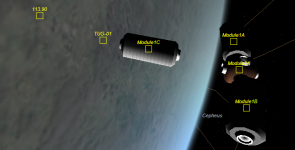
Dragonfly.png
 
If you deleted a mesh, just reinstall. Not sure what other help you want. :shrug:
 
If you'd deleted the mesh, the Orbiter.log file would show that.

Have a read of this article, it should help you give us the information we need to adequately help.
 
If you deleted a mesh, just reinstall. Not sure what other help you want. :shrug:

Well, the Dragonfly scenarios were defaults. I've already had to reinstall Orbiter cuz the files were screwed up. I don't want to do it again.

WAIT!:idea:

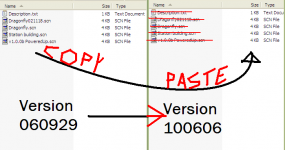
I have 060929 and 100606 on my desktop. Would it be possible to copy the 060929 dragonfly scenarios, meshes, textures, etc. and paste them into 100606?
dragonflyfiles.png
 
Generally a missing mesh will cause a CTD. An invisible mesh is caused by a missing component, normally a C++ runtime of one sort or another so make sure you have checked that you have the various C++ runtimes installed.

Moving the files from 2006 to 2010 will only have the effect of moving the files. If a runtime is missing the dragonfly will still be invisible.
 
...Moving the files from 2006 to 2010 will only have the effect of moving the files. If a runtime is missing the dragonfly will still be invisible.

Thanks, you just stopped me from doing something stupid. I was waiting for a reply specific to that question.

Oh, two more questions:

  1. What's a CTD?
  2. What's a runtime?

Ok I checked the textures and meshes, everything's where it's supposed to be. I think. And Orbiter.log didn't show anything about deletes
 
Last edited:
CTD = Crash To Desktop. You don't really need to know what a runtime is, just that there are specific ones you need. Orbiter 2010 comes with a "redist" file in the Install folder, but the installation verifier should test and verify those runtime libraries before you actually get that far.
 
CTD=Crash to desktop which is what Orbiter does when it encounters something it does not understand - i.e. a missing mesh.

Runtime = A set of components, often a library that a compiled DLL might call. For example -> Visual C++ 2005 Runtime

That and the 2008 runtime will often fix invisible mesh issues.
 
Ok I found some files that looked important. Here goes nothin:

Dragonfly.cfg (saved as .txt)
View attachment Dragonfly.txt

Dragonfly.bmp
View attachment Dragonfly.bmp

FlightData.log (it says TUG-01, which is the vessel name in the scenarios)
View attachment FlightData.log

Oh here's these:
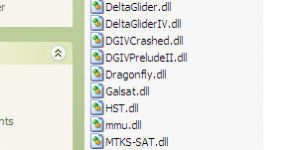
Dragonflydll.png
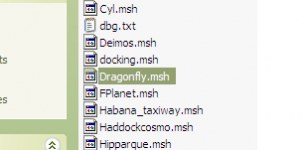
Dragonflymsh.png

Any significant files missing?


I know the way I posted these is probably frowned upon by the orbiter community...so I don't really want any crap about it. It was just easier...:dry:
 
Last edited:
Have you actually read the last two posts in this thread? If the file was missing, Orbiter would stop and complain about it, it wouldn't just carry on regardless and pretend nothing's wrong. That only happens in certain circumstances, as detailed above. It's not due to missing files.
 
Back
Top