Eagle Cockpit Graphics

Jax6213

Donator
Donator
Joined
Feb 22, 2008
Messages
36
Reaction score
0
Points
0
Location
Seattle
Hello!

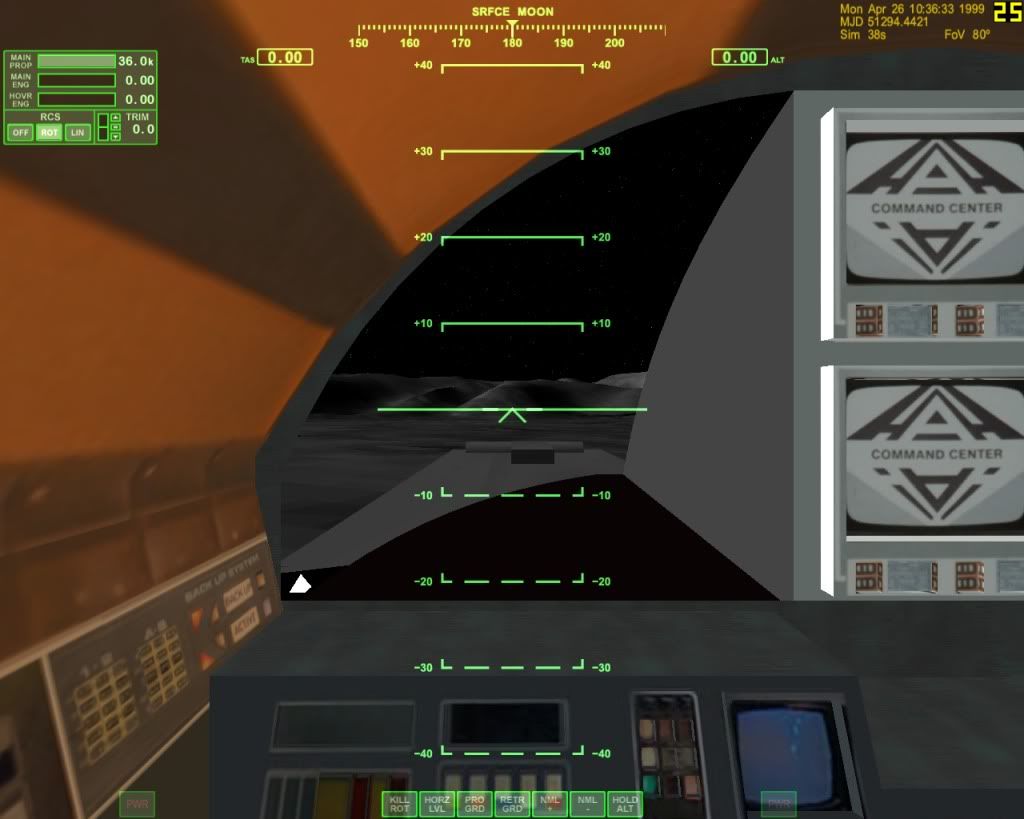
Is there a way to turn off or remove the cockpit graphics for the eagle transporter from the Moon base Alpha add on? I ask because it's difficult seeing out the front window when the graphics are turned on.

Thanks
 
Here's a photo about what I'm talking about. The hud graphics are nice but I want to know if it can be removed.

cf89fb69.jpg
 
Last edited:
The HUD Graphics are part of the orbiter core and as such the key combination is listed in the orbiter manual as 'Ctrl-H'.
 
The HUD Graphics are part of the orbiter core and as such the key combination is listed in the orbiter manual as 'Ctrl-H'.


Thanks for the reply, but Control-H turns off the hud not the graphics.

-Jax
 
Are the graphics the ones on the center area. They are all part of the mesh. So they can not be removed.
 
Thanks for the reply, but Control-H turns off the hud not the graphics.

-Jax

When you said 'HUD Graphics' I assumed you meant 'the graphical HUD overlay'. In that case use F8.
 
Here's a photo about what I'm talking about. The hud graphics are nice but I want to know if it can be removed.

cf89fb69.jpg

The reason F8 doesn't work is because that's not a Virtual Cockpit.
The "hud graphics" you are talking about are part of the mesh (the 3d model) file of the ship and thus cannot be removed, without removing the whole model as well. Only thing you can do is press z to shorten your field of view.

-EDIT:
This might be what can solve your problem: [ame="http://www.orbithangar.com/searchid.php?ID=3624"]CameraViewMFD[/ame]
-Activate the MFD in the modules tab of Orbiter launchpad
-Run a scenario and open CameraViewMFD on one of the MFDs
-Use the buttons to place the camera wherever you want.
 
Last edited:
The best solution would be to place the HUD or MFDs on the center cockpit displays. I don't remember exactly if my VC mesh is already prepared for this. If not, it's simple to add the required rectangles.

Nevertheless, the Eagle doesn't have a realistic viewing position. I did the best I could in providing the greatest exterior view while following what was shown on the series.

Now, if we disregard the interior views from the series and simply follow the exterior design, then we have windows under the pilot legs, much like an helicopter....
 
Last edited:
If we changed the long chairs to something that extends less, the two lower cockpit windows (as seem from the outside) could be visible from the inside, bellow the main control console. Of course, this is not shown on the series.
But it could be done as an alternate Eagle command pod.
 
Maybe but you run the risk of seeing thru the main mesh and seeing the back side of the nose part.

At one time I and others played around with a separate command pod. But it just added more stuff to deal with. Like another attachment. How do you load the crew in. From the command pod how do you control the Eagle. I recounter these in the UltraProbe. I just dded for the main ship a camera position the same as the pod.

The command pod may have also had landing gear.
http://www.space1999.net/catacombs/main/models/eagle/w2mebits.html
 
I agree, too much effort for little gain. Given the current Orbiter features, the Eagle is quite good.
I was merely mentioning the idea of having interchangeable command pods.
But in practice the concept doesn't work that well. Where's the engine located, for example?
 
Last edited:
Back
Top