
You are using an out of date browser. It may not display this or other websites correctly.
You should upgrade or use an alternative browser.
You should upgrade or use an alternative browser.
General Question F4?
- Thread starter ddom2006
- Start date

jinglesassy
New member
You have to enable it in orbiter launchpad modules tab.

Lucy
in the sky, with diamonds.
Administrator
Moderator
Orbiter Contributor
Addon Developer
Webmaster
GFX Staff
Beta Tester
- Joined
- Aug 9, 2009
- Messages
- 7,110
- Reaction score
- 1,304
- Points
- 203
- Location
- 10.0.0.1
- Website
- www.orbiter-radio.co.uk
- Preferred Pronouns
- she/her
Try pressing CTRL and F4.

Works on my end, are you using orbiter.exe or orbiter_ng.exe with a separate client?

- Joined
- Jan 14, 2008
- Messages
- 9,267
- Reaction score
- 1,738
- Points
- 203
- Location
- VA
- Website
- alteaaerospace.com
- Preferred Pronouns
- he/him
Hold down CTRL and press F4 at the same time; a dialog titled "Custom Functions" should pop up at the top-left of your Orbiter window. It should work for both Orbiter.exe and Orbiter_NG.exe.
If you press F4, you should get this:
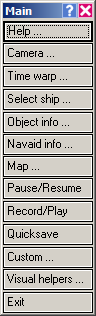
However if you hold down control then press F4, you should get this:
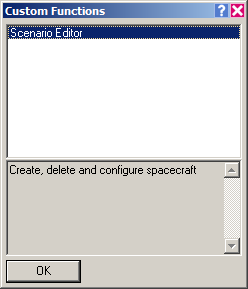
However if you hold down control then press F4, you should get this:

ddom2006
New member
- Joined
- Nov 12, 2009
- Messages
- 155
- Reaction score
- 0
- Points
- 0
Works on my end, are you using orbiter.exe or orbiter_ng.exe with a separate client?
Orbiter.exe I believe.
Hold down CTRL and press F4 at the same time; a dialog titled "Custom Functions" should pop up at the top-left of your Orbiter window. It should work for both Orbiter.exe and Orbiter_NG.exe.
I tried all possible variations of CTRL + F4 and just pressing F4. Nothing pops up for me.
Lucy
in the sky, with diamonds.
Administrator
Moderator
Orbiter Contributor
Addon Developer
Webmaster
GFX Staff
Beta Tester
- Joined
- Aug 9, 2009
- Messages
- 7,110
- Reaction score
- 1,304
- Points
- 203
- Location
- 10.0.0.1
- Website
- www.orbiter-radio.co.uk
- Preferred Pronouns
- she/her
But you can bring up the vessel selection screen (F3)?
How about the other function keys, CTRL+F1, F2 etc, do they pull up menu items? Some work with control held, some just work when pressed unmodified.
How about the other function keys, CTRL+F1, F2 etc, do they pull up menu items? Some work with control held, some just work when pressed unmodified.
ddom2006
New member
- Joined
- Nov 12, 2009
- Messages
- 155
- Reaction score
- 0
- Points
- 0
The only things that works on the F panel are F1 and F8. Nothing else seems to be working. I checked both window mode and full screen mode, various vessels, etc. Still no success.
*Edit - Did check the F buttons out of the simulator as well, works fine for everything else, Just not for Orbiter 2010*
*Edit - Did check the F buttons out of the simulator as well, works fine for everything else, Just not for Orbiter 2010*
Lucy
in the sky, with diamonds.
Administrator
Moderator
Orbiter Contributor
Addon Developer
Webmaster
GFX Staff
Beta Tester
- Joined
- Aug 9, 2009
- Messages
- 7,110
- Reaction score
- 1,304
- Points
- 203
- Location
- 10.0.0.1
- Website
- www.orbiter-radio.co.uk
- Preferred Pronouns
- she/her
That's extraordinarily odd. I'd suggest checking out the keymap file and making sure they're not mysteriously unbound in some way. Since you haven't mentioned it, I'm guessing the other controls work as expected.
I saw a post here a few days ago about numpad 1 and 3 not working. Perhaps it's the same issue. Is this happening in a clean install or one with addons present?
I saw a post here a few days ago about numpad 1 and 3 not working. Perhaps it's the same issue. Is this happening in a clean install or one with addons present?
Lucy
in the sky, with diamonds.
Administrator
Moderator
Orbiter Contributor
Addon Developer
Webmaster
GFX Staff
Beta Tester
- Joined
- Aug 9, 2009
- Messages
- 7,110
- Reaction score
- 1,304
- Points
- 203
- Location
- 10.0.0.1
- Website
- www.orbiter-radio.co.uk
- Preferred Pronouns
- she/her
You can open .cfg files with notepad.
Beyond this, I'm not sure what else to suggest. These keys have always worked fine on my end unless some addon I've coded is interfering with the key command, which can't be the case if it doesn't work on a clean install.
Beyond this, I'm not sure what else to suggest. These keys have always worked fine on my end unless some addon I've coded is interfering with the key command, which can't be the case if it doesn't work on a clean install.
ddom2006
New member
- Joined
- Nov 12, 2009
- Messages
- 155
- Reaction score
- 0
- Points
- 0
I did a number of remarkably simple things, restarted the computer, pulled the keyboard out of its USB port, put it in another USB slot... and now it's decided it wants to work again. So who knows why I didn't want to work for the last 3 days or so *sigh*. Thanks for your help everyone  .
.
.
If you have a keyboard with tall keys, then shake it. A bit of food or something might be jammed behind the key, preventing it's operation.
And don't ask me how I know that!
And don't ask me how I know that!

Similar threads

- Replies
- 2
- Views
- 857

- Replies
- 6
- Views
- 3K


- Replies
- 3
- Views
- 2K

