Open-source versions of built-in MFDs?

Hielor

Defender of Truth
Donator
Beta Tester
Joined
May 30, 2008
Messages
5,580
Reaction score
2
Points
0
So I've started down the long and lonely road of building a simpit for Orbiter. Both my roommate and I are much more software people than hardware people, so naturally we've decided to start with the software aspect.

We will have several external MFDs, which will be separate laptops networked to the main sim computer using a modified version of Orb:Connect. The laptops are Thinkpad 600Es, chosen more for their abundance at the local Goodwill Computer Store than anything else. They will be running Linux (a stripped-down version of Slackware 10.2).

Due to the performance limitations of these laptops and the presence of several of them, using External MFD with MaxiVista (or a similar virtual desktop extender) is not an option. Each system will need to be running its own MFDs, with the only communication from the server being data packets (via the modified Orb:Connect).

The problem is twofold: One, MFDs compiled for Orbiter will not be usable (at least not directly--it would probably be easier to just rebuild the things from source than to try to rip out bits and pieces of Wine code to load the dlls) on the Linux platforms. Two (and more importantly), the most basic MFDs are actually inside Orbiter and can't be brought out, either as a dll or source.

I've looked around a bit, but haven't found any open-source versions of built-in MFDs that I could port to Linux--things like the Orbit MFD, Surface MFD, and Transfer MFD. The Transfer MFD seems to be the only one that has been re-created, but both TransX and IMFD appear to be closed-source.

Do such things exist, or am I stuck re-writing these things by hand? Orbit MFD might not be too bad (and would let me do cool things I've been thinking of like 3D...) but the Surface MFD doesn't look like it would be too much fun...

Edit: Apologies if this is the wrong forum; I was considering also the OrbiterSDK (since this is a source inquiry), but since they're addons...
 
hmmm, interest problem.

A possible solution that I would think would be easier is create a dll that exports the various information (I think alot of the required data is already calculated by the Orbiter core) to the PCs.

The PCs would use this data and reconstruct the MFD using its own software.

I realise this is the exact opposite of what you want, but that is what I am thinking of.

If you ask the right people, you may be able to aquire the source code of some addon mfds ;)
 
hmmm, interest problem.

A possible solution that I would think would be easier is create a dll that exports the various information (I think alot of the required data is already calculated by the Orbiter core) to the PCs.

The PCs would use this data and reconstruct the MFD using its own software.

I realise this is the exact opposite of what you want, but that is what I am thinking of.

If you ask the right people, you may be able to aquire the source code of some addon mfds ;)

Not really the exact opposite of what I want--that's sort of where the project is currently going. An addon on the computer that's running orbiter will send the necessary data (ie, for a surface MFD: airspeed, altitude, AoA, bank angle, etc) to the laptop, which will then display that data using all the fanciness one expects from an MFD.

Sorry if I didn't get that across very well in my original post.

Of course, it occurs to me that most of what the MFDs do after they have the data is drawing, which I'd have to convert to use the Linux graphics library anyway (from the Windows GDI). It's mostly that I think converting a program from GDI to Allegro would be easier than starting from scratch.
 
If you are planning to ask Martin for the source code, ask him if he could release whole orbiter under MIT license.
 
If you are planning to ask Martin for the source code, ask him if he could release whole orbiter under MIT license.

Yeah. Then we can stop waiting for Orbiter 2008. And wait for Orbiter 0.0.1.2 Build 7567, with the first release candidate being ready when martins has the time to do the important work, as most people will only code stupid new features - like integrating Orbiter Sound, Orulex and UMMU into the core, instead of continuing the path towards giving Orbiter a microkernel and a more modular architecture.

I am all for Open-source development, if there exists a useful core team and an architecture that allows it. Orbiter is one of the many cases, where a closed-source standard kernel and an open-source add-on/client layer is better.

Just look at the orbiter add-on development. We have many projects, which are open-source and could need all help from coders. But finally all projects are kept running by 2-4 core developers, with almost zero support by other developers, even small patches are rare (I think there had been only three orbiter coders in history, which provided small patches to a open-source add-on, and I am one of them).

Do you think, this situation will change, when the core engine is open-source? :dry: Even the OVP project is kept running by the usual suspects - and it is as open-source as Orbiter could possibly get.
 
I thought Orbiter did use the MIT license(which says nothing about open-source)? I guess that was one of the add-ons I looked at, nevermind--I haven't slept in...hmmm, going on 26 hours now I think. Yay.

I was not planning on asking Martin for the Orbiter source code--I'm pretty sure plenty of people more qualified than myself have done so in the past to no avail, and as Urwumpe points out, that's not necessarily a bad thing.

The Orbiter community is already small enough as it is--we don't need people forking off their own versions of the software and going in wholly different directions resulting in incompatible softwares. "Hey, this add-on says it's for Orbiter, why isn't it working? Oh, it's for x-and-y's version of orbiter, which blah blah blah blah blah..." Releasing the full source code would, I think, open up a rather large can of worms.

I'm not asking for sources from the Orbiter core. I'm asking if there's existing MFDs out there that have been written to improve upon the built-in ones (like TransX/IMFD did for the Transfer MFD) that I could take and adapt to run on a remote machine running Linux.

If there isn't, it'll be a bunch more coding (and actually reading that astrodynamics book my dad got me last year when I went to work for USA, lol) on my part but it won't kill the project by any means. Hopefully anything I make won't be inferior to what's in the orbiter base, but even if it's far better I can't really see it being all that useful to too many other people (since it will have been written for Linux, not Windows).

Anyway. I think I should go to sleep sometime, I'm starting to not make sense.
 
I'm not asking for sources from the Orbiter core. I'm asking if there's existing MFDs out there that have been written to improve upon the built-in ones (like TransX/IMFD did for the Transfer MFD) that I could take and adapt to run on a remote machine running Linux.

Did you look already into the OVP Project? I think this project requires making the build-in MFDs open source or at least separated from the closed-source core part... but I am not sure. My graphic programming skills are not even good enough for programming a CCTV module for SSU, let alone cooperating in the OVP Project, so I can't tell you, if they are open-source or some other solution was found.
 
I think this project requires making the build-in MFDs open source or at least separated from the closed-source core part... but I am not sure.
Not quite. The way MFD's works is probably being reworked, and things like common instrumentation library for new drawing system appear along the way, but standard MFD's stays inside for the moment.
There was a small discussion on the subject some 6 months ago, and Martins said that they (at least surface MFD) used some data from the core directly, so getting them out is not so straight-forward.
Nothing on the subject as of late, i've asked about his plans on MFDs and their drawing methods in the latter debug thread, but the question was passed unanswered, probably unnoticed.

but both TransX and IMFD appear to be closed-source.
Last time i've checked they both was open-source, TransX for sure.
 
Not quite. The way MFD's works is probably being reworked, and things like common instrumentation library for new drawing system appear along the way, but standard MFD's stays inside for the moment.
There was a small discussion on the subject some 6 months ago, and Martins said that they (at least surface MFD) used some data from the core directly, so getting them out is not so straight-forward.
Nothing on the subject as of late, i've asked about his plans on MFDs and their drawing methods in the latter debug thread, but the question was passed unanswered, probably unnoticed.

Thanks for the info. Yeah, if it's getting data directly out of the core, it wouldn't necessarily help much to have the source anyway.

Last time i've checked they both was open-source, TransX for sure.

I see the TransX version 2.1 source on Orbit Hangar, but not any more recent versions...and I didn't see the IMFD sources in the IMFD download or listed separately...
 
I'm sure that if you e-mailed jarmonik, maker of IMFD, he'd probably be more than happy to give you the source (of course, I may be jumping the gun here, and I sure can't speak for anyone, least of all myself. Or jarmonik).

Anyway, the base MFDs shouldn't be too hard to "clone", especially if you're sending the flight data to the Thinkpads in a sort of "CurrentAOA = x". I have no idea what I'm talking about here, so don't worry.

But wait... Thinkpads. *thinks* Aren't they a little bulky? Oh, wait... you could remove the screens and have the motherboard elsewhere, in some corner of the beast... And they use 'em on the ISS! At least, according to a caption in this article. Because you can fake anything these days. Back to the topic.

I was talking about ripping the screens off, right? Well, it might be cheaper to get one fairly good computer, capable of running MaxiVista or otherwise, and then grabbing a bunch of external monitors from places. Small, thin ones. Maybe cheaper. How much do the ThinkPads cost, anyway?

Anyway, whatever you do, I think this is going to be one awesome project. Be sure to make three: One for you, one for your roomate, and one for me. :)
 
But wait... Thinkpads. *thinks* Aren't they a little bulky? Oh, wait... you could remove the screens and have the motherboard elsewhere, in some corner of the beast...
About 5 lbs fully loaded, about 12x9.5x1.5 inches external dimensions. Not all that bad. We were planning on "coaxing" (read: removing) the hinges to allow us to fold the screen all the way around resulting in a package with a keyboard facing out on one side and a screen facing out on the other side. We would then mount the thing to the back of our panels.

I was talking about ripping the screens off, right? Well, it might be cheaper to get one fairly good computer, capable of running MaxiVista or otherwise, and then grabbing a bunch of external monitors from places. Small, thin ones. Maybe cheaper. How much do the ThinkPads cost, anyway?
Doubtful. Right now we've probably averaged about $60-70 per, and that's including the touchscreen monitor we bought for the one with the bum screen (talk about difficult to mount...i'm really not looking forward to that).
The local goodwill computer store has the following price scheme:

$20 for what they call a "scraptop"--basically just a motherboard and case. No battery, hard drive or caddy, cdrom/floppy drives, memory, or plastic covers (like the thing that covers the memory sticks). Usually high end PIs to low end PIIIs.

$5 for a battery. Most are the orginal ones that came with the laptop and probably won't hold a charge, although I did pick up a replacement one that will hold a charge for like 3 hours.

$9 for 128mb PC133Mhz SoDIMM.

$10 for 6.6GB hard drive.

$10 for a CDROM

$5 per cover/caddy (this adds up quick--the 600E has two covers and an HD caddy, but the people who work there know me so they've typically given me one of the 3 for free)

$15 per AC adapter.

Radioshack has the BIOS battery for about $4, and all of the ones we've gotten have had a dead one.

If you want a machine you can actually use normally, it'll be around $80-90. For the purpose of an MFD machine, you only really need the scraptop, an AC adapter, and a way to boot it -- the 600E has 32MB built-in RAM which we think will be enough. So it'd be about $50 for a basic MFD machine.

Also check ebay. I picked up a complete system (228MB ram total, 6.6GB HD, CD-ROM, battery (which didn't hold a charge at all, but at least it covers the hole in the case), a 10/100 network card, and all covers for only $30 including shipping, and it's in excellent condition. I only needed to throw in an AC adapter and a BIOS battery.

Also, MaxiVista doesn't allow you to hook up additional monitors, it just allows another computer to pretend it's an additional monitor. To get 4 screens on one computer then you'd need either 2 graphics cards or a Matrox TripleHead2Go box or something similar. That right there would push the budget above what I've spent on the thinkpads, and we haven't even gotten to the rest of the desktop or the screens themselves yet!

Anyway, whatever you do, I think this is going to be one awesome project. Be sure to make three: One for you, one for your roomate, and one for me. :)

Haha...we're currently considering the possibility of having a 2-seater. I think tandem would be easier to accomplish, but side-by-side would be cooler. What would be awesome I think is if you had it as an side-by-side setup but with the ability to somehow partition them to act as two separate pits.

Probably our first version will just be a single-seater to get the software and hardware set up right. After you've got it all working once, it's really just a matter of duplicating everything to the second seat if you want a two-seater.

Well, I have now managed to thoroughly hijack my own thread. Whoops. The simpit is still in the design phase at this point, but when(if...) we move to development/construction I'll probably set up a blog somewhere.
 
TransX is closed source at the moment, but not for any specific reason. I've got no problem open-sourcing it though. I'll look into doing this when I get back from the Oktoberfest.
 
IMFD is also a closed source software. Where would you need those sources anyway ? Those codes won't work without Orbiter's Application Programming Interface.

I suppose it should be possible to run non-graphics version of Orbiter and ExternalMFD plugin in it. However, I have never tested that. It would also require finding a way to syncronize multible orbiter installations.

How many displays you are planning to use running the orbiter and how many MFDs ?

I suppose the easiest way would be using a dual screen configuration, one 17" or 15" LCD display for running 4 MFDs in it and the orher remaining LCD for the in-flight-view.

Also, Is it possible to display different camera angles in different display in current orbiter version or the furure versions ?
 
agentgonzo:
agentgonzo said:
TransX is closed source at the moment, but not for any specific reason. I've got no problem open-sourcing it though. I'll look into doing this when I get back from the Oktoberfest.
That would be awesome, thanks. If you'd rather not though, I can use the 2.1 source on OH, assuming you're still allowing people to use that.

Have fun at the Oktoberfest!

jarmonik:

IMFD is also a closed source software. Where would you need those sources anyway ? Those codes won't work without Orbiter's Application Programming Interface.

The API will be emulated through the use of a modified Orb:Connect, allowing the API calls to be available to a remote machine. Additionally, I would need to modify the drawing calls to use the Allegro API rather than GDI. I suppose that both of these tasks could be done by implementing a middle layer, but I suspect that modification of the original would be easier.

I suppose it should be possible to run non-graphics version of Orbiter and ExternalMFD plugin in it. However, I have never tested that. It would also require finding a way to syncronize multible orbiter installations.

How many displays you are planning to use running the orbiter and how many MFDs ?
The machines that will be hosting the MFDs will be running Linux, which precludes the use of ExternalMFD. We currently have 3 laptops which will be runing 1 MFD each, As for the Orbiter itself, it'll either be running across three screens (if I figure out how to convince it to do so--has anyone tried Orbiter using a TripleHead2Go?) or on a single projector.

Also, Is it possible to display different camera angles in different display in current orbiter version or the furure versions ?
I don't know, but that would be absolutely awesome.

Both:

If you don't want to release the source, that's totally cool though, I understand -- it's not like the modifications that I would be making would be useful to the Orbiter community at large, which is pretty much the point of open-source. Only reason I was asking was because I didn't want to re-invent the wheel from scratch if there was an open-source option already available--I'm not asking for the source to closed-source projects if the author would rather keep them that way.
 
Also, Is it possible to display different camera angles in different display in current orbiter version or the furure versions ?
Can CameraMFD be used with ExtMFD?
 
Last edited:
Today I tried to make a clone of Orbit MFD, with the intention of releasing it open source. Normally that wouldn't be really useful, but now I can combine three things:

  • I can fulfill the request in this thread
  • I can use it as the first test-case of my "KOST" library (see another thread)
  • I can use it to learn making MFDs.

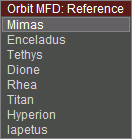
However, I found an interesting problem: I can't find an API function to make menus like the one in the attached picture. And, as far as I can see in the MFDs on my system, only built in MFDs seem to use such menus.

This must be a known problem for MFD add-on developers. Does anyone have a solution?
 

Attachments

  • menu.png
    menu.png
    2.7 KB · Views: 7
Last edited:
Maybe, we can create such menus as dialog... would be a evil hack...

Otherwise, I would sign quickly the call for implementing such menus into the OVP infrastructure.
 
Have you considered how much trouble it would save using a Windows platform instead of Linux ?
 
Have you considered how much trouble it would save using a Windows platform instead of Linux ?

There are also good cross platform game engines, which implement similar features as Orbiters graphics functions supply (in terms of user interfaces).
 
Back
Top