
You are using an out of date browser. It may not display this or other websites correctly.
You should upgrade or use an alternative browser.
You should upgrade or use an alternative browser.
New Release Release of OrbiterSound 4.0 (3D)
- Thread starter dansteph
- Start date


Is the on-orbit music from "Vangelis" ???
If so you've done me a great honor in picking this......
"Calm space" by Pawel Blaszczak license bought on ShockWave:
http://www.shockwave-sound.com/track/3435
It say it's inspired from Vangelis

My Dad was a huge Vangelis fan and loved their music....
He died 9 years ago and when I heard the music for the first time tonight looking down at that blue earth below me it litterally brought tears to my eyes...........
Just a sentimental fool I guess.........................
He died 9 years ago and when I heard the music for the first time tonight looking down at that blue earth below me it litterally brought tears to my eyes...........
Just a sentimental fool I guess.........................

Thanks for the great update Dan!
One question: after installing V4.0 on top of the existing 3.5 I am not able to play any of the mp3's I had installed in the related folder except the default one you have installed with the new version (they do not even appear in the mp3 list on the MFD if I try to recall them running Orbiter)
Am I missing something or omitted to change some settings?
One question: after installing V4.0 on top of the existing 3.5 I am not able to play any of the mp3's I had installed in the related folder except the default one you have installed with the new version (they do not even appear in the mp3 list on the MFD if I try to recall them running Orbiter)
Am I missing something or omitted to change some settings?

- Joined
- Sep 12, 2010
- Messages
- 3,133
- Reaction score
- 415
- Points
- 123
- Location
- Rome
- Website
- www.tuttovola.org
If you had copied your mp3 files directly into your Sound\mp3 folder, you have to rename/delete the file orbitersound_playlist.m3u (a Winamp playlist).
Last edited:

- Joined
- Oct 30, 2009
- Messages
- 14,019
- Reaction score
- 4
- Points
- 0
But you don't have to rename or delete it. You can add them into that playlist instead.If you had copied your mp3 files directly into your Sound\mp3 folder, you have to rename/delete the file orbitersound_playlist.m3u (a Winamp playlist).
- Joined
- Sep 12, 2010
- Messages
- 3,133
- Reaction score
- 415
- Points
- 123
- Location
- Rome
- Website
- www.tuttovola.org
Oh yes, of course you don't have to.
It's just that I've never liked/used WinAmp, and have always followed Dansteph's indications, found in the "Sound\mp3\ReadMe How to add more Mp3.txt" file:
COPY FILES TO THIS MP3 FOLDER
-------------------------------------
Another solution is to simply copy any MP3 you want
into this directory. IN THIS CASE YOU MUST EMPTY THE PLAYLIST
or RENAME IT AS "orbitersound_playlist.back" FOR EXAMPLE.
OrbiterSound looks first for the M3U playlist
and stops the search of MP3s in this folder if it finds
even one entry in the playlist.
This is not the only option though.
It's just that I've never liked/used WinAmp, and have always followed Dansteph's indications, found in the "Sound\mp3\ReadMe How to add more Mp3.txt" file:
COPY FILES TO THIS MP3 FOLDER
-------------------------------------
Another solution is to simply copy any MP3 you want
into this directory. IN THIS CASE YOU MUST EMPTY THE PLAYLIST
or RENAME IT AS "orbitersound_playlist.back" FOR EXAMPLE.
OrbiterSound looks first for the M3U playlist
and stops the search of MP3s in this folder if it finds
even one entry in the playlist.
This is not the only option though.
- Joined
- Sep 12, 2010
- Messages
- 3,133
- Reaction score
- 415
- Points
- 123
- Location
- Rome
- Website
- www.tuttovola.org
I assumed it was Winamp because Dansteph wrote (in the same txt file) "WINAMP M3U PLAYLIST SOLUTION (recommended)".
Anyway I think it's a bit redundant to add mp3s in the Sound\mp3 folder and then add those same files to that playlist.
Anyway I think it's a bit redundant to add mp3s in the Sound\mp3 folder and then add those same files to that playlist.
Last edited:

- Joined
- Apr 1, 2008
- Messages
- 2,164
- Reaction score
- 658
- Points
- 113
Me neitherI don't have any idea why what work for everyone fail in your case.
No. I mean it's plain Orbiter_100830 (nothing else)You don't use any Orbiter patch yes ? I see in log Orbiter version is 100830.
I re-did my check on a different machine and on a different folder ("D:\OrbiterSound40\") with no change.What might not be good is the "program files" folder which is doomed for file permission.
Try to copy your orbiter folder elsewhere (user directory) then run again the OrbiterSound
installer on this new folder, if not done give admin right to the installer.
I thought about the file-permissions myself already, but after my current setup it seems not to be the problem.
The only module installed/enabled is OrbiterSound.Next eventually disable all other modules and check.
Sorry, but my work-around was a "doesn't-work-around". I jumped the gun a bit (see my EDIT-EDIT in my post). What happened after disabeling 3D Audio was just that the sound of the (wrong) DeltaGlider appeared louder and I thought it worked. But it did not change anything! Please don't advertise this work-around 'cause it isn't gonna change anything. Sorry for that.That's strange... disabling 3D don't change at all the focus call order. So it really sound like a speaker config problem (I mean a 3D sound rendering problem of your system)
But that is not consistent with your focus problem... which is not consistent at all with ok status when 3D disabled.
Can you post the log when you disable 3D and load the welcome scenario ?
I sum up my installation steps here, so we might find a clue:
- Extracted orbiter100830.zip into "D:\OrbiterSound40" folder
- Executed OrbiterSound40_20121120_setup.exe and selected "D:\OrbiterSound40" folder to install into.
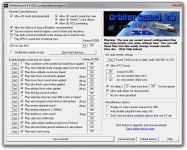
- Ran "D:\OrbiterSound40\SoundConfig.exe" and selected "Never play MP3" (see attachment for further details)
- Ran "D:\OrbiterSound40\Orbiter.exe", activated "OrbiterSound" under Modules and ran "_OrbiterSound 4.0 demo\01- Per-vessel sound environnment.scn" Scenario...
- ...pressed Space after the "welcome to OrbiterSound" anouncment (nice voice BTW) finished
- Closed and re-started Orbiter.exe
- Selected the "2010 Edition\Welcome.scn" Scenario.
So I can now only think of the "Never play MP3" option that might be different to other installations (will check later if that does make any difference)
Regards,
Kuddel
Attachments
Having the only two machine where OrbiterSound fail is really a strange coincidence.
If it's the same download it's possible its corrupt, clear your browser's cache, download again.
What OS on the two machines ? Special hardware on both ?
DirectX and drivers up to date ?
If it's the same download it's possible its corrupt, clear your browser's cache, download again.
What OS on the two machines ? Special hardware on both ?
DirectX and drivers up to date ?
Last edited:
- Joined
- Apr 1, 2008
- Messages
- 2,164
- Reaction score
- 658
- Points
- 113
I doubt that the download is corrupt, 'cause I haven't used the same binary.Having the only two machine where OrbiterSound fail is really a strange coincidence.
If it's the same download it's possible its corrupt, clear your browser's cache, download again.
What OS on the two machines ? Special hardware on both ?
DirectX and drivers up to date ?
The two machines are as follows:
a) "Home" / Laptop
OS: Windows 7 Home Premium (64 bit)
Sound: n/a
[*]
DirectX: n/a
[*]
Sound HW: n/a
[*]
b) "@Work" / LENOVO ThinkCenter
OS: Windows 7 Professional (64 bit)
Sound HW: Realtek high Definition Audio
Can I provide some more detailed logs (OrbiterSound, DxDiag, whatever?)
Regards,
Kuddel
[*] 'cause I am writing this at work, I can't tell you exactly the specs of my "home" machine
...but I will post an updated the info-table as soon as I am @ home.
- Joined
- Apr 1, 2008
- Messages
- 2,164
- Reaction score
- 658
- Points
- 113
Hi again,
now beeing at home I can update the information:
So, apart from the OS (Premium Home vs. Professional) both machine share the same chipsets and DirectX installations (wich is not soooooo good for comparison ).
I still have the feeling that something prevents Orbiter from calling the clbkFocusChanged ...But I have no idea what could be the reason for that.
Changing the focus manually (via F3) works perfectly well, just the playback scenario doesn't seem to do it.
Am I right, that the following should/will appear in the OrbiterSound_Log.txt any time the focus changes:
?
I think I will make a module (addon) that just logs calls of clbkFocusChanged into a log-file, just to see if there IS a difference between playback and 'manual focus change'.
Again, can I provide some more detailed logs (OrbiterSound, DxDiag, whatever?)
Regards and thanks for any efforts,
Kuddel
---------- Post added at 22:23 ---------- Previous post was at 21:58 ----------
Hi again (again),
I've written and run an addon that logs the calls to "opcFocusChanged".
And it shows, that the opcFocusChanged is only called once if I run the "Welcome" playback scenario,
while every F3 vessel change triggers the opcFocusChangedlike expected!
Can anyone else reproduce this with plain Orbiter 100830 "Welcome"-scenario? I mean, the "no specific Atlantis sound when it starts" issue.
Currently I am out of options here. I do however try more recent Orbiter Versions as well (although I know they are not officially supported by OrbiterSound 4.0; just for the tests)
Good night, from a puzzeled,
Kuddel
---------- Post added at 23:15 ---------- Previous post was at 22:23 ----------
INVESTIATION RESULTS:
I've run the tests with all the Orbiter (beta) Versions[1] and all of them only call opcFocusChanged once for a playback scenario[2]!
It seems that during playback only the Camera Target changes, not the Vessel Focus.
So, this is something that should be either fixed in Orbiter,
or we accept the fact that playback doesn't have propper sound,
or we find another solution[3]
But anyway I am wondering: Shouldn't this behavior be present for all users, not just me? Maybe not many run the "Welcome" Scenario and expect a Vessel Specific sound for Atlantis?
Regards,
Kuddel
[1] 100830, 101016, 110822, 110824, 111029, 111105, 121023 & 121025
[2] tested with "2010 Edition\Welcome.scn"
[3] How did OrbiterSound 3.5 handle this?
now beeing at home I can update the information:
- "Home" / Laptop
OS: Windows 7 Home Premium (64 bit)
DirectX: 11
Sound HW:Realtek High Definition Audio - "@Work" / LENOVO ThinkCenter
OS: Windows 7 Professional (64 bit)
DirectX: 11
Sound HW: Realtek High Definition Audio
So, apart from the OS (Premium Home vs. Professional) both machine share the same chipsets and DirectX installations (wich is not soooooo good for comparison
).I still have the feeling that something prevents Orbiter from calling the clbkFocusChanged ...But I have no idea what could be the reason for that.
Changing the focus manually (via F3) works perfectly well, just the playback scenario doesn't seem to do it.
Am I right, that the following should/will appear in the OrbiterSound_Log.txt any time the focus changes:
Code:
Focus changed attempting to load vessel wave
Info: Sound config found for class: XXXXXXXXX. NN parameters set.
Focus changed load vessel wave - OKI think I will make a module (addon) that just logs calls of clbkFocusChanged into a log-file, just to see if there IS a difference between playback and 'manual focus change'.
Again, can I provide some more detailed logs (OrbiterSound, DxDiag, whatever?)
Regards and thanks for any efforts,
Kuddel
---------- Post added at 22:23 ---------- Previous post was at 21:58 ----------
Hi again (again),
I've written and run an addon that logs the calls to "opcFocusChanged".
And it shows, that the opcFocusChanged is only called once if I run the "Welcome" playback scenario,
while every F3 vessel change triggers the opcFocusChangedlike expected!
Can anyone else reproduce this with plain Orbiter 100830 "Welcome"-scenario? I mean, the "no specific Atlantis sound when it starts" issue.
Currently I am out of options here. I do however try more recent Orbiter Versions as well (although I know they are not officially supported by OrbiterSound 4.0; just for the tests)
Good night, from a puzzeled,
Kuddel
---------- Post added at 23:15 ---------- Previous post was at 22:23 ----------
INVESTIATION RESULTS:
I've run the tests with all the Orbiter (beta) Versions[1] and all of them only call opcFocusChanged once for a playback scenario[2]!
It seems that during playback only the Camera Target changes, not the Vessel Focus.
So, this is something that should be either fixed in Orbiter,
or we accept the fact that playback doesn't have propper sound,
or we find another solution[3]
But anyway I am wondering: Shouldn't this behavior be present for all users, not just me? Maybe not many run the "Welcome" Scenario and expect a Vessel Specific sound for Atlantis?
Regards,
Kuddel
[1] 100830, 101016, 110822, 110824, 111029, 111105, 121023 & 121025
[2] tested with "2010 Edition\Welcome.scn"
[3] How did OrbiterSound 3.5 handle this?
Hi again,
It seems that during playback only the Camera Target changes, not the Vessel Focus.
AAAaaaaaaaaaaaaaaaaaaaaaaaaaaaaaaaaah....
I thought it was a bug with normal scenarios NOT with playback scenario. :facepalm:
Shouldn't this behavior be present for all users, not just me?
Yes of course I have it.
No focus change= no callback= no sound change.
[3] How did OrbiterSound 3.5 handle this?
It's even worse as we have wind in space (Focus on GL01 while cam on Shuttle docked to ISS)
So, this is something that should be either fixed in Orbiter,
or we accept the fact that playback doesn't have propper sound,
or we find another solution[3]
There is no way of detecting a focus change that is never made in Orbiter.
So this bug should be reported to Martin.
Sorry for misunderstanding, to be sure you confirm that all is working as expected with "non playback scenario" ?
In anyway thanks for having tested so much this issue.
Dan
EDIT: Issue added to FAQ
http://orbiter.dansteph.com/forum/read.php?f=2&i=15516&t=15516
Last edited:
- Joined
- Apr 1, 2008
- Messages
- 2,164
- Reaction score
- 658
- Points
- 113
to be sure you confirm that all is working as expected with "non playback scenario" ?
Yes, in "non-playback scenario"s everything works as expected.
So I think a callback like "clbkCameraTargetChanged" should be requested from the Doctor, right?
Code:
[COLOR=Blue]namespace[/COLOR] oapi {
[COLOR=SeaGreen]  // ...[/COLOR]
[COLOR=Blue]  class[/COLOR] OAPIFUNC Module: [COLOR=Blue]public[/COLOR] ModuleNV {
[COLOR=Blue]  public[/COLOR]:
     [COLOR=SeaGreen]// ...[/COLOR]
[COLOR=SeaGreen]
[/COLOR][COLOR=SeaGreen]     /**
[/COLOR][COLOR=SeaGreen]      * \brief Change of camera view target notification
[/COLOR][COLOR=SeaGreen]      *
[/COLOR][COLOR=SeaGreen]      * Called when camera target view is switched to a new object.
[/COLOR][COLOR=SeaGreen]      *
[/COLOR][COLOR=SeaGreen]      * \param new_target handle of object receiving the camera focus
[/COLOR][COLOR=SeaGreen]      * \param old_target handle of old_target losing camera focus
[/COLOR][COLOR=SeaGreen]      * \default Calls \ref opcCameraTargetChanged, if defined in the module.
[/COLOR][COLOR=SeaGreen]     * \note This callback function is also called at the beginning of
[/COLOR][COLOR=SeaGreen]      *   the simulation, where new_target is the object receiving the
[/COLOR][COLOR=SeaGreen]      *   initial camera focus, and old_target is NULL.
[/COLOR][COLOR=SeaGreen]      * \note clbkCameraTargetChanged is sent to non-vessel modules after any
[/COLOR][COLOR=SeaGreen]     *   vessel receiving and/or losing focus have been notified via
[/COLOR][COLOR=SeaGreen]      *   VESSEL2::clbkFocusChanged.
[/COLOR][COLOR=SeaGreen]      */[/COLOR]
     [COLOR=Blue]void[/COLOR] clbkCameraTargetChanged (OBJHANDLE new_target, OBJHANDLE old_target);
     [COLOR=SeaGreen]// ...[/COLOR]
  }; [COLOR=SeaGreen]// class Module[/COLOR]
[COLOR=SeaGreen]  // ...[/COLOR]
}; [COLOR=SeaGreen]// namespace oapi[/COLOR]Thanks for looking into it,
Kuddel
So far so excelent. Adds a lot to the experience even when using old, simple spacecraft3 vessels. Among other things (ah....the birds...the sea), I loved the MFD option for manually turning on the capcom chat in these cases.
Overall, a spiritually ravishing gift. Thanks, Dan.
BEEP
Overall, a spiritually ravishing gift. Thanks, Dan.
BEEP
So I think a callback like "clbkCameraTargetChanged" should be requested from the Doctor, right?
Kuddel
Nope, only focus vessel should play sound because it's the one that receive all commands, the one where is the player.
Camera target != vessel focus at anytime.
Playback should just record focus change and "play" them again. ie: At record time in the welcome video there was
several focus change that aren't played, hence the problem.
Last edited:

Spacethingy
Multitasker
- Joined
- Sep 9, 2010
- Messages
- 1,515
- Reaction score
- 0
- Points
- 36
- Location
- Not the anti-matter universe
- Website
- spacethingy.weebly.com
Ooooo... lovely job! Thank you very much! The sounds have an extra kinda quality to them now. My first view of the ISS with the new background music gave a reaction not disimilar to hearing "Air On a G-String" for the first time in space - a worth successor!
:thumbup: x100
:thumbup: x100
{{The auditorium lights dim & the music fades. The curtain rises, and a single, nearly overpowering, spotlight shines upon me. Digging through my pocket I pull out my prepared speech & adjust my tie. Looking over the audience and coming to the stage front, I figure you deserve 1up and crumble the prepared speech. A live presentation instead of a pre-scripted sermon. In a philosophical contemplative tone of voice I begin my introduction..}}
There are times.. (thunderous applause) ..THERE ARE TIMES! ..when the quality of a freeware package exceeds that of commercial for-profit software.. My fellow Orbiter fans.. With the introduction of OrbiterSound, iteration #4, this is a trend which is only gathering steam. (roaring applause!!)
(audience settling down)
What is driving force behind such a phenomenon? Perhaps it is nothing more than a love of one's work. Heart and soul being poured, by bucketloads, into projects such as this; what a wonderful accomplishment!
It is important make mention of the longevity of many freeware and open-sourced projects.. These are among the longest running franchises in the software industry today. In many instances these projects outlive multiple generations of operating systems and hardware upgrade cycles. Impressive! I've followed long-lived undertakings of this magnitude many times before, and today is no different.
I've been following many of these freeware gigs since the mid 1990's. And it still amazes me that the level of consistency between major releases remains at an impressively high level. Let me cite an example, without naming names, a system maintenance utility which I have used for almost 9 years. Over those 9 years I've seen functionality steadily increase. And yet the only outward changes visible to the user have been some updated icons. Throw in some new menu items to address new features and call it a day. There is no need for constant user interface changes and modifications. Do away with the busy work! Little things like that really do add to the experience. Same thing can be said for installation procedures. Clean. Concise. Trouble-free. And while installation routines are not often used, not as often as the main program itself, a clean routine is equally appreciated.
Let it be known for all time it is add-ons like this which take an already impressive program, Orbiter in this case, and kick it up a notch!
(screaming audience standing ovation style)
Thankyou, thankyou.... Thank-YOU!!!
{{My introduction is complete - I now leave the stage. The hum of 10kw power amplifiers comes online and a second set of curtains retract to show a 30meter screen}}
[someone finish this I have to be outa here now]
There are times.. (thunderous applause) ..THERE ARE TIMES! ..when the quality of a freeware package exceeds that of commercial for-profit software.. My fellow Orbiter fans.. With the introduction of OrbiterSound, iteration #4, this is a trend which is only gathering steam. (roaring applause!!)
(audience settling down)
What is driving force behind such a phenomenon? Perhaps it is nothing more than a love of one's work. Heart and soul being poured, by bucketloads, into projects such as this; what a wonderful accomplishment!
It is important make mention of the longevity of many freeware and open-sourced projects.. These are among the longest running franchises in the software industry today. In many instances these projects outlive multiple generations of operating systems and hardware upgrade cycles. Impressive! I've followed long-lived undertakings of this magnitude many times before, and today is no different.
I've been following many of these freeware gigs since the mid 1990's. And it still amazes me that the level of consistency between major releases remains at an impressively high level. Let me cite an example, without naming names, a system maintenance utility which I have used for almost 9 years. Over those 9 years I've seen functionality steadily increase. And yet the only outward changes visible to the user have been some updated icons. Throw in some new menu items to address new features and call it a day. There is no need for constant user interface changes and modifications. Do away with the busy work! Little things like that really do add to the experience. Same thing can be said for installation procedures. Clean. Concise. Trouble-free. And while installation routines are not often used, not as often as the main program itself, a clean routine is equally appreciated.
Let it be known for all time it is add-ons like this which take an already impressive program, Orbiter in this case, and kick it up a notch!
(screaming audience standing ovation style)
Thankyou, thankyou.... Thank-YOU!!!
{{My introduction is complete - I now leave the stage. The hum of 10kw power amplifiers comes online and a second set of curtains retract to show a 30meter screen}}
[someone finish this I have to be outa here now]
Similar threads
- Replies
- 8
- Views
- 4K

- Sticky
- Replies
- 6
- Views
- 9K

- Replies
- 16
- Views
- 5K


- Replies
- 10
- Views
- 5K