Space Shuttle Ultra 1.25 Revision B development

Bitmaps can't have alpha channels, only .dds can have an alpha channel.

There are RGBA bitmaps in windows for quite some time now.

 
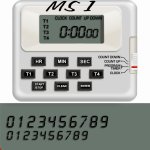
Sorry, but I'm not familiar with using them. Is there anything you need added or changed, with what I've done ? I can make the LCD screen blank if you need it, and move all the text to another bitmap, if you wish.
 
Bitmaps can't have alpha channels, only .dds can have an alpha channel.
In the windows dialog code you can choose a transparency key (just an RGB value) which Windows will display as transparent. You can choose any colour you like so long as it is a known RGB value and not the same colour as anything you want displayed (just like a green screen). Then just paint anything you want transparent in that colour.

---------- Post added at 23:25 ---------- Previous post was at 22:48 ----------

There are RGBA bitmaps in windows for quite some time now.
I see you are right:
http://msdn.microsoft.com/en-us/library/ms633556(VS.85).aspx
but you need to pre-multiply the RGB values in your source bitmap by the corresponding alpha channel values:
http://msdn.microsoft.com/en-us/library/dd183393(VS.85).aspx
I think your alpha channel will only have values of either 0 or 255 so you could save yourself the trouble and just set all transparent areas to black.
 
Is this better ?
 

Attachments

  • stopwatch.jpg
    stopwatch.jpg
    86.3 KB · Views: 852
Yeah, looks much more realistic :)
 
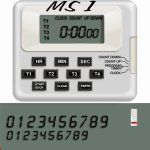
Can you use that, or do you need me to send you something more ?
 
Can you use that, or do you need me to send you something more ?

Looks good that way, I would split the bitmap into two parts, but that is a part I can do...wait...the sliding switch at the side of the clock should be separated, so I can paint it as well.
 
Looks good that way, I would split the bitmap into two parts, but that is a part I can do...wait...the sliding switch at the side of the clock should be separated, so I can paint it as well.


Can this work ?
 

Attachments

  • stopwatch.jpg
    stopwatch.jpg
    87.2 KB · Views: 817
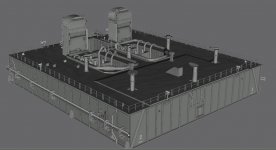
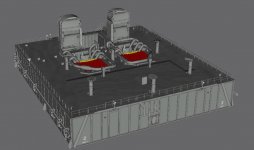
New MLP in progress. Now with correct dimensions and new textures. Also going to have correct shapes on the SRB overpressure suppression water pipes.
 

Attachments

  • New_MLP_1.jpg
    New_MLP_1.jpg
    106.6 KB · Views: 866
New MLP in progress. Now with correct dimensions and new textures. Also going to have correct shapes on the SRB overpressure suppression water pipes.

Very nice detail.
 
New MLP in progress. Now with correct dimensions and new textures. Also going to have correct shapes on the SRB overpressure suppression water pipes.

I just noticed in the current secret distraction project of mine, that slow particle streams are affected by gravity and fall towards Earth on a ballistic curve. maybe this could be exploited for the rainbirds.
 
I just noticed in the current secret distraction project of mine, that slow particle streams are affected by gravity and fall towards Earth on a ballistic curve. maybe this could be exploited for the rainbirds.
It is fairly noticeable during tests of the water system. They recently did that after MLP-1 was transferred to Pad B after STS-119 launch in March:


I'm thinking about sending a e-mail to KSC PAO to see if there's an HD version of the event that they can upload to the NASA HD video page of NASA.gov.

In that video you can see that the water from the pipes come first with the rainbirds kicking in with a real torrent after a delay.
 
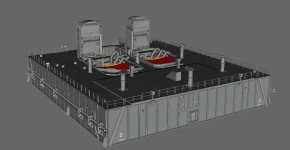
Latest work on the new MLP. The pipes are now correct and they now have the brackets that hold them in place on the SRB blastsheilds. There's some other brackets that hold the rest of the pipe work in place to the MLP which I will add next.

Then I plan to revise the rainbirds, they're a bit off and need a bit of attention.
 

Attachments

  • New_MLP_2.jpg
    New_MLP_2.jpg
    107.6 KB · Views: 843
Well, it took a while to research and add the brackets, but they're all done. Next up: The rainbirds.
 

Attachments

  • New_MLP_3.jpg
    New_MLP_3.jpg
    97.3 KB · Views: 794
Anyone willing to add the Ku gimballing capability? This way we could use actual Ku deploy/stow procedures listed in the Orbit Ops checklist.
 
Anyone willing to add the Ku gimballing capability? This way we could use actual Ku deploy/stow procedures listed in the Orbit Ops checklist.

Willed yes, capable no. I still have not got the math done for converting elevation/azimuth into alpha and beta gimbal angles.
 
Willed yes, capable no. I still have not got the math done for converting elevation/azimuth into alpha and beta gimbal angles.
How about simply trying a trial and error approach until we get something that starts to approach what we do know?

For example: We do know that according to the Orbit Ops C/L that the pre-stow neutral alpha and beta angles is -27° and -123° respectively.

And that final stow alpha and beta angles according to the same document is -29° and -125° respectively.

Is there not any way you could use these angles as a base and work from there?
 
Is there not any way you could use these angles as a base and work from there?

No, because I lack more samples to span the matrix around them. the main problem for me is just getting the three-four basic rotations and transformations done right...i would need some time to lock in my room and work without the world bothering me...
 
No, because I lack more samples to span the matrix around them. the main problem for me is just getting the three-four basic rotations and transformations done right...i would need some time to lock in my room and work without the world bothering me...
I've been looking at a pic of the KU antenna and I think I have a solution for you. Let me neaten up my scribbles and I will come back soon.
 
I've been looking at a pic of the KU antenna and I think I have a solution for you. Let me neaten up my scribbles and I will come back soon.

Thank you. :)
 
Back
Top