Space Shuttle Ultra 1.25 Revision B development

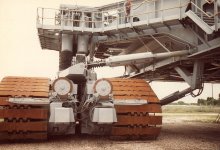
Probably, but it might be a bit tricky. Do you have any images showing how the struts look when the main body is raised?

Here's one:
 

Attachments

  • crawler12.jpg
    crawler12.jpg
    229 KB · Views: 696
yeah, that must be done, we also need this for reentry and after landing.

A 100% solution would be doing this after the Shuttle Bus code, the ATVC and the ATVC SOP (should be part of the GNC software in OPS 1, 3, 6 and 8).

Could maybe be done earlier with a temporary solution, but would then also require temporary controls, while the 100% solution could be controlled over DPS SPECs.

Any idea when this could start to be worked on , and is there anything needed mesh or texture wise ?
 
Any idea when this could start to be worked on , and is there anything needed mesh or texture wise ?

Currently I know nothing mesh or texture-wise that is needed for that, I still play through the Shuttle Bus sequences, because I am not convinced I can implement it like that.

I am not sure which mesh work we need for the shuttle next, I only have stuff on my wish-list which can be implemented in 2010, like a SpaceHab or a SpaceLab module with interior.

In the VC, I only miss an option to move the COAS sight from front to overhead or back. Another option would be optimizing the VC textures. The many dynamic textures we currently have could maybe be merged into a single texture for the VC. A single large texture is more effective than many small. But the VC performance is currently the least of our worries.

If you could make an astronaut in an ACES suit, with parachute pack, this would be great, as we wanted to concentrate on the reentry sequence, we could implement a contingency abort with them. As such things don't touch the main shuttle work, they could be implemented easily parallel to the more critical items.

Otherwise, I don't know much good currently. You mesh too fast. Maybe I should order you to do something so titanic outrageous, that you are busy until we have caught up with you, like the Michoud plant, the ET barque, the Stennis Space Center and Disney World. :cheers:
 
I just finished updating the STS-118 payload, I could do a VC for the SpaceHAB after STS-119 payload.
 
Nice job on the CT JEL! Could you make it so that the diagonal struts connecting the main body with the drive trucks not get disconnected when raising the main body?
Finally got the strut code done and checked it in. The struts aren't perfectly attached to the drive trucks, but they don't get visibly disconnected.
 
Finally got the strut code done and checked it in. The struts aren't perfectly attached to the drive trucks, but they don't get visibly disconnected.
Great! I'm currently redoing the VAB as the old one had quite some issues but they're now fixed. Another problem to be investigated is that the CT may be too short in height compared to the VAB and pad MLP stands when jacked up to clearance height.

---------- Post added at 01:29 AM ---------- Previous post was at 01:06 AM ----------

Speaking about the VAB: I was tipped about this video on the movement of the VAB High Bay doors: http://www.archive.org/details/VabDoorsOpeningWithTimeLapse

It's of the STS-125 propulsion stack bay-to-bay transfer done in February where the stacked ET/SRBs was transferred from High Bay 1 to High Bay 3. This was done to clear High Bay 1 for the stacking of the STS-127/400 elements.
 
Nothing new from my side yet, I still work myself through the ALT Software Design Specs, the only good thing yet, the core ALT software seems to be really identical to the later Shuttle software, at least the OPS0 displays are and the FCOS operating system behavior did also not change significant to the current software revision.

Well, what I have now:

  • Complete list of FCOS operating system calls, including flow charts of the functions
  • Description of the IOP behavior, but I have not yet analyzed it completely.
  • Description of the whole user interface system software. Includes communication and data transfer over downlist, LDB, ICC and MMUs.
  • A long list of format control words, but no detailled description of the format of each FCW. FCWs are send to the DEU in 508 word blocks, and rendered by the DEU/IDP.
  • Basic descriptions of the OPS0 software, but at least the GPC MEMORY display changed in later history.
  • GPC startup routine.
See this image for the key drawing about the software structure:
PASS-UserInterface-BD.png
 
Anyone have any documentation on the VAB overhead cranes?
 
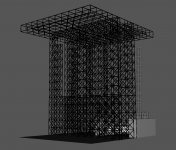
Just got done with the basic roof structure of the VAB. Just need to add the X-sections and it's 100% complete.
 

Attachments

  • VAB_interior_structure_5.jpg
    VAB_interior_structure_5.jpg
    233.7 KB · Views: 594
Anyone have any documentation on the VAB overhead cranes?
Any help here? Got some trouble with the low bay/transfer aisle crane as well. I'm in serious need of some dimensions of the cranes.
 
Any help here? Got some trouble with the low bay/transfer aisle crane as well. I'm in serious need of some dimensions of the cranes.

No, can't help you there.

Currently do Black Dart work, need to search some Shuttle documentation about the Display Electronics Unit for filling some Gaps.
 
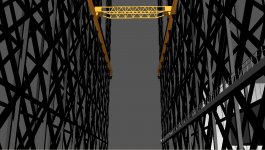
After several re-works the transfer aisle crane is starting to come together at last! The north section is almost complete and done. Screenshot showing the almost done north section from the transfer aisle floor is attached to this post.
 

Attachments

  • VAB_interior_structure_6.jpg
    VAB_interior_structure_6.jpg
    369.8 KB · Views: 578
Is anybody interested in helping me making HTML help for SSU? It is a bit sad we don't use the feature. Especially for the historic missions, we could do some serious value with it... I am not sure I can do much code for SSU now, since I now work 20 hours per week + study stuff, but writing documentation should be possible with only little time per week.
 
Is anybody interested in helping me making HTML help for SSU? It is a bit sad we don't use the feature. Especially for the historic missions, we could do some serious value with it... I am not sure I can do much code for SSU now, since I now work 20 hours per week + study stuff, but writing documentation should be possible with only little time per week.

I can help with graphics.
 
Another problem to be investigated is that the CT may be too short in height compared to the VAB and pad MLP stands when jacked up to clearance height.
Just did the check and it's too short in height. 5.8 m vs 6.1 m for the real one. This will be fixed along some other improvements and fixes.
 
Hello :)
Code:
1>------ Build started: Project: Atlantis_MLP, Configuration: Release Win32 ------
1>Compiling...
1>MLP.cpp
1>.\MLP\MLP.cpp(506) : error C2065: 'GRP_LH_T0_umbilical' : undeclared identifier
1>.\MLP\MLP.cpp(511) : error C2065: 'GRP_RH_T0_umbilical' : undeclared identifier

Sources updated about 15 minutes ago.
 
Hello :)
Code:
1>------ Build started: Project: Atlantis_MLP, Configuration: Release Win32 ------
1>Compiling...
1>MLP.cpp
1>.\MLP\MLP.cpp(506) : error C2065: 'GRP_LH_T0_umbilical' : undeclared identifier
1>.\MLP\MLP.cpp(511) : error C2065: 'GRP_RH_T0_umbilical' : undeclared identifier

Sources updated about 15 minutes ago.
Should be fixed now.

I've also made added the Flt Cntlr Power switches; the appropriate switch needs to be turned on to be able to control the shuttle.
 
Should be fixed now.

I've also made added the Flt Cntlr Power switches; the appropriate switch needs to be turned on to be able to control the shuttle.


Nice, Do you think maybe you could hook the single joint mode to the joystick (ala 2 and 8 keypad), by linking it with the single joint momentary switch ? Then you would be able to move that joint from the outside view. I know it's not realistic, but until we get the monitors working, it would be easier.
 
Nice, Do you think maybe you could hook the single joint mode to the joystick (ala 2 and 8 keypad), by linking it with the single joint momentary switch ? Then you would be able to move that joint from the outside view. I know it's not realistic, but until we get the monitors working, it would be easier.
I've added the code for this now.
 
Works great !! Thanks
 
Back
Top