
Open-source versions of built-in MFDs?

Hello together,

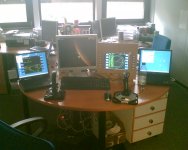
just yesterday I have finished a Client-Server-MFD system. How it works:

1.) You compile my "NetMFD.cpp" into your spacecraft-dll.
2.) You give your spacecraft-dll a list of IP-adresses (one for each MFD)
3.) You install the MFD-Server on each of your laptops. I'm using some 400Mhz laptops with WinXP and it works just fine. I even have an USB-IO/Flatpanel interface built in my Server.
4.) You start Orbiter and press F8. The panel initialization routine of your S/C will register the MFDs to Orbiter and stablish a network link to your laptops.

The protocol is TCP based and very simple. I believe implementing a Linux Server would be very easy.

H/W-List for a complete MFD:
- Laptop
- Flatpanel
- USB I/O-Card (Quancom USBTTL24)
- 15 pushbuttons
- panel plate with cutouts
- some 1k-Resistors, cables, .....

If you are interested, I can give you some photos and additional information (drawings, documentation, ...). Contact me under [email protected].
 

Attachments
  • Image019.jpg
    Image019.jpg
    347.8 KB · Views: 53
Last edited:
Hello together,

just yesterday I have finished a Client-Server-MFD system. How it works:

1.) You compile my "NetMFD.cpp" into your spacecraft-dll.
2.) You give your spacecraft-dll a list of IP-adresses (one for each MFD)
3.) You install the MFD-Server on each of your laptops. I'm using some 400Mhz laptops with WinXP and it works just fine. I even have an USB-IO/Flatpanel interface built in my Server.
4.) You start Orbiter and press F8. The panel initialization routine of your S/C will register the MFDs to Orbiter and stablish a network link to your laptops.

The protocol is TCP based and very simple. I believe implementing a Linux Server would be very easy.

H/W-List for a complete MFD:
- Laptop
- Flatpanel
- USB I/O-Card (Quancom USBTTL24)
- 15 pushbuttons
- panel plate with cutouts
- some 1k-Resistors, cables, .....

If you are interested, I can give you some photos and additional information (drawings, documentation, ...). Contact me under [email protected].

Cool. Couple questions though:

1) What about if I want a generic vessel to have it? Like the built-in DG?


Is that the Orbiter built-in MFDs you have shown on the laptops? If so, how are you getting them/displaying them?
 
Cool. Couple questions though:

1) What about if I want a generic vessel to have it? Like the built-in DG?


Is that the Orbiter built-in MFDs you have shown on the laptops? If so, how are you getting them/displaying them?

My implementation is based on the external MFD code, which is included in the orbitersdk.
On the main screen (see image attached to my post above), you can see a small white dot in the upper left corner of the display. This is what's left from the external MFD.
Basically, every time the window (which has 1px size here) receives a redraw event, I know that there's a new MFD image available. But instead of drawing it to the screen, I convert it into a DIB and put it in the network TX buffer and ..... flush it to the Server.
So, you can do everything you can do with the external MFD. Afaik you can pick a target vessel with extMFD. In my version, this function is just commented out. Should be easy to re-enable it. Then you just open an external-MFD-with-network and pick any kind of vessel.
 
My implementation is based on the external MFD code, which is included in the orbitersdk.
On the main screen (see image attached to my post above), you can see a small white dot in the upper left corner of the display. This is what's left from the external MFD.
Basically, every time the window (which has 1px size here) receives a redraw event, I know that there's a new MFD image available. But instead of drawing it to the screen, I convert it into a DIB and put it in the network TX buffer and ..... flush it to the Server.
So, you can do everything you can do with the external MFD. Afaik you can pick a target vessel with extMFD. In my version, this function is just commented out. Should be easy to re-enable it. Then you just open an external-MFD-with-network and pick any kind of vessel.

:speakcool:
This means you don't have to re-implement all MFDs, right? It only means you continuously put bitmaps on the network... like transmitting uncompressed video.

I'll still continue on Orbit MFD, for my own reasons.
 
Interesting, and very clever, but I think I will be continuing with my current plans for the time being, because:

1) I'm already pretty much done with the SurfaceMFD
2) I need a large programming project to keep me from going back to playing WoW (lol)
3) Orb:Connect is already out there
4) Even if I only use 256 colors, that's 2 MB/s of network traffic just for one MFD, right?--not scalable to the Internet or many additional clients
5) My main sim computer is actually kind of old, and at least until I upgrade it I would like to off-load the MFD drawing elsewhere

Don't get me wrong, that's a really clever way of doing it, but I think I'll keep going the way I am. Thanks for the info tho.
 
4) Even if I only use 256 colors, that's 2 MB/s of network traffic just for one MFD, right?--not scalable to the Internet or many additional clients

Exactly what I was worrying about.

But obviously there's not a big problem. I even had 600x600-Frames running over the network and it was not even closely exceding the capacity!

Now I'm using 300x300 frames and scale them up by factor 2 after receiving (very easy in GDI). I've set the MFD update interval to 0,5s and are now running two MFDs.

The higher refresh rate together with the scaling up makes it a really cool experience!!! :beach:

Even IF I run into trouble with bandwidth, well, then I'll buy a 1GBit card and a GBit Switch and that's it! 100 bucks and I can use 10 times as many MFDs than before.

(I've done a network analysis on packet level, it's really working fine!)

Well, one problem I do still have: The menu issue that was metioned above. I'd be glad to have all builtin MFDs with internal "object selection". Maybe we could do some "technology transfer" here ....:)
 
My implementation is based on the external MFD code, which is included in the orbitersdk.
On the main screen (see image attached to my post above), you can see a small white dot in the upper left corner of the display. This is what's left from the external MFD.
Basically, every time the window (which has 1px size here) receives a redraw event, I know that there's a new MFD image available. But instead of drawing it to the screen, I convert it into a DIB and put it in the network TX buffer and ..... flush it to the Server.
So, you can do everything you can do with the external MFD. Afaik you can pick a target vessel with extMFD. In my version, this function is just commented out. Should be easy to re-enable it. Then you just open an external-MFD-with-network and pick any kind of vessel.
A very neat solution. I take it then, that its limited to MFDs that can normally run in ExtMFD? Something like CameraMFD (for additional external views) wouldn't work?
 
Yes, CameraMFD does not work when the focus switches to another vehicle. So far, this is the only limitation I have encountered.

But I interpret this as a CameraMFD-issue, not as an issue of the ExtMFD ....
 
The other problem with that method that I hadn't thought of is that it wouldn't work for anything but Orbiter, and I'd like my simpit to be able to handle other sims.
 
The other problem with that method that I hadn't thought of is that it wouldn't work for anything but Orbiter, and I'd like my simpit to be able to handle other sims.

Well it would work for any sim as long as that sim has a way of generating 'MFD-screen-bitmaps'. In that case all MFDs should be implemented on the sim-side of the network, and not on the display-side.

Question: suppose you want to implement the MFDs on the display-side (the cheap Linux laptops). What kind of data is transmitted over the network? A lot of things about the state of your vehicle and the rest of the simulation, right? In fact, everything any MFD ever needs, should be supported by the protocol. How are you planning to make such a protocol sim-independent? I think sending bitmaps is by far the easiest and generic protocol (but not the most efficient).

About the popup menus: if I and dougkeenan manage to get the popup menus working properly within Orbiter, then a remote MFD could simply send a message back to Orbiter to display a popup menu. The menu would then become visible on the main screen: conceptually, you could see it as a part of the HUD. Only: you need to use the mouse to select an item in the menu, which is not really simpit-like.
 
About the popup menus: if I and dougkeenan manage to get the popup menus working properly within Orbiter, then a remote MFD could simply send a message back to Orbiter to display a popup menu. The menu would then become visible on the main screen: conceptually, you could see it as a part of the HUD. Only: you need to use the mouse to select an item in the menu, which is not really simpit-like.

Yes. I'm doing the project at my university. We want to build a soyuz-style simpit to train students. So, having a mouse in the cockpit would be .... strange. Simulation should be as realistic as possible.
There actually IS a pointing device in real Soyuz!!! Well but .... it's not really a mouse.
 
Yes. I'm doing the project at my university. We want to build a soyuz-style simpit to train students. So, having a mouse in the cockpit would be .... strange. Simulation should be as realistic as possible.
There actually IS a pointing device in real Soyuz!!! Well but .... it's not really a mouse.
Many glass cockpits use pointing devices; some use joystick-like controls, but many are basically trackballs and I plan on having a trackball-thingy next to my throttles. But using a different computer for each MFD would mean a switch for the mouse (and keyboard), and then where do you put that? Making each panel as self contained as possible is probably best.

If only touchscreens were cheaper. . .


-----Posted Added-----


The other problem with that method that I hadn't thought of is that it wouldn't work for anything but Orbiter, and I'd like my simpit to be able to handle other sims.
Blasphemy! :lol:

But thats a good point. Another benefit of your approach is that you're not limited to the form factor of the Orbiter MFDs. Many MFD's are square ~14" affairs, but the new ones are true 8.5" x 11" displays. Coincidently, you can display two of those full-size in a portrait configuration on a 22" widescreen monitor. You can see examples on the Regional Jet Glass Cockpit page at http://www.projectmagenta.com/ That site has good examples of different PFD and ND screen layouts. Something to think about. ;)
 
Well it would work for any sim as long as that sim has a way of generating 'MFD-screen-bitmaps'. In that case all MFDs should be implemented on the sim-side of the network, and not on the display-side.

Question: suppose you want to implement the MFDs on the display-side (the cheap Linux laptops). What kind of data is transmitted over the network? A lot of things about the state of your vehicle and the rest of the simulation, right? In fact, everything any MFD ever needs, should be supported by the protocol. How are you planning to make such a protocol sim-independent? I think sending bitmaps is by far the easiest and generic protocol (but not the most efficient).

Doing it this way would require me to re-implement the MFD as an addon for every sim I want to use, each of which may have drastically different drawing functions and/or APIs.

My plan is not that the protocol will be sim-independent, but rather that the MFD will be protocol-independent. Supporting a different sim would simply be a matter of adding a module to the MFD that supports whatever remote interface it uses (for Orbiter, Orb:Connect; for FS, WideFS or whatever it is). The SurfaceMFD only needs 20 values. Perhaps an image would help:

MFD <----> Protocol Module<------(network)------> Sim

The "Protocol Module" itself can be broken down into two parts: the protocol handler itself, and a mapping from MFD values to protocol instructions. The protocol handler would work for any MFD, and the mapping could be loaded from a config file. IE, you could run it from the commandline as:

>remoteMFD --orbiter

and it would load the "orbiter" protocol module for use.

To support additional sims, this would only need you to know the protocol/remote API for the sim, rather than requiring that you fully re-implement your MFD inside the sim.

Sending/receiving bitmaps is an easy protocol for Orbiter, but it may not be as easy to obtain such bitmaps in other sims. Sending/receiving data is universal.

cjp said:
About the popup menus: if I and dougkeenan manage to get the popup menus working properly within Orbiter, then a remote MFD could simply send a message back to Orbiter to display a popup menu. The menu would then become visible on the main screen: conceptually, you could see it as a part of the HUD. Only: you need to use the mouse to select an item in the menu, which is not really simpit-like.

That could be cool. I don't know if I'm going to use pop-up menus though; I mean, in a real aircraft you would have already looked up the names/frequencies of all points you need as part of your flight planning and would have them available for reference.

Still, it would be a very nifty ability to have.

You know, alternately, we could just ask (nicely) for Martin to make the menu-pop-up thing part of the public API for the next version...
 
I made some progress on Orbit MFD. The output is still GDI-based but if you want it a different way for Linux, it should not be too difficult to change. I can even make a version on top of my platform-independent AVSGL idea (see another thread in this forum).

Basically, I have everything except for:
  • Graphics (so you only have the data lists)
  • The G-field contribution indicator
I also reverse-engineered the "TGT" popup-menu, so that now works just like the original.

I think I'll release the thing (with source code: that's the important bit here) tomorrow. Shall I place it on Orbit Hangar immediately or place it here and only put it on Orbit Hangar once finished?

Does anybody have a clue on how to do the G-field indicator easily? Of course I can calculate the gravity from each celestial body and compare them, but isn't there an easier way?
 
I made some progress on Orbit MFD. The output is still GDI-based but if you want it a different way for Linux, it should not be too difficult to change. I can even make a version on top of my platform-independent AVSGL idea (see another thread in this forum).
Which thread? And yeah, if it's all text output at the moment, converting it to Allegro shouldn't be hard at all.

Basically, I have everything except for:
  • Graphics (so you only have the data lists)
  • The G-field contribution indicator
I also reverse-engineered the "TGT" popup-menu, so that now works just like the original.
Aww but the graphics are the best part! The popup-menu will be "fun" to convert to linux, I'm sure...

I think I'll release the thing (with source code: that's the important bit here) tomorrow. Shall I place it on Orbit Hangar immediately or place it here and only put it on Orbit Hangar once finished?
How difficult is it to change an Orbit Hangar upload? IE, can you do it now, and then upload a new version over the top of it later? If not, there's probably no point to doing it now.

Does anybody have a clue on how to do the G-field indicator easily? Of course I can calculate the gravity from each celestial body and compare them, but isn't there an easier way?
Yeah--use GetWeightVector() to calculate the total gravitational influence of everything. Take the magnitude of the force exerted by the target body and divide it by the magnitude of the weight vector--that should give the fraction of the total.

Thanks for doing that one; that's probably one of the hardest ones.
 
So, here it is:
http://orbithangar.com/searchid.php?ID=3609
OH add-ons can be updated.

It's the first MFD I ever made.

Yes, the graphics are the best part, but for doing the graphics I need to re-invent the math behind it. I think I'll add a function to KOST for making a polyline approximation of the shape of the orbit, given certain parameters (like the number of line segments, and the maximum distance for hyperbolic orbits). After that, it's just a matter of projecting it, scale it to MFD pixel coordinates and draw it.

This is the thread with my AVSGL idea. AVSGL is far from finished (even the API hasn't stabilized yet). My latest implementation is based on SDL, but it's easily implemented on OpenGL, GDI drawing or whatever you want. In fact, SDL is the most difficult target, as SDL does not have high-level drawing primitives by itself.
 
Yes, the graphics are the best part, but for doing the graphics I need to re-invent the math behind it. I think I'll add a function to KOST for making a polyline approximation of the shape of the orbit, given certain parameters (like the number of line segments, and the maximum distance for hyperbolic orbits). After that, it's just a matter of projecting it, scale it to MFD pixel coordinates and draw it.

Looks good just glancing over it; I'll take a closer look when I get a chance, maybe later today. I've got a project due at midnight, so...yeah.

Also, for drawing an orbit: Closed orbits are ellipses. The way I was going to do it on Allegro was to draw an ellipse with the right dimensions on a second buffer and then rotate it to the main one. Can you do anything like that in GDI?
 
Also, for drawing an orbit: Closed orbits are ellipses. The way I was going to do it on Allegro was to draw an ellipse with the right dimensions on a second buffer and then rotate it to the main one. Can you do anything like that in GDI?

You know what: I have no idea. This is almost my first GDI project, so I have to look up everything.

My AVSGL has an arbitrarily oriented ellipse. On SDL, I implemented it as a polygon, but a "pixel-aligned" ellipse can be drawn in a faster way. So, maybe your way of drawing a pixel-aligned ellipse and then rotating it as an image is faster than my polgon-method, maybe it isn't.

I looked up in a computer graphics book how oriented ellipses are usually rasterized, and it describes a different approach for translating an ellipse into pixels. It might very well be by far the fastest method on software-rendered systems (if you have a fast way of drawing individual pixels), so it's worth implementing in the SDL version of AVSGL, but if you use hardware acceleration, a polyline is probably faster (but you'd have to test it to really know it).

Edit: I did some reading on Allegro, and it's just as software-based as SDL. So, the oriented ellipse rasterizing method from my CG book would also be useful there. That is: if you are prepared to spend lots of programming on making the graphics faster.

One advantage of a polyline is that Hyperbolas can also be done that way: you can simply say to KOST: "here are the state vectors (and/or orbital elements); give me the shape of the orbit"; you don't have to worry about whether it's an ellipse or a hyperbola.

BTW, I don't think it makes sense to use my AVSGL, or improve AVSGL itself, unless it's going to be used by(!) the next Orbiter version. Otherwise, it's better to find out what system will be used by the next Orbiter version, and see if that is just as good.
 
Last edited:
Yeah--use GetWeightVector() to calculate the total gravitational influence of everything. Take the magnitude of the force exerted by the target body and divide it by the magnitude of the weight vector--that should give the fraction of the total.

OK I tried it:
Code:
VECTOR3 Gtot_vec;
m_Vessel->GetWeightVector(Gtot_vec);

double Gtot = kostAbsv(&Gtot_vec);
double Gref = GRAVITATIONAL_CONSTANT *
    m_Vessel->GetMass() * oapiGetMass(m_Reference) /
    kostAbs2v(&m_VesselData.state.pos);

double Gpart = Gref / Gtot;
Explanation:

  • m_Vessel: the vessel
  • kostAbsv: calculate length of vector
  • GRAVITATIONAL_CONSTANT: 6.67259e-11
  • m_Reference: reference body
  • kostAbs2v: calculate square of length of vector
  • m_VesselData.state.pos: position of vessel relative to reference body

It looks nice, but it is not exactly the same as displayed by Orbit MFD. The difference is not much: on the trajectory I tried, it was about 10% at most. Close to 1.00 and 0.00 the difference is smaller. Orbit MFD's value was lower than my own.

I think I know a much better way of calculating the indicator value, and which will not decrease as fast as Orbit MFD when leaving a body. For instance, my indicator would still be way above 0.5 for earth at the same distance as the moon. This makes sense as the moon's orbit is really stable.

I'm only afraid it could be confusing for people following a certain tutorial that mentions the G value of the original Orbit MFD. Also, it's a kind of a challenge to make an exact(*) copy of Orbit MFD, so I'd like to know how it's done there.

(*) Without violating copyrights of course. I do all programming myself, without copying things from Orbiter.

Edit:
There's DEFINITELY something wrong with the suggested approach: the ratio can become larger than one. This can happen when different gravity forces compensate each other, so that the total is smaller than the size of each individual component. I found a trajectory where "G 1.40" appeared! :lol:

Edit 2:
I think I figured out what the built-in MFD does. It calculates the scalar sum of all gravity forces, and displays the part of the reference body divided by that sum. But, as I said, I know a much better method...
 
Last edited:
Back
Top