
You are using an out of date browser. It may not display this or other websites correctly.
You should upgrade or use an alternative browser.
You should upgrade or use an alternative browser.
XR2 Public Release Candidate Testing
- Thread starter dbeachy1
- Start date


OK. It looks like it works. I've just tried changing the dds into a DXT5, and the mesh changes the dynamic opacity perfectly.
And that was indeed what I meant by "dynamic opacity"
I can post some screenies after work, if you want.
I'll try it here when i have time, is that file size less than 2mb?

- Joined
- Feb 11, 2008
- Messages
- 2,604
- Reaction score
- 31
- Points
- 63
I'll try it here when i have time, is that file size less than 2mb?
1366 kb.
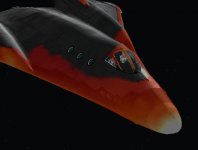
PS: I wonder if it's a good idea to have the windows glowing. :beach:
The windows are a special top secret carbon material.:beach:
Actually i'd love to be able to see that glow from the inside... don't know if it would A, be visible at all and B, wouldn't just look weird anyway because of the alpha issues.
Anyway, thanks, i'll try that setting with the new build.
Actually i'd love to be able to see that glow from the inside... don't know if it would A, be visible at all and B, wouldn't just look weird anyway because of the alpha issues.
Anyway, thanks, i'll try that setting with the new build.
Is it my imagination, or did the initial MFD 1 in the takeoff to ISS scenario change from surface to align plane? 

- Joined
- Jan 14, 2008
- Messages
- 9,267
- Reaction score
- 1,737
- Points
- 203
- Location
- VA
- Website
- alteaaerospace.com
- Preferred Pronouns
- he/him
Is it my imagination, or did the initial MFD 1 in the takeoff to ISS scenario change from surface to align plane?
That is correct; I left that in the new scenario in deference to C3PO, since that's how he sent it to me.
I am on the fence, though -- should I set it back to the surface MFD for newbies? I do use "align planes" during ascent, though, so I'm leaning toward leaving it as-is. Thoughts?

- Joined
- Feb 11, 2008
- Messages
- 2,604
- Reaction score
- 31
- Points
- 63
Here's my test:
Oops! Old habit.
I very seldom use SurfaceMFD in a save because it's quite easy to switch to. Align- and MapMFD contain target info that are saved in the scenario. This way I don't have to select target every time I start.
Is it my imagination, or did the initial MFD 1 in the takeoff to ISS scenario change from surface to align plane?
Oops! Old habit.
I very seldom use SurfaceMFD in a save because it's quite easy to switch to. Align- and MapMFD contain target info that are saved in the scenario. This way I don't have to select target every time I start.
the problem is 3po, is that you're deriving that from the 1bit alpha file, so it's alpha data has already been degraded by that to one bit, changing the alpha mode at that point will make little difference if any really.
So, there's no point me using that file - thanks for offering to send me it though.
The one generated from the source file looks much better with a proper gradient.
So, there's no point me using that file - thanks for offering to send me it though.
The one generated from the source file looks much better with a proper gradient.

Actually i'd love to be able to see that glow from the inside... don't know if it would A, be visible at all and B, wouldn't just look weird anyway because of the alpha issues.
Actually, the default DG glows from the inside, so does the default Atlantis.
thats not the same thing at all.
I did a quick survey, and there's a slight bias toward surface for the default vessels (except DG). The XR1 and XR5 use surface MFD. The stock DG and the DGIV use the orbit MFD. I would say maintain consistency within the XR series scenarios. So, if you wanted to quick update the other two vessels. . .That is correct; I left that in the new scenario in deference to C3PO, since that's how he sent it to me.yagni01 said:Is it my imagination, or did the initial MFD 1 in the takeoff to ISS scenario change from surface to align plane?
I am on the fence, though -- should I set it back to the surface MFD for newbies? I do use "align planes" during ascent, though, so I'm leaning toward leaving it as-is. Thoughts?

EDIT: I changed my mind. Align is more useful and this is a step up from other vessels. Leave it and update the XR1 and XR5 scenarios whenever the next release is. Go with a higher standard.

Like to report a bug. Im surprised noone has discovered this:huh:
The bottom panel is completely back

The bottom panel is completely back
looks like you're just missing the background graphics, i think those are all embedded in the dll along with the switches? it's fine here though... maybe try re-downloading and installing it again? are the other panels working?
Works ok for me, you must have the infrared versionLike to report a bug. Im surprised noone has discovered this:huh:
The bottom panel is completely black
Can you provide some specifics?
-----Posted Added-----
On a related note, I just set my prefs for 1600 wide panel and still get the default. (Both fullscreen and windowed) EDIT: Disregard this last. I'm an idiot.
Last edited:
now it works. just need to redownload
I just pumped this bad boy up to 32bit color. :OMG:
I'll take the 67% framerate hit!
I'll take the 67% framerate hit!
- Joined
- Jan 14, 2008
- Messages
- 9,267
- Reaction score
- 1,737
- Points
- 203
- Location
- VA
- Website
- alteaaerospace.com
- Preferred Pronouns
- he/him
I just pumped this bad boy up to 32bit color. :OMG:
I'll take the 67% framerate hit!
What resolution and video card are you using? In any case, 16-bit color can look odd, so 32-bit color is recommened. With a fast video card and processor you should be getting 200+ fps on XP and about 80 on Vista with VistaBoost.
i did notice actually, that the MDA temperature font colours aren't 16-bit safe... but then i usually run in 32bit, often with orulex and nebo, which brings the FPS down to 30.
my graphics card is a bit old now though, really need to upgrade, i only get 120fps with a plain vanilla installation.
my graphics card is a bit old now though, really need to upgrade, i only get 120fps with a plain vanilla installation.
Similar threads

- Replies
- 16
- Views
- 5K
- Replies
- 12
- Views
- 5K
- Replies
- 7
- Views
- 3K


- Replies
- 1
- Views
- 3K

- Replies
- 71
- Views
- 10K